I asked today how to save vertex in specified cluster here
https://groups.google.com/forum/#!topic/orient-database/DTPxPBGqu5Y
Andrey politely pointed to method of OrientBaseGraph class,
addVertex(String className, String clusterName).
So, I started using it. But came up with strange (in my opinion) issue.
I create Vertex classes, that I'm going to use

    private void initClasses(){
        classes = new HashMap<>(IdentityType.values().length-2);
        for(IdentityType type:IdentityType.values()){
            if(type.name().equals("Root") || type.name().equals("Case"))
                continue;
            OClass clazz =  graph.getVertexType(type.name());
            if(clazz == null)
                clazz =  graph.createVertexType(type.name());
            classes.put(type.name(), clazz);

        }
        graph.commit();
    }

BTW, do I need to commit here, if graph = new OrientGraph() ?

Then, I'm adding Vertices

    private void addIdentities__(List<Identity> identities){
        for(Identity identity:identities){
            String clusterName =
identity.getCollection().getCase().getName();
            if(!db.getClusterNames().contains(clusterName.toLowerCase()))
                db.addCluster(clusterName, OStorage.CLUSTER_TYPE.PHYSICAL);
            Vertex v = graph.addVertex(identity.getType().name(),
clusterName);
            v.setProperty(Fields.NAME, identity.getNormValue());
            v.setProperty(Fields.COUNT, identity.getCount());
        }
        graph.commit();
    }

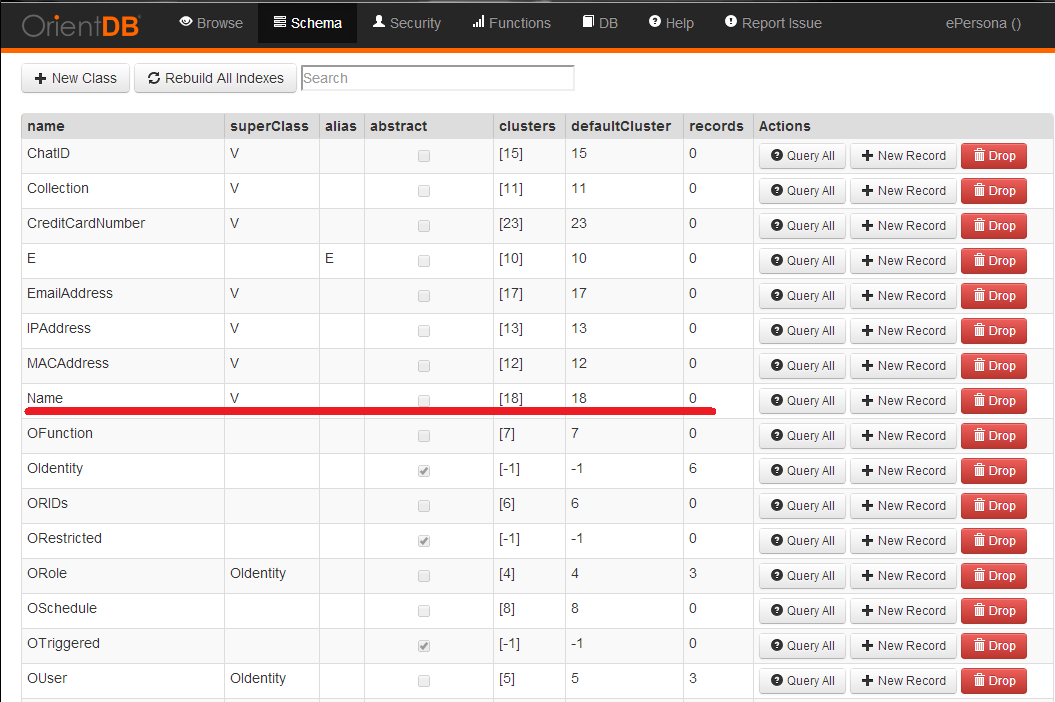
For tests, all Vertices have class Name, this class was added at the first
place too. Cluster name is JUNIT_CASE.

After that, I try to query what I inserted

*select count(*) from cluster:JUNIT_CASE *

returns 1000000 - expected result

*select count(*) from Name*

return 0 - unexpected result

*select count(*) from V*

returns 0 - unexpected result too

Here is my schema, class Name is there

<https://lh6.googleusercontent.com/-1D1WLFkZ6F0/UulZ5d8vTNI/AAAAAAAAMoA/_owUYCVhbV4/s1600/schema.png>
Is it a normal behavior?
If yes, point please where it's explained.

Thanks!

-Andrey

--

---
You received this message because you are subscribed to the Google Groups
"OrientDB" group.
To unsubscribe from this group and stop receiving emails from it, send an email
to [email protected].
For more options, visit https://groups.google.com/groups/opt_out.