Note: I actually sent this email to Chris a month ago but it didn’t go to the
list, so I’m sending it there so that there’s a record of this conversation.
Hi Chris,

I’ve been quietly working on this for a few weeks now, and have got the various
permutations working on OS X. Basically, there are 2 paths for GTK on OS X (now
called macOS): X11, which is the classic approach, and Quartz, which is native,
but newer and a little less fully baked. Homebrew, a very popular package
manager on OS X, switched to Quartz mode at some point, which broke the pike
builds. This sort of dual mode situation affected GL and GLUT as well. So, I’ve
arrived at a solution where we prefer the native Quartz versions but will fall
back if they’re not present (such as if you happen to be running the Darwin
open source OS that macOS is based on. I think that’s the most reasonable
approach because every macOS install will have Quartz, GL and GLUT (and using
GTK doesn’t require you to install X11/XQuartz.

I’ve merged your change into 8.1 and 8.0 after testing, along with a bunch of
other fixes to get things working. I have not been able to verify that the
changes work properly on Windows because I am having trouble getting the
windows build to compile successfully. Likely because I foolishly tried to
upgrade to VC2015 from VS2008, which was working properly. There are also a
number of problems with other bits of the 8.1 codebase that cause problems on
Windows, though I see some commits lately that seem to suggest that may be a
temporary thing.

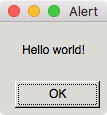
Anyway, that’s the current update. And to answer your question about being able
to run gtk apps on macOS without having to install X11, here’s a little taste :

object x;

int main()
{
  GTK2.setup_gtk();
  x = GTK2Support.Alert("Hello world!");
  return -1;
}

Yields:

http://bill.welliver.org/dist/pike/gtkmacdialog.png
<http://bill.welliver.org/dist/pike/gtkmacdialog.png>

Enjoy!

Bill