On 15/01/04 at 13:12 Kevin wrote:
>
> Just found this which may be of interest to some.
>
Kevin:

As a means of backing up a system this new 9 Gig system looks quite
attractive, however I do think it's best not to overlook the importance of
standards when it comes to DVD storage, especially if you need to play them
back on other systems.

There was a post made to PhotoPro list yesterday with a link to a site which
gives info on DVD formats/players and, most importantly, compatibility.

http://www.cdrinfo.com/Sections/DVDMediaFormats


Their Executive summary states:

"The content created on a DVD-R/RW writer using a write once DVD-R disc
played back in virtually all (96.1 percent) of the DVD players and DVD-ROM
drives used in the research. DVD+R discs played back in 87.6 percent of the
devices tested."

They mention DVD readers and writers, but didn't specifically mention the
actual player that Apple is branding as their "superdrive." With a little
sleuthing, I found a Macworld article from February 2001 that mentioned,
"Pioneer (who manufacture the SuperDrive for Apple)." So narrowed down the
list list to the two Pioneer DVR models (because they appeared to be the
only ones that could "write" DVD's) and concluded that the Pioneer
DVDRA05/105 DVD-RW Drive must be what is in the new G5's as the Apple
Superdrive (the other Pioneer drive is a stand alone model that you use with
a TV).

The specs seem to match and I've reprinted both at the end of this post.

The good news is that this device is very compatible in reading discs
authored on other systems.  See
(http://www.cdrinfo.com/Sections/DVDMediaFormats/Details.aspx?Player=PIONEER+DVR-A05)
for the details.  I don't understand enough about DVD authoring to know if
this is purely a function of the hardware, or the hardware/software in
combo.

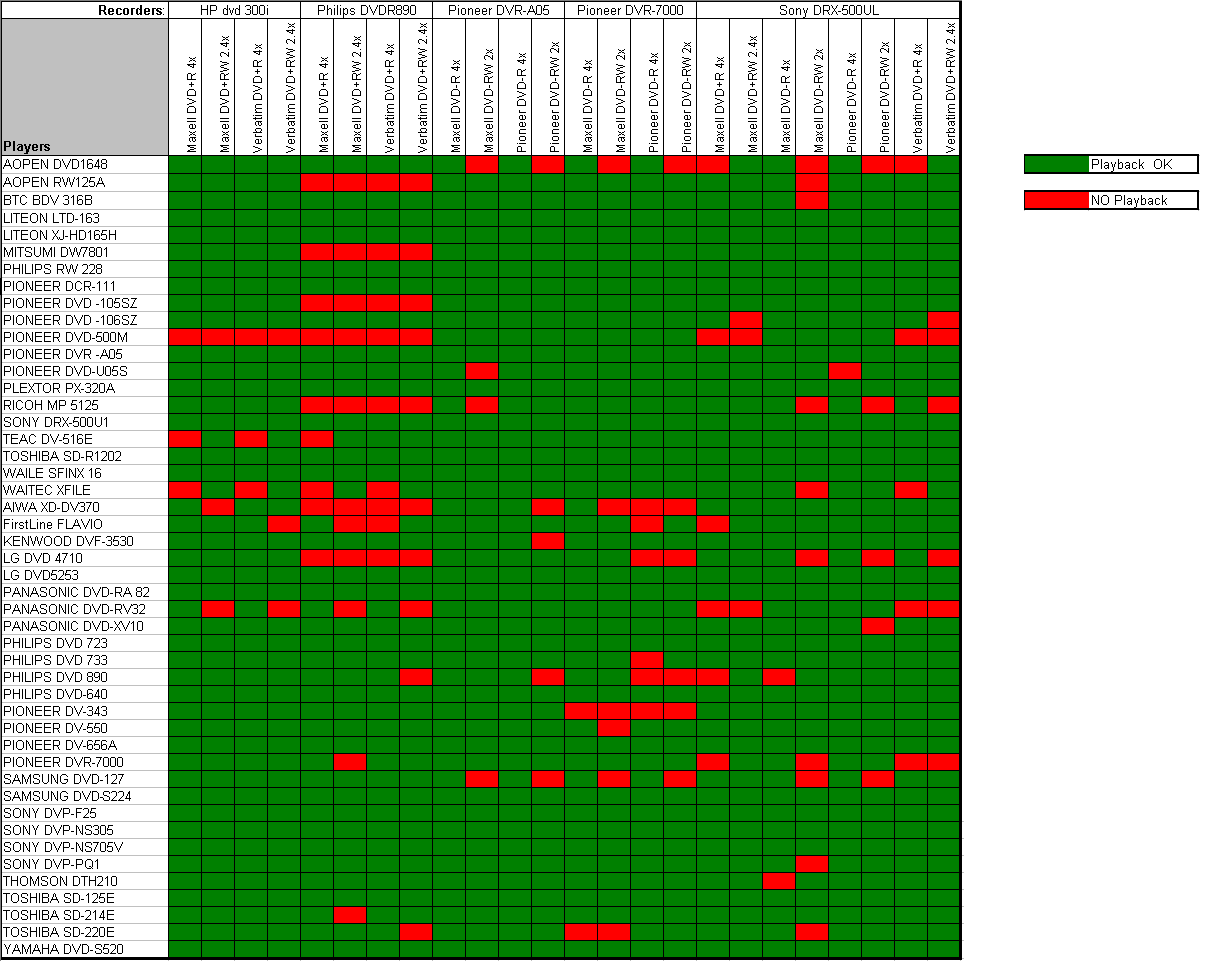
If you want to see how the discs authored by this machine fared in other
players it's a little more difficult. The test results seem to cycle through
several different recorders using the four various formats -R+R -RW +RW, and
with various "media."

While you can look at each entry for the Pioneer A05 to determine which
media and format work for the majority of the players, it was much easier
once I found this chart that breaks it down in a much easier to read format.

http://www.cdrinfo.com/Sections/Articles/Sources/DVD%20Media%20Format%20Compatibility%20Tests/Images/Sheet_PerRecorder.gif

So for this model it looks like Maxell DVD-R 4x, or Pioneer DVD-R 4x media
are the clear winners, being playable in all of the 47 players they tried !

Hope that helps.

David

-----------------------------
Here's the comparison specs on the drives for reference.

Apple Superdrive (DVR-103, DVR-104)

Apple's revolutionary SuperDrive (DVD-R/CD-RW) allows you to create music
and data CDs, read DVDs, and create DVD data discs and DVD-video discs for
playback on most standard DVD players. Along with Apple's iDVD software
(included on systems with SuperDrive) your Power Mac G5 is a full-featured
DVD authoring studio. The SuperDrive reads DVDs at 12x, writes to DVD-R at
4x, reads CDs at 32x, writes to CD-R at 16x, and writes to CD-RW at 10x. The
drive supports CD-ROM, CD-Audio, CD-R, CD-RW, CDI, CD Bridge, CD Extended,
CD Mixed Mode, Photo CD, DVD-Video, DVD-ROM, and DVD-R media.


Pioneer DVDRA05/105 DVD-RW Drive

A05/105         DVD Speed       CD Speed

Write           4X              16X
ReWrite         2X/1X           8X
Read            12X             32X

Pioneer's DVR-A05 drive doubles writing performance across the board with 4X
DVD-R, 2X DVD-RW, 16X CD-R and 8X CD-RW capabilities. The new 4X DVD-R
recording speed translates into approximately 15 minutes to fully record a
high-speed 4.7 GB DVD-R disc. Using data writing software bundled with the
drive, the DVR-A05 also offers two-minute quick formatting for DVD-RW data
discs, and allows finished DVD-RW discs to be "unfinalized" for writing
additional data files. A DVD authoring tool and DVD/CD data recording
application are also included with the drive, as well as blank 4X DVD-R and
2X DVD-RW discs

--
Creating an image database? be sure to visit
(http://ControlledVocabulary.com/)!
Read a review of the Image Info Toolkit utility at:
(http://ControlledVocabulary.com/imagedatabases/imageinfotoolkit.html)
--
David Riecks (that's "i" before "e", but the "e" is silent)
http://www.riecks.com , Chicago Midwest ASMP member
http://zillionbucks.com "The Webhost for your Creative Business"

===============================================================
GO TO http://www.prodig.org for ~ GUIDELINES ~ un/SUBSCRIBING ~ ITEMS for SALE