Revision: 405
Author:   luismarianoguerra
Date:     Wed Mar 30 01:32:40 2011
Log: Edited wiki page DeveloperGettingStartedGuide through web user
interface.
http://code.google.com/p/pubsubhubbub/source/detail?r=405
Modified:
 /wiki/DeveloperGettingStartedGuide.wiki

=======================================
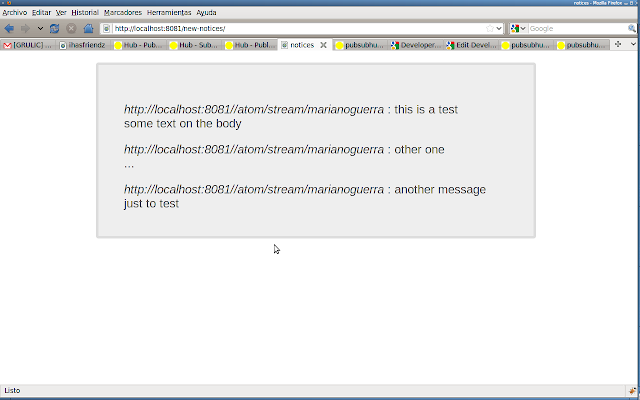
--- /wiki/DeveloperGettingStartedGuide.wiki     Mon Aug  2 10:38:15 2010
+++ /wiki/DeveloperGettingStartedGuide.wiki     Wed Mar 30 01:32:40 2011
@@ -8,202 +8,187 @@

 ----

-*This section by Mariano Guerra*
-
-= Getting Started Guide for Developers =
-
-== screencast ==
-
-If you just want to watch someone else go through this demo, watch the
screencast!
-
-<wiki:video url="http://www.youtube.com/watch?v=5obK-l8JwSY"/>
-
-== naming conventions ==
-  * pshb/PSHB = pubsubhubbub
-  * gae/GAE = Google App Engine
-  * things that start with "$" are bash commands
-  * things that start with "!" are important notes
-
-== before you start ==
-
-to follow this guide you will need some tools installed on your system
-
-  * python 2.5 (to run the google app engine hub)
-  * subversion client (to fetch the pubsubhubbub code)
-  * git client (to fetch the example code)
-
-this can be installed on a debian based distribution with a command like
+=PubHubSubBub Developer Tutorial=
+
+
+Note: the project and this document are hosted here:
https://github.com/marianoguerra/pshb-example improvements and corrections
are welcome!
+
+welcome, this document contains an example application written in python
that will help you play with a pshb (pubsubhubbub from now on) hub and an
application that publishes its content to it.
+
+this guide explains how to install a pubsubhubbub server in your computer
so you can play with it, normally on a web application you would use a pshb
compatible server like:
+
+  * official pshb hub on app engine: http://pubsubhubbub.appspot.com/
+  * superfeedr hub: http://superfeedr.com/
+
+
+==Requirements==
+
+  * python >= 2.5 (I'm using 2.6.1)
+  * git (for the example)
+  * subversion (to download pshb code)
+  * bash or similar shell to run the scripts
+
+==Installing==

 {{{
-sudo aptitude install python2.5 subversion git-core
+
+       git clone https://github.com/marianoguerra/pshb-example.git
+       cd pshb-example
+       bash setup.sh
 }}}
-on other distributions the command should be similar depending on the
package manager.
-
-== create directory to hold all the content of this tutorial ==
-
-{{{
-$ mkdir pshb
-$ cd pshb
-}}}
-
-== download Google App Engine SDK ==
-
-*!* pshb trunk needs the latest version of GAE (1.3.5 as of today) to
work, but
-*!* the download page display an older version
+the first command will fetch the project from github, the third one will
get some
+libraries needed for the example to run.
+
+note: answer "y" to sammy and "n" to all the other questions that the
script
+does (we don't need those libraries)
+
+==Running==
+
+now we will start the example application called pleinu twice (so we can
test the communication using the hub) and we will start a local pshb hub.
+
+open 3 terminals and run one comment on each one:

 {{{
-$ wget
http://googleappengine.googlecode.com/files/google_appengine_1.3.5.zip
-$ unzip google_appengine_1.3.5.zip
+google_appengine/dev_appserver.py src/ -p 8000 --datastore_path=/tmp/tubes1
+google_appengine/dev_appserver.py src/ -p 8001 --datastore_path=/tmp/tubes2
+google_appengine/dev_appserver.py pubsubhubbub/hub/
 }}}
-*!* GAE needs python 2.5 in order to work, if you have an older or newer
version of python install python 2.5 (OS and distro dependent, wont be
covered here)
-
-== download the latest version of pshb ==
-
-{{{
-$ svn checkout http://pubsubhubbub.googlecode.com/svn/trunk/ pubsubhubbub
-}}}
-
-== start pshb ==
-
-{{{
-$ python2.5 google_appengine/dev_appserver.py pubsubhubbub/hub/
-}}}
-
-*!* note the python2.5 command
-
-== check that the hub started ==
-
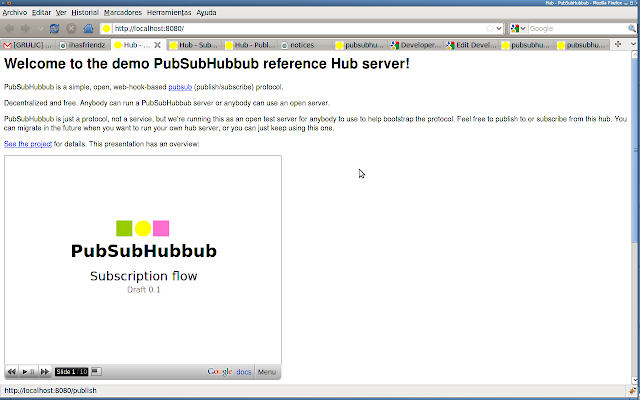
-type http://localhost:8080 on your browser, you should see something like:
-
-_Welcome to the demo PubSubHubbub reference Hub server!_
-
-http://3.bp.blogspot.com/_XkKIWh0VZYk/SqrdHFQ2i6I/AAAAAAAAGxs/kPxuBPwJ6Nc/s640/pshb0.png
-
-== download the example ==
-
-{{{
-# we will need to fetch the tubes library and the example that we will be
using.
-$ git clone git://github.com/marianoguerra/tubes.git
-
-# now we will start the example
-
-$ cd tubes/ihasfriendz/
-$ python main.py
-}}}
-
-we should see something like:
-
-{{{
- * Running on http://0.0.0.0:8081/
- * Restarting with reloader...
-}}}
+this commands asume that you are at the root of the pshb-example folder.
+
+==Playing==
+
+open a browser tabs pointing to:
+
+        http://localhost:8000/
+
+click the signup link and create a new user.
+
+
+https://github.com/marianoguerra/pshb-example/raw/master/doc/img/pshb-1.png
+
+
+I will create one called spongebob, you will have to change the username
whenever you see it.
+
+https://github.com/marianoguerra/pshb-example/raw/master/doc/img/pshb-2.png
+
+
+after the signup process click the login button and enter the user and
password you just entered.
+
+
+https://github.com/marianoguerra/pshb-example/raw/master/doc/img/pshb-3.png
+
+
+create a message and click send, the message should appear below.


-=== components used by the example ===
-
-  * werkzeug: http://werkzeug.pocoo.org
-  * jquery: http://jquery.com
-  * tubes: http://github.com/marianoguerra/tubes/tree/master
-  * pubsubhubbub_publish.py: from pshb
-  * feedformatter.py: http://code.google.com/p/feedformatter/
-
-== publish the feed to the hub ==
-
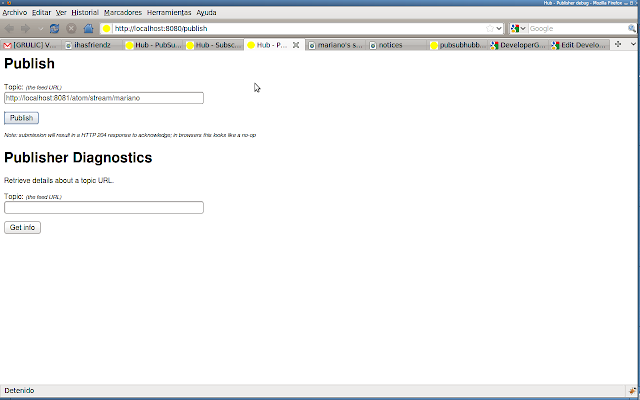
-go to the following URL on your browser: http://localhost:8080/publish
-
-on the _Topic_ field enter: http://localhost:8081/atom/stream/_MYUSER_ and
click publish
-
-http://4.bp.blogspot.com/_XkKIWh0VZYk/SqrdHbMyTDI/AAAAAAAAGx0/HU3XaAhjP_w/s640/pshb1.png
-
-*!* if everything goes OK, then you wont notice anything on the page,
that's ok, browsers act that way to 204 responses
-
-*!* _MYUSER_ is a placeholder for the user you will use to post notices on
the test app later (for example
http://localhost:8081/atom/stream/marianoguerra)
-
-== subscribing to the hub ==
-
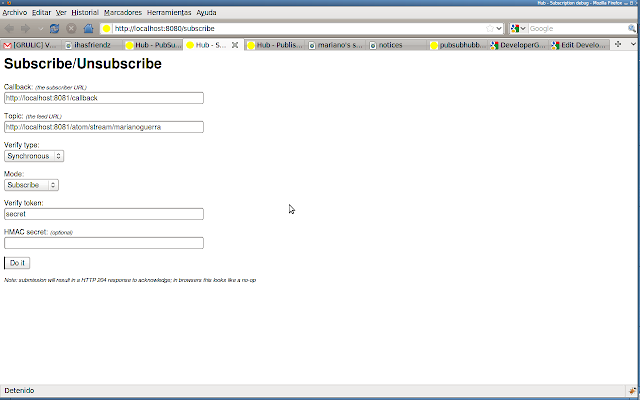
-go to the following URL on your browser: http://localhost:8080/subscribe
-
-on the _Callback_ field enter: http://localhost:8081/callback
-on the _Topic_ field enter: http://localhost:8081/atom/stream/_MYUSER_
-on the _Verify token_ field enter something random like: _iwantmahcookie_
-
-http://4.bp.blogspot.com/_XkKIWh0VZYk/SqrdHx3cWDI/AAAAAAAAGx8/V4UrVzmx1Tc/s640/pshb2.png
-
-*!* _MYUSER_ is a placeholder for the user you will use to post notices on
the test app later (for example
http://localhost:8081/atom/stream/marianoguerra)
-
-click _Do it_
-
-*!* if everything goes OK, then you wont notice anything on the page,
that's OK, browsers act that way to 204 responses
-
-== create some content ==
-
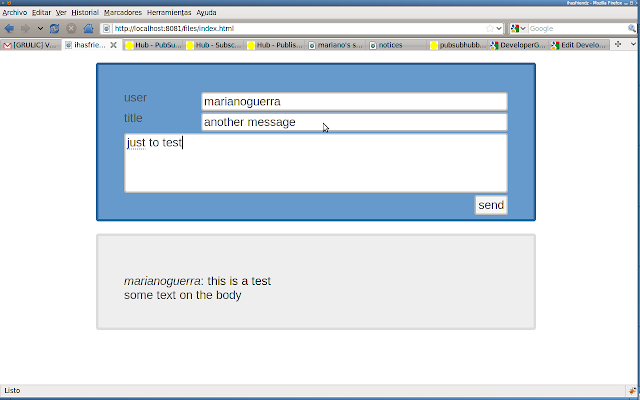
-go to the following URL on your browser:
http://localhost:8081/files/index.html
-
-post some content on the form, use the user you used as _MYUSER_
-
-http://3.bp.blogspot.com/_XkKIWh0VZYk/SqrdIRtBMoI/AAAAAAAAGyE/hOtiESEaaHY/s640/pshb3.png
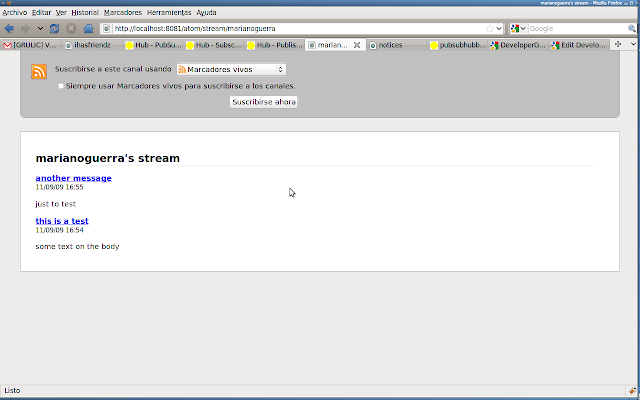
-
-you can check that the item was posted going manually to
http://localhost:8081/atom/stream/_MYUSER_, you should see an atom feed
there
-
-http://1.bp.blogspot.com/_XkKIWh0VZYk/SqrdJC1gwRI/AAAAAAAAGyM/vKPiADfZpLI/s640/pshb4.png
-
-== manually processing the tasks ==
-
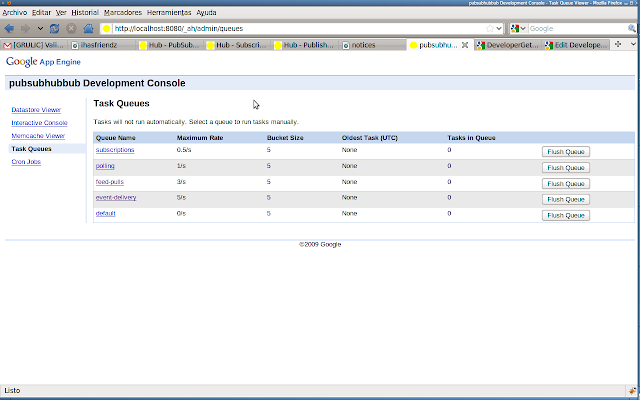
-when running the hub on the dev server we have to run the task queues by
hand, to do that go to http://localhost:8080/_ah/admin/queues
-
-http://2.bp.blogspot.com/_XkKIWh0VZYk/Sqrd_5aSiyI/AAAAAAAAGyU/pjEz8TOZXWc/s640/pshb5.png
-
-on the _Tasks in Queue_ column of the _feed-pulls_ you should see a number
different than 0 (that is the number of messages you created since the last
execution of that task).
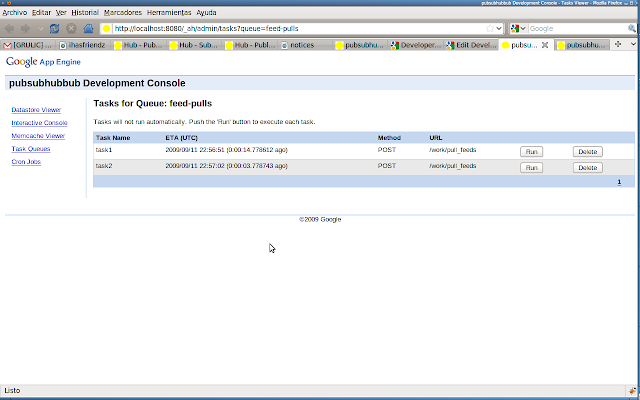
-
-click on the _feed-pulls_ link, there click on the _run_ button.
-
-http://3.bp.blogspot.com/_XkKIWh0VZYk/SqreATS1_OI/AAAAAAAAGyc/loOLwdvXcSk/s640/pshb6.png
-
-when we run the feed pulls task, we tell pshb to fetch the feeds that have
new content (the ones that did a post to the hub to inform that there is
new content)
-
-*!*  on production hubs this tasks are done automatically
-
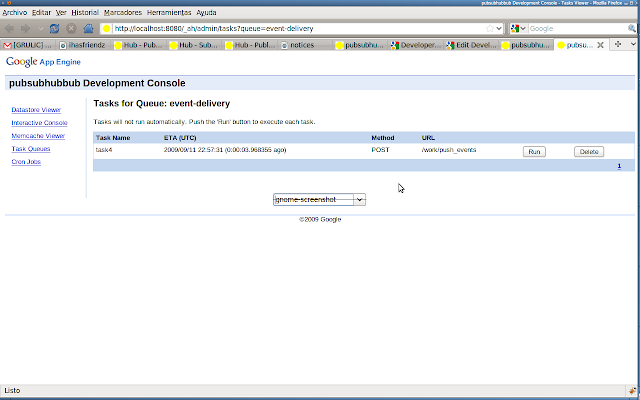
-now we go again to the _Task Queues_ page, there the _event-delivery_
queue should have a number different than 0 (the number of messages that
are pending to be sent to the subscribers), we click on the
_event-delivery_ and then we click on the _run_ button.
-
-http://1.bp.blogspot.com/_XkKIWh0VZYk/SqreA9bViFI/AAAAAAAAGyk/TOOj_6tdoJ8/s640/pshb7.png
-
-when we run the event delivery task, we tell pshb to do a POST on every
callback url registered for the feeds that were fetched on the _feed-pulls_
task.
-
-== seeing it work ==
-
-now that we created a feed, informed the hub that we had new content, the
hub fetched the content and sent it to the callback, we want to see this
content, for this go with your browser to
http://localhost:8081/new-notices/, you will see the notices that pshb
posted back to you the last time.
-
-http://1.bp.blogspot.com/_XkKIWh0VZYk/SqreBWaXNCI/AAAAAAAAGys/wxGClI7Q2S0/s640/pshb8.png
-
-*!* if you refresh the page you will notice that the messages aren't there
anymore, that's because the example stores the new messages in a Queue that
is flushed when the request for new notices is made, in this way you can
see only the new messages.
-
-*!* the example stores all the information on global variables on main.py
(this is to make the example simpler), so every time you change something
on main.py and save the server will reload the changes and all the data
will disappear.
-
-== for lazy people ==
-
-{{{
-#!/usr/bin/env sh
-
-# create the example directory
-mkdir pshb
-cd pshb
-
-CWD=$(pwd)
-EXAMPLE=$CWD/tubes/ihasfriendz
-
-wget http://googleappengine.googlecode.com/files/google_appengine_1.3.5.zip
-unzip google_appengine_1.3.5.zip
-
-svn checkout http://pubsubhubbub.googlecode.com/svn/trunk/ pubsubhubbub
-
-
-# we will need to fetch the tubes library and the example that we will be
using.
-git clone git://github.com/marianoguerra/tubes.git
-
-# now we will start the example
-
-echo "run \"cd $EXAMPLE; python main.py\" on a shell to run the example"
-echo "run \"cd $PWD; python2.5 google_appengine/dev_appserver.py
pubsubhubbub/hub/\" on a shell to run the hub"
+https://github.com/marianoguerra/pshb-example/raw/master/doc/img/pshb-4.png
+
+https://github.com/marianoguerra/pshb-example/raw/master/doc/img/pshb-5.png
+
+
+now go to http://localhost:8000/atom/messages/from/spongebob/
+
+
+https://github.com/marianoguerra/pshb-example/raw/master/doc/img/pshb-6.png
+
+
+you should see an atom feed with the message you just created.
+
+==Publishing==
+
+now that we have a page that generates information we need to publish it
on the hub.
+
+open a tab in your browser pointing to http://localhost:8080/ and click on
the publish link near the bottom.
+
+
+https://github.com/marianoguerra/pshb-example/raw/master/doc/img/pshb-7.png
+
+https://github.com/marianoguerra/pshb-example/raw/master/doc/img/pshb-8.png
+
+
+if you get an error remove the s from the https protocol in the address
bar and refresh.
+
+
+https://github.com/marianoguerra/pshb-example/raw/master/doc/img/pshb-9.png
+
+
+on the Topic field enter the url to the atom feed we saw before:
http://localhost:8000/atom/messages/from/spongebob/
+
+https://github.com/marianoguerra/pshb-example/raw/master/doc/img/pshb-10.png
+
+
+and click Publish, the page wont change, that's ok.
+
+==Subscribing==
+
+now we need to subscribe one user from the other site
(http://localhost:8001/) to the messages sent by our user.
+
+go to http://localhost:8001/ and create another user, I will call it
patrick
+
+https://github.com/marianoguerra/pshb-example/raw/master/doc/img/pshb-11.png
+
+
+in the main page of the hub (http://localhost:8080/) click on the
subscribe like near the bottom
+
+enter http://localhost:8001/p/notify/patrick/ on the Callback field
(change patrick for your username if you used another one) enter
http://localhost:8000/atom/messages/from/spongebob/ on the Topic field
(change spongebob for your username if you used another one)
+
+https://github.com/marianoguerra/pshb-example/raw/master/doc/img/pshb-12.png
+
+click the "Do it" button, the page won't change, that's ok.
+
+==Sending a message==
+
+Go to http://localhost:8000/ (login if you closed it) and send a message.
+
+https://github.com/marianoguerra/pshb-example/raw/master/doc/img/pshb-13.png
+
+ Now go to http://localhost:8001/ and refresh the page, you should see the
messages published by the user in the other site.
+
+https://github.com/marianoguerra/pshb-example/raw/master/doc/img/pshb-16.png
+
+
+===Note===
+
+
+to make it work and avoid an exception I had to add a return statement at
the beginning of the log_message function at
google_appengine/google/appengine/tools/dev_appserver.py
+
+if you get that exception like this:
+
+{{{
+in log_request
+    self.requestline, str(code), str(size))
+  File "/home/asd/pubsubhubbub/pshb/google_appengine/google/appengine/
+tools/dev_appserver.py", line 3314, in log_message
+    if self.channel_poll_path_re.match(self.path):
+AttributeError: DevAppServerRequestHandler instance has no attribute
+'path'
+}}}
+
+
+https://github.com/marianoguerra/pshb-example/raw/master/doc/img/pshb-15.png
+
+
+edit the function to look like this:
+
+{{{
+def log_message(self, format, *args):
+  """Redirect log messages through the logging module."""
+  return
+  if self.channel_poll_path_re.match(self.path):
+    logging.debug(format, *args)
+  else:
+    logging.info(format, *args)
 }}}
+
+
+
+you will have to set write permissions to the file to save it (chmod u+w
dev_appserver.py)
+
+https://github.com/marianoguerra/pshb-example/raw/master/doc/img/pshb-14.png
+
+you will have to restart the pshb server:
+
+
+google_appengine/dev_appserver.py pubsubhubbub/hub/