Unfortunately, you're not missing anything simple. The way pyglet's batch
drawing works just doesn't support depth-ordering for vertex draws. Really
fixing the problem without impacting performance involves a fairly radical
change that will probably break backwards compatibility. The only solution
I figured out required having all sprite textures in a batch to be regions
of a single texture object.
I think z-ordering sprites is a pretty major feature that many people just
assume is present by default. I'm glad Ben took the time to add a branch
for this!

On Tuesday, August 30, 2016 at 6:53:19 PM UTC-5, Charles wrote:
>
> I have been working on something for a while now and have been trying to
> figure out a layered order properly. I have searched these forums for
> recommendations and read numerous articles but none of the proposed
> solutions have worked out.
>
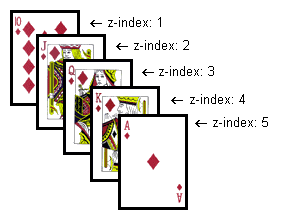
> Basically I want a layered order based on the Y value without having to
> constantly create a new batch, re-add sprites, and sort everytime something
> needs to move. This way the player may appear between things depending on
> it's position. Here is a picture of what I mean:
> http://html.net/tutorials/css/figure020.gif
>
> 1) Tried implementing depth testing for a z-order by modifying pyglet a
> little (adding a third float for z), but found problems with alpha
> blending. You have to make sure the ones being blended are rendering last
> or they sometimes appear black. Basically you end up sorting them anyways
> since new objects get added to the screen and you need those to be removed
> and added back. This also is kind of impossible in a tile based system as
> some of the tiles may have some alpha blending.
>
> 2) Tried using OrderedGroup. In this context it would mean I would need an
> OrderedGroup for each Y axis. Unfortunately this brings the FPS down to
> unusable levels and I am guessing is removing the point of a batch.
>
> 3) I've tried sorting the objects before adding to the batch, which works,
> but when you have to make the player move you have to delete it from the
> batch, sort sprites, then create a new batch and migrate all of the current
> sprites over in the right order. This creates a lot of overhead and
> performance problems whenever something on the screen moves or if many
> things move.
>
> I really would like to use the batch system so I can try out shaders and
> get the benefits of those, instead of fixed function opengl, but in every
> test case I've done it's slower.  I feel like I am over complicating
> something that should be very simple; is there another method I am missing?
>

--
You received this message because you are subscribed to the Google Groups
"pyglet-users" group.
To unsubscribe from this group and stop receiving emails from it, send an email
to [email protected].
To post to this group, send email to [email protected].
Visit this group at https://groups.google.com/group/pyglet-users.
For more options, visit https://groups.google.com/d/optout.