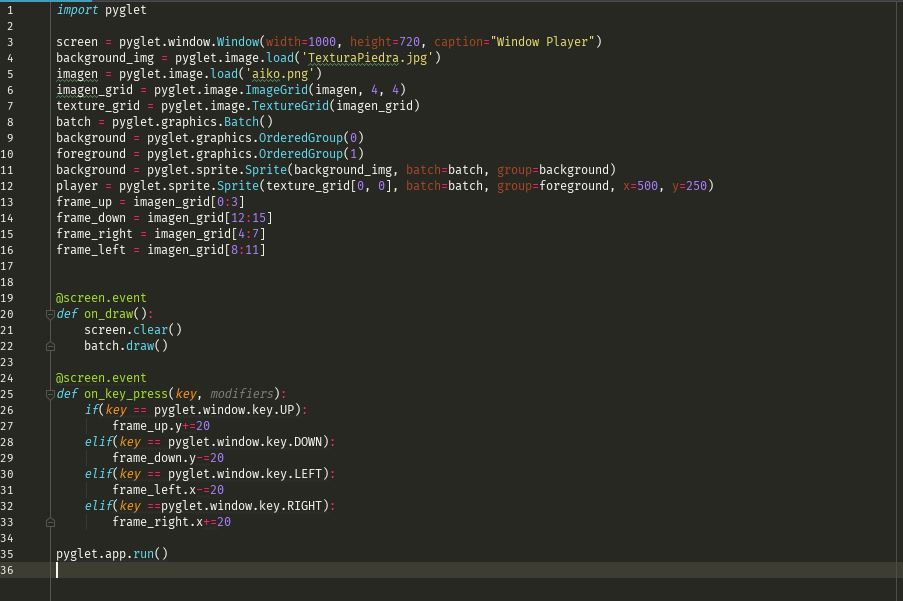
Hi Benjamin, thanks for answering. I want to move around the screen as in
an RPG game format, I show you the code that I have. In this code I try to
move it with the keyboard and it gives me an error, but in reality I want
to move it with mouse clicks.
<https://lh3.googleusercontent.com/-Kr5wsUjTD7Q/W1ipH18pDbI/AAAAAAAAAN0/p09_xKrE90cTjmPjr75Xrt3frZ4g8TyDgCLcBGAs/s1600/codigo_pyglet.JPG>


This is the result is a 4x4 grid sprite where the initial position is [0, 0]

<https://lh3.googleusercontent.com/-iiGnP4KT_IQ/W1irJ9vdBtI/AAAAAAAAAOA/EyQeD4W8kFkI3Yr-WNjG2CrGLzxT3d1XwCLcBGAs/s1600/Captura_pantalla.JPG>


and the error it gives when trying to move the sprite is this.
(AttributeError: 'List' object has not attribute 'y') so on go pressing the
directional keys, but as I mentioned earlier my intention is to move it
with the mouse clicks this was just a test

<https://lh3.googleusercontent.com/-knU20g4gF9Y/W1ir91_XkXI/AAAAAAAAAOI/u9tUcUROIq85cKD0BJ18Ddd5Sys68PeYgCLcBGAs/s1600/Captura_error.JPG>


El miércoles, 25 de julio de 2018, 4:44:22 (UTC-5), Benjamin Moran escribió:
>
> Hi Alex,
>
> Do you want to move individual sprites, or do you want to scroll the
> entire screen?
>

--
You received this message because you are subscribed to the Google Groups
"pyglet-users" group.
To unsubscribe from this group and stop receiving emails from it, send an email
to [email protected].
To post to this group, send email to [email protected].
Visit this group at https://groups.google.com/group/pyglet-users.
For more options, visit https://groups.google.com/d/optout.