Lawrence D'Oliveiro wrote:
> Yes, fair enough. I prefer to use APSW rather than the SQLite binding
> in the standard library; that seems nicer in some ways, providing more
> flexibility in placeholders for parameter substitution
> <https://rogerbinns.github.io/apsw/example.html#why-you-use-bindings-to-provide-values>.
>
> I tend to fall out of the habit of using placeholder mechanisms,
> because they don¢t cope with more advanced cases.
Agreed. All good ideas. All worthwhile to consider.

In fact, all your points are valid and worthwhile to consider, especially
your point that we should strive to figure out a way to eliminate Nova.db!

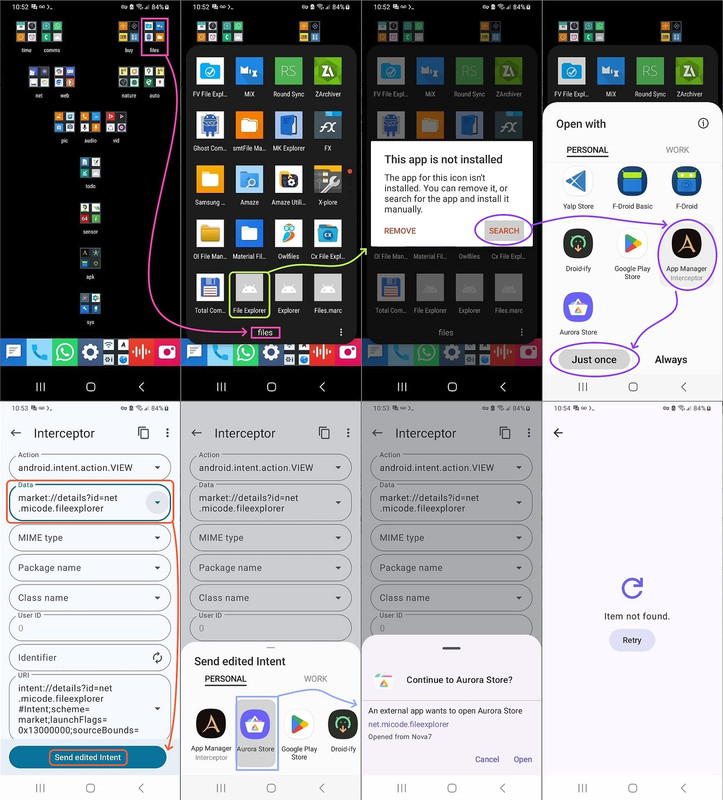
I agree with you that there "should be a way" to query Android for
homescreen folders, app icons & intents, such as using this manual method
(using Muntashirakon App Manager, which is one of the finest Android apps)
 <https://i.postimg.cc/zvKdH4PX/homescreen-intent.jpg>

Note that Muntashirakon knows much of what we'd need for that script.
 a. It knows the package name (e.g., com.simplemobiletools.clock)
 b. It knows the action (e.g., android.intent.action.MAIN)
 c. And the category (e.g., android.intent.category.LAUNCHER)

So maybe we can use Muntashirakon to list all the apps that are capable
of being launched on the homescreen, whether or not they've been placed.

But forcing folks to install anything on Android, is, I agree, sub optimal.
We "should" be able to obtain the necessary data simply by running queries.

I'm sure adb can, in and of itself, also list packages for every app on the
phone which has an icon capable of appearing on the home screen.
 C:\> adb shell cmd package resolve-activity --brief -a
android.intent.action.MAIN -c android.intent.category.LAUNCHER

While Python comes with sqlite3, APSW (aka another python sqlite wrapper)
is certainly worthy to consider given it allows far more advanced control.

Certainly APSW allows more freedom and fewer restrictions, as you noted.

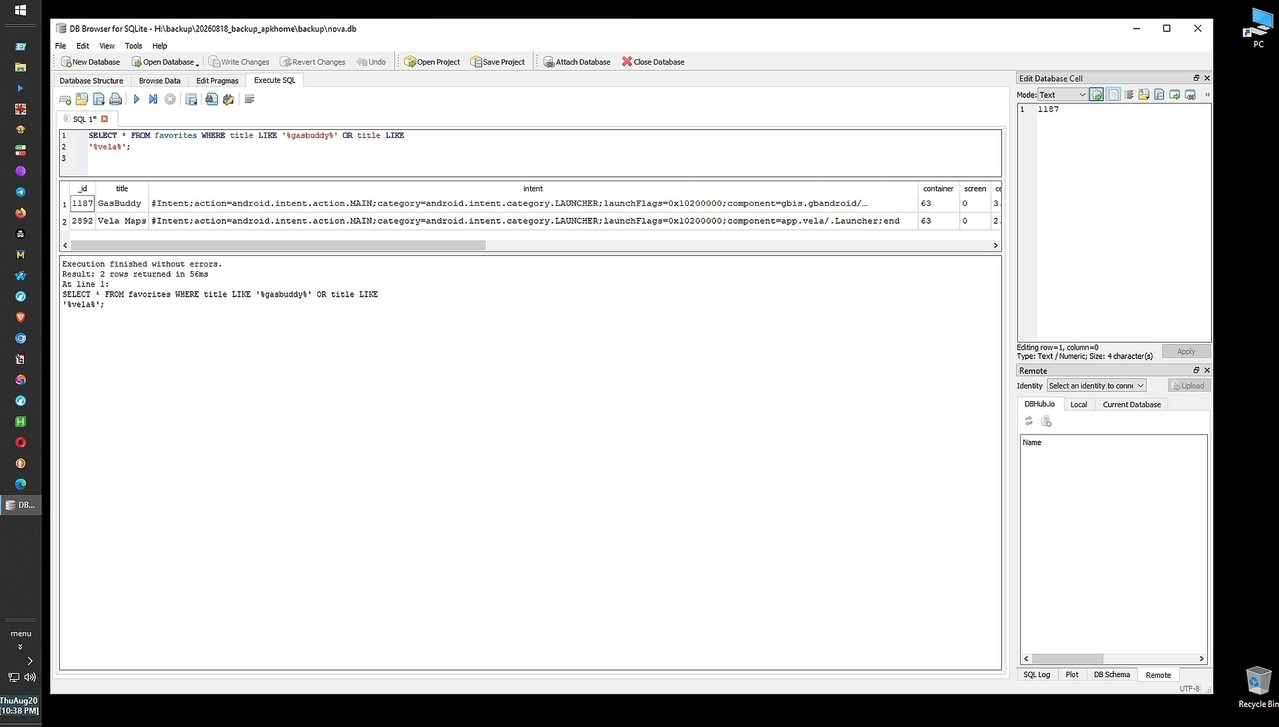
The real hurdle, as I see it, is creating the SQL db in the first place.
My script punts and simply reads from the Nova Launcher exported output.
 <https://i.postimg.cc/28w4VzSk/sql-query.jpg>

If I could figure out how to query the Android phone to build that SQL
database, that would be the holy grail in replicating the homescreen.

a. We'd have to query the phone to find all the panes (aka screens)
b. Then, we'd find the folders including their names and locations
c. Inside those folders, we'd find the app icons, locations & intents
d. Where the intents reveal the "target" of the app icon by package name
e. We then query the phone for those package names & their sub versions
f. And we build a duplicate hierarchy of pane/folder/app on the PC disk
g. Then we copy the base/split APK into that pane/folder/app PC hierarchy
h. And lastly, we build the adb command batch file to re-install

I'll keep thinking about how to query Android for that information.

Along the vein of ditching the need for any given launcher, it would be
trivial to just archive every app on the phone, with or w/o a launcher.

a. We'd query the user-installed package list using adb on the PC
    C:\> adb shell pm list packages -f
b. We'd extract the app manifest, metadata and launcher-intent filters
    C:\> cmd package resolve-activity
c. We might even organize apps by the built-in "system roles" or "app tags"
   C:\> adb shell pm path <package>
    (e.g., system-defined categories like Audio, Games, Productivity)
d. And then we'd pull the APKs to a hierarchy of those roles on the PC
    C:\> adb pull <package>
e. Lastly, we'd write a script to re-install the APks back to the phone
    C:\> adb install-multiple

The only hard part is getting the exact homescreen panes, folder names and
positions and the app names & locations inside of each folder (or loose).

Everything else is literally trivial to do.
Which is why I punted and used the Nova.db to get the position information.

Now that the backup script is already working, for me, I'll consider
writing a script that just gets all user-installed apps and puts them in
known categories, where it should be doable to get those app categories.

I know from helping the Skyica App Finder developer that there is a python
library "google-play-scraper" which might be able to pull from the Google
Play repository the developer-assigned app category for any given package.
from google_play_scraper import app

 result = app(
    'com.whatsapp',
    lang='en', # optional
    country='us' # optional
 )
 print(result['genre']) # or result['category'] depending on the library version

Likewise, F-Droid hosts structured metadata files (in XML or JSON) for
every app in its repository, which explicitly list the app's designated
category (e.g., "System," "Internet," "Multimedia"), which we can query.

In summary, it's worthwhile to organize the apps by some method, where the
script I wrote uses the organization that the user employed on his
homescreen, but the downside is it only works for one known app launcher.

However, if we don't organize the apps, backup/restore becomes trivial.
--
https://mail.python.org/mailman3//lists/python-list.python.org