R:azzak,

When I am using an Enhanced grid in a form, I really like the Filter Bar
option, as it allows selecting records quickly.
I know I can limit the rows on the table by using the WHERE clause when
opening the form to select a sub-set; however, once a sub-set is selected,
the entire set cannot be seen without exiting the form or using views and
then closing, redefining and re-opening the view. I am trying to get away
from this by using a grid with a pre-set value on the Filter bar so the user
can, if necessary, just delete the filter value and then the entire set is
displayed.
I would like to be able to pre-set the Filter Bar with a value by using the
PROPERTY command on the After Start EEP, such as:
PROPERTY GridComponentID FILTER->COLUMNNAME->' 'value'
So, when the form opens, the grid has a pre-set 'value' for the COLUMNNAME
filter, and only the records meeting this criteria are shown and the user
can then reset or delete the value to show a different or the entire set of
records.

I have gone over every possible PROPERTY option for the Enhanced Grid and I
have not been able to find one that would allow me to do what I described
above; however; there are so many PROPERTY options for the Enhanced grid
that I could have missed an obvious one. Is there a PROPERTY option that
would allow me to do this?

Javier,

Javier Valencia, PE
913-829-0888 Office
913-915-3137 Cell
913-649-2904 Fax
 <mailto:[email protected]> [email protected]

Thursday, April 14, 2011

Tip of the Day - Dynamically Changing Band List Properties
Product: R:BASE eXtreme 9.1 (32/64)
Update.: 3
Build..: 9.1.3.10417 or higher http://www.rupdates.com
Section: Forms
Control: Enhanced DB Grid (Band List)

Did you know that you can dynamically change the properties of
Enhanced DB Grid Band List(s), including the CAPTION and FONT.

Now you may use the following GETPROPERTY/PROPERTY commands:

-- To Obtain Band Count in Enhanced DB Grid
    GETPROPERTY ComponentID BANDS->COUNT vValue

-- To obtain Current Caption for a Given Band in Enhanced DB Grid
    GETPROPERTY ComponentID BANDS[n]->CAPTION vValue

-- To Dynamically Change Caption for a Given Band in Enhanced DB Grid
    PROPERTY ComponentID BANDS[n]->CAPTION value

-- To Dynamically Change Font Name for Band(s) in Enhanced DB Grid
    PROPERTY ComponentID BANDS->FONT_NAME value

-- To Change Font Color for Band(s) in Enhanced DB Grid
    PROPERTY ComponentID BANDS->FONT_COLOR Value

-- To Dynamically Change Font Size for Band(s) in Enhanced DB Grid
    PROPERTY ComponentID BANDS->FONT_SIZE value

-- To Dynamically Change Font Height for Band(s) in Enhanced DB Grid
    PROPERTY ComponentID BANDS->FONT_HEIGHT value

-- To Dynamically Change Font Bold Style for Band(s) in Enhanced DB Grid
    PROPERTY ComponentID BANDS->FONT_BOLD value
    Values TRUE/FALSE

-- To Dynamically Change Font Italic Style for Band(s) in Enhanced DB Grid
    PROPERTY ComponentID BANDS->FONT_ITALIC value
    Values TRUE/FALSE

-- To Dynamically Change Font Strikeout Style for Band(s) in Enhanced DB
Grid
    PROPERTY ComponentID BANDS->FONT_STRIKEOUT value
    Values TRUE/FALSE

-- To Dynamically Change Font Underline Style for Band(s) in Enhanced DB
Grid
    PROPERTY ComponentID BANDS->FONT_UNDERLINE value
    Values TRUE/FALSE

    -- Example 01
    -- Database: RRBYW17
    -- Form Name: RBG91_EnhancDBGrd_BandList_Properties
    -- Control: Enhanced DB Grid
    -- Related Tables: Customers, InvoiceHeader
    -- Component ID: DBGrid_Customers, DBGrid_Invoices
    -- Band List Count: 1
    -- Bit Button: [Change Band Properties]
    -- Custom EEP:
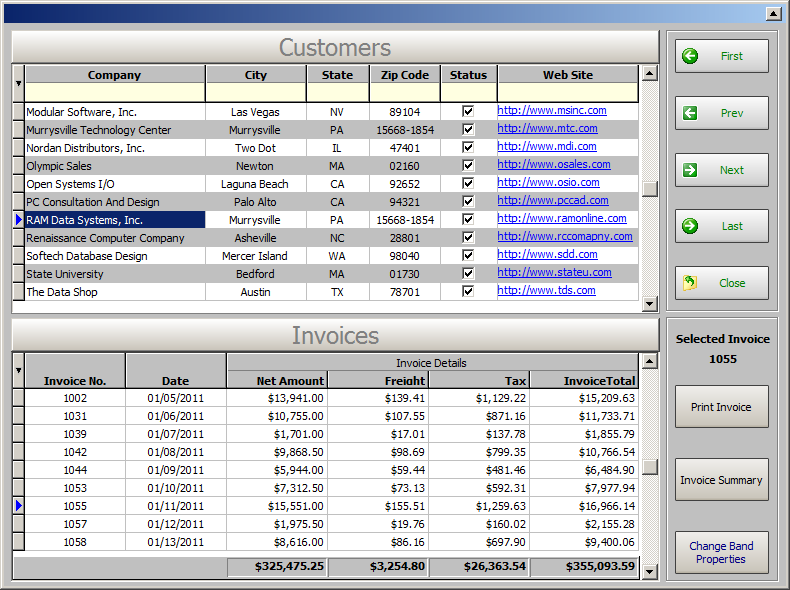
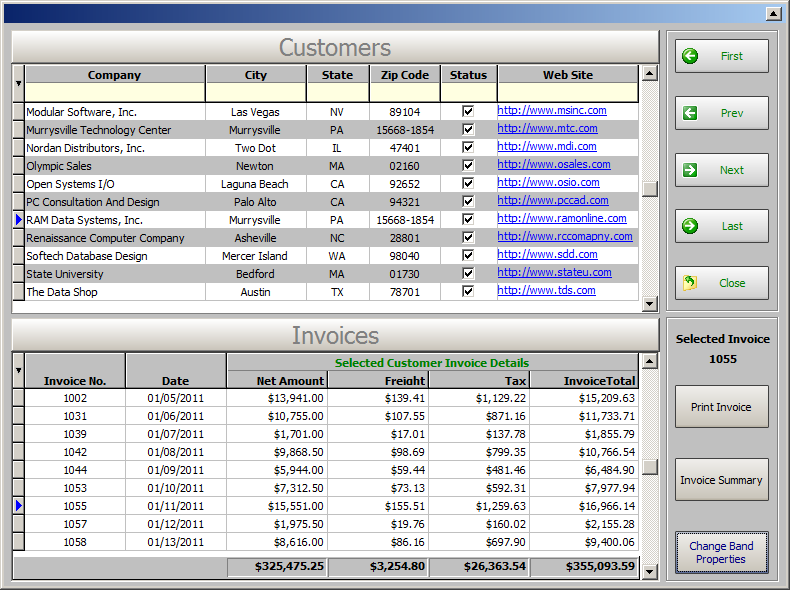
    PROPERTY DBGrid_Invoices BANDS[0]->CAPTION 'Selected Customer
Invoice Details'
    PROPERTY DBGrid_Invoices BANDS->FONT_NAME Tahoma
    PROPERTY DBGrid_Invoices BANDS->FONT_COLOR GREEN
    PROPERTY DBGrid_Invoices BANDS->FONT_SIZE 8
    PROPERTY DBGrid_Invoices BANDS->FONT_BOLD TRUE
    RETURN

    For your viewing pleasure ....
    Before: http://www.razzak.com/tips/Enhanced_DB_Grid_BandList_Before.png
    After: http://www.razzak.com/tips/Enhanced_DB_Grid_BandList_After.png

Have fun!

Very Best R:egards,

Razzak.