At 05:03 AM 8/12/2014, rehan wyne wrote:
How can I access DB Grid / DB Scrolling Region individual records
to process them in a loop while that DB Grid / DB Scrolling Region
is currently focused in the form?
For Example:
1. If I put "Auto save Off" and I want to put all rows into the base
table ( of DB grid / DB Scrolling Region)  after some processing and
verification.

2. I just want to show Grand Total of a column including rows that
were fetched from base table and all newly added rows into DB Grid
/ DB Scrolling Region that were not saved yet into base table.
Rehan,

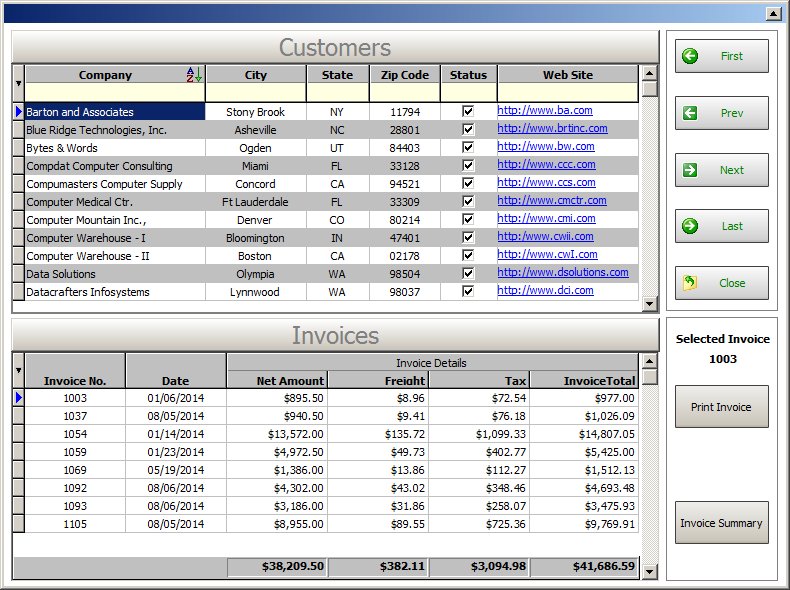
Using the "Enhanced DB Grid" control, you can "Show Footer" where you
can define "Band" to calculate anything, including "Sum" of a given
column(s), to display in that Footer.

Take a look at the "RBG9_EnhancDBGrd" form included with the sample
RRBYW18 database/application to understand the use of such feature.

http://www.razzak.com/tips/EnhancedDBGridWithFooterAndBand.jpg

Programmatically, you could also define a Custom EEP at the "Table"
level to calculate and display all results as one of the options as
follows:

. On Row Entry
. On Row Exit
. After Saving Row
. After Leaving Section
. Before Insert Row
. After Insert Row

Form Designer|Main Menu|Tables|Add/Remove Tables|Table Settings

Hope that helps!

Very Best R;egards,

Razzak.

www.rbase.com
www.facebook.com/rbase
--
31 years of continuous innovation!
16 Years of R:BASE Technologies, Inc. making R:BASE what it is today!
--
--- RBASE-L
================================================
TO POST A MESSAGE TO ALL MEMBERS:
Send a plain text email to [email protected]

(Don't use any of these words as your Subject:
INTRO, SUBSCRIBE, UNSUBSCRIBE, SEARCH,
REMOVE, SUSPEND, RESUME, DIGEST, RESEND, HELP)
================================================
TO SEE MESSAGE POSTING GUIDELINES:
Send a plain text email to [email protected]
In the message SUBJECT, put just one word: INTRO
================================================
TO UNSUBSCRIBE:
Send a plain text email to [email protected]
In the message SUBJECT, put just one word: UNSUBSCRIBE
================================================
TO SEARCH ARCHIVES:
Send a plain text email to [email protected]
In the message SUBJECT, put just one word: SEARCH-n
(where n is the number of days). In the message body,
place any
text to search for.
================================================