Wednesday, January 14, 2015

Sample Application: Using Variable Lookup List View Row Numbers & Check Boxes
Product..: R:BASE eXtreme 9.5 (32/64) - Update 5
Build....: 9.5.5.20109 or higher
Section..: Form Controls (Variable Lookup List View)
Keywords.: Row Numbers, Check Boxes
With the official release of R:BASE eXtreme 9.5, Update 5, a few additional
options are now implemented in the Variable and DB Lookup List Controls.

Form Designer | Variable Controls | Variable Lookup List View Control

Form Designer | Database Controls | DB Lookup List View Control


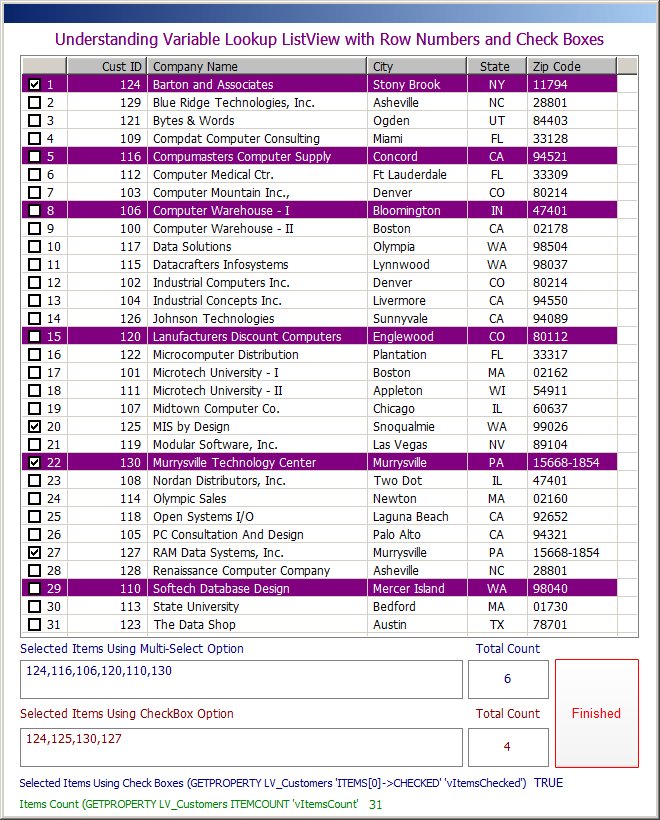
Show Row Numbers:
Specifies if a separate row number column is displayed at the far left of
the list

Show Check Boxes: (eXclusively Update 5)
Specifies if a check box column is displayed at the far left of the list

Example:
http://www.razzak.com/tips/Using_VLLV_With_RowNumbers_And_CheckBoxes.jpg

A sample application is also available to illustrate the use of
Row Numbers & Check Boxes in List View using R:BASE eXtreme 9.5,
Update 5 or higher.

Sample Applications: http://www.Razzak.com/SampleApplications/

Application Title: Using Count Down Timer in R:BASE eXtreme 9.5

Date Posted: 01/14/2015

Note:

To thoroughly understand this application, all features, and new
PROPERTY/GETPROPERTY commands, you MUST use R:BASE eXtreme 9.5,
Update 5, Build: 9.5.5.20109 or higher, along with the sample
RRBYW18 sample database included with your RBG95 installation.

Therefore, copy and extract the sample application into R:BASE
Sample Database folder, such as:

\RBTI\RBG95_64\Samples\RRBYW18\
\RBTI\RBG95_32\Samples\RRBYW18\

External Form: VarLookupListViewWithRowNumbersAndCheckBoxes.rff

Have fun!

Razzak.

www.rbase.com
www.facebook.com/rbase
--
32 years of continuous innovation!
17 Years of R:BASE Technologies, Inc. making R:BASE what it is today!
--