StefanieZhao7 commented on code in PR #266:
URL: https://github.com/apache/iotdb-docs/pull/266#discussion_r1663593218
########## src/UserGuide/latest/Ecosystem-Integration/Ignition-IoTDB-plugin.md: ########## @@ -0,0 +1,270 @@ +<!-- + + Licensed to the Apache Software Foundation (ASF) under one + or more contributor license agreements. See the NOTICE file + distributed with this work for additional information + regarding copyright ownership. The ASF licenses this file + to you under the Apache License, Version 2.0 (the + "License"); you may not use this file except in compliance + with the License. You may obtain a copy of the License at + + http://www.apache.org/licenses/LICENSE-2.0 + + Unless required by applicable law or agreed to in writing, + software distributed under the License is distributed on an + "AS IS" BASIS, WITHOUT WARRANTIES OR CONDITIONS OF ANY + KIND, either express or implied. See the License for the + specific language governing permissions and limitations + under the License. + +--> +# Ignition-IoTDB Plugin + +## 1、Product Overview + +1. Introduction to Ignition + +Ignition is a web-based monitoring and data acquisition tool (SCADA) - an open and scalable universal platform. Ignition allows you to more easily control, track, display, and analyze all data of your enterprise, enhancing business capabilities. For more introduction details, please refer to [Ignition官网](https://docs.inductiveautomation.com/docs/8.1/getting-started/introducing-ignition) + +2. Introduction to the Ignition-IoTDB plugin + + The ignition-IoTDB connector is divided into two modules: the ignition-IoTDB connector,Ignition-IoTDB With JDBC。 Among them: + + - Ignition-IoTDB connector: Provides the ability to store data collected by Ignition into IoTDB, and also supports data reading in Components. It injects script interfaces such as `system. iotdb. insert`and`system. iotdb. query`to facilitate programming in Ignition + - Ignition-IoTDB With JDBC: Ignition-IoTDB With JDBC can be used in the`Transaction Groups`module and is not applicable to the`Tag Historian`module. It can be used for custom writing and querying. + + The specific relationship and content between the two modules and ignition are shown in the following figure. + + 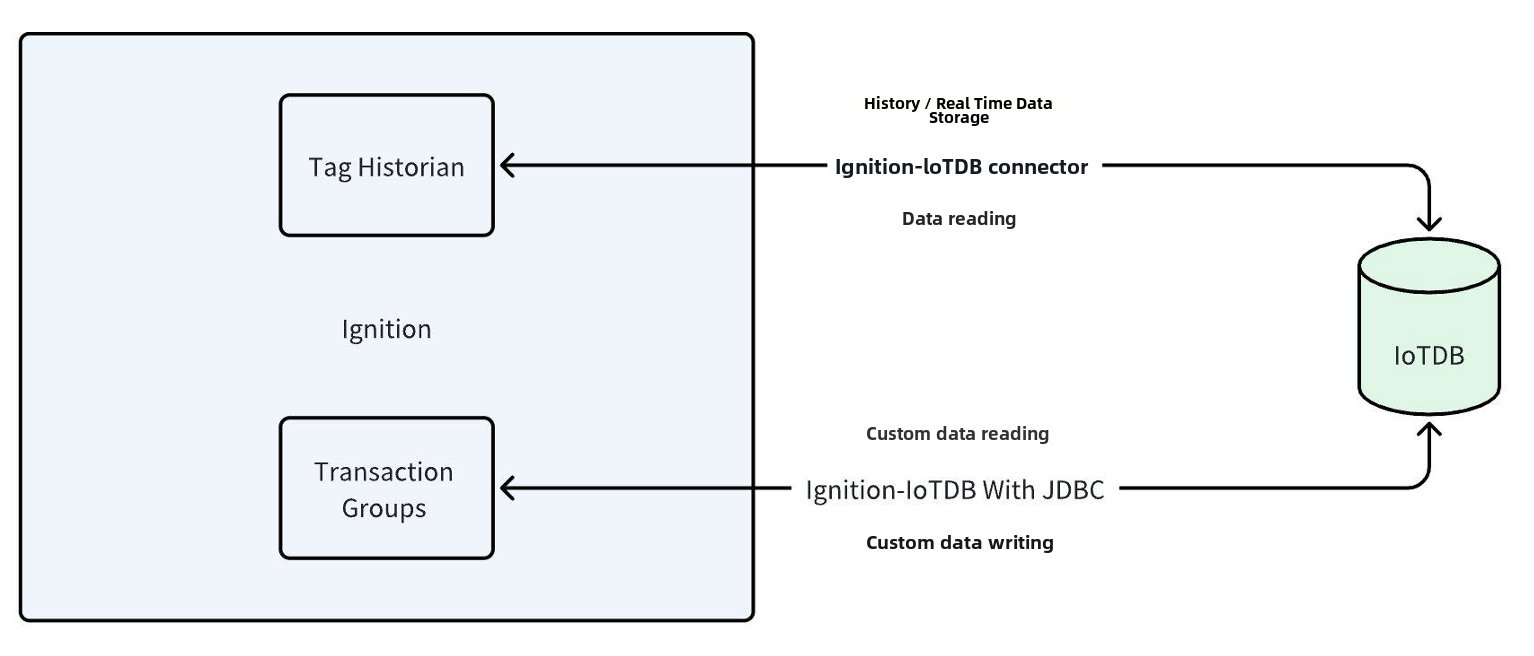 + +## 2、Installation Requirements + +| **Preparation Content** | Version Requirements | +| ------------------------------- | ------------------------------------------------------------ | +| IoTDB | Version 1.3.1 and above are required to be installed, please refer to IoTDB for installation [Deployment Guidance](https://www.timecho.com/docs/UserGuide/latest/Deployment-and-Maintenance/IoTDB-Package_timecho.html) | +| Ignition | Requirement: 8.1 version (8.1.37 and above) of version 8.1 must be installed. Please refer to the Ignition official website for installation [Installation Guidance](https://docs.inductiveautomation.com/docs/8.1/getting-started/installing-and-upgrading)(Other versions are compatible, please contact the business department for more information) | +| Ignition-IoTDB Connector module | Please contact Business to obtain | +| Ignition-IoTDB With JDBC | Download address:https://repo1.maven.org/maven2/org/apache/iotdb/iotdb-jdbc/ | + +## 3、Instruction Manual For Ignition-IoTDB Connector + +### 1、Introduce + +The Ignition-IoTDB connector module can store data in a database connection associated with the historical database provider. The data is directly stored in a table in the SQL database based on its data type, as well as a millisecond timestamp. Store data only when making changes based on the value pattern and dead zone settings on each label, thus avoiding duplicate and unnecessary data storage. + +The Ignition-IoTDB connector provides the ability to store the data collected by Ignition into IoTDB. + +### 2、Installation Steps + +Step 1: Enter the `Configuration` - `System` - `Modules` module and click on the `Install or Upgrade a Module` button at the bottom + + + +Step 2: Select the obtained `modl`, select the file and upload it, click `Install`, and trust the relevant certificate. + +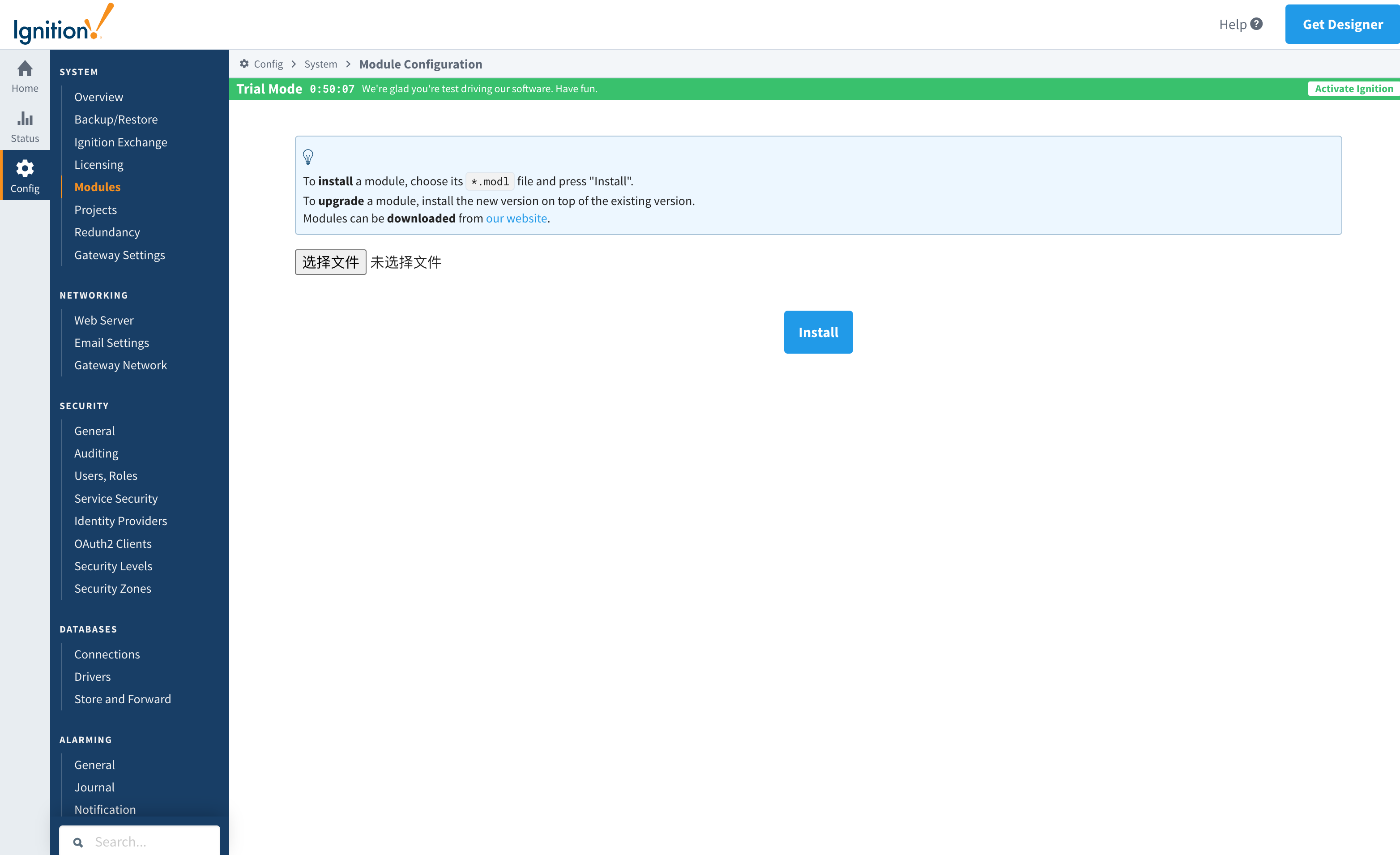 Review Comment: 更新为英文版 -- This is an automated message from the Apache Git Service. To respond to the message, please log on to GitHub and use the URL above to go to the specific comment. To unsubscribe, e-mail: [email protected] For queries about this service, please contact Infrastructure at: [email protected]



