Donovan!
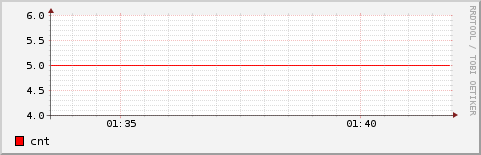
With your script I got all values set to 5, as I can  see both in dump and
graph.
1. But from your email I didn't got clear info that you tried to run script
with delays and "N:", is that correct?
2. If I simply put in `for` cycle "sleep 63" and change update not to use
calculated time, but instead N:5, I got these data seen in dump:

<!-- 2013-05-16 23:11:00 EEST / 1368735060 --> <row><v>NaN</v></row> │
<!-- 2013-05-16 23:12:00 EEST / 1368735120 -->
<row><v>1.7920090000e+00</v></row> │
<!-- 2013-05-16 23:13:00 EEST / 1368735180 -->
<row><v>3.5915094167e+00</v></row> │
<!-- 2013-05-16 23:14:00 EEST / 1368735240 -->
<row><v>3.8415422500e+00</v></row> │

Here's my for cycle (for clarification):

for ((t=$start; t<=$start+60*63; t=t+63 )); do
echo $t
rrdtool update testing3.rrd N:5;
sleep 63
done

I see some weird bug when N used, that's at least.
Can anyone confirm present or absent of such behavior?
Thanks.


2013/5/16 Donovan Baarda <[email protected]>

> I don't get that result at all... I'm using RRDtool 1.4.7 on a Debian
> system.
>
> Are you sure you are using GAUGE and not something like ABSOLUTE?
>
> Some minor funnies in what you are doing is using step "-s 60" when
> creating your rrd, and -S 1 when generating your graph. This means your
> data is only resolution 60, and you are asking it to give you a 1 second
> resolution graph. However, that should not cause what you are seeing.
>
> In your graph cmd you have "CDEF:realcnt=cnt,1,*
>  LINE:realcnt#00A000:Cnt", which means you have an unnecessary multiply by
> 1 and you could just use; "LINE:cnt#00A000:Cnt".
>
> Try running the attached script and having a look at the testing2.png
> output. I definitely don't get any strange stepping. If you do, then I'd
> suspect something strange on your platform.
>
>
>
> On 16 May 2013 18:40, Alexander Yerenkow <[email protected]> wrote:
>
>> This is my command.
>>
>> rrdtool create -s 60 testing2.rrd DS:cnt:GAUGE:120:U:U
>> RRA:AVERAGE:0.5:1:1440 RRA:AVERAGE:0.5:60:720 RRA:AVERAGE:0.5:1440:365
>>
>> graph:
>>
>> rrdtool graph testing2.png -s -1200 -S 1 -a PNG -w 1000 -h 250 -v
>> "testing" DEF:cnt= testing2.rrd:cnt:AVERAGE CDEF:realcnt=cnt,1,*
>>  LINE:realcnt#00A000:Cnt
>>
>> Even if I got problem in graph, how do I get not "5" in dump:
>>
>> <!-- 2013-05-16 16:49:00 EEST / 1368712140 -->
>> <row><v>4.8531933333e+00</v></row>
>> <!-- 2013-05-16 16:50:00 EEST / 1368712200 -->
>> <row><v>0.0000000000e+00</v></row>
>> <!-- 2013-05-16 16:51:00 EEST / 1368712260 -->
>> <row><v>1.9154833333e-01</v></row>
>> <!-- 2013-05-16 16:52:00 EEST / 1368712320 -->
>> <row><v>4.4032950000e-01</v></row>
>> <!-- 2013-05-16 16:53:00 EEST / 1368712380 -->
>> <row><v>6.8845091667e-01</v></row>
>> <!-- 2013-05-16 16:54:00 EEST / 1368712440 -->
>> <row><v>9.4017525000e-01</v></row>
>>
>> Could anyone *please* run this test?
>> create testing db, and gather there data with my script (with real delays
>> one), and not via dumping into file a lot of data in just moment...
>>
>> I'll need or confirmation that it's somehow   my only problem, or we'll
>> get know that problem elsewhere.
>> Thanks.
>>
>>
>>
>> 2013/5/16 Donovan Baarda <[email protected]>
>>
>>> What does your rrdtool create and graph lines look like? I suspect
>>> that's where the error lies.
>>>
>>>
>>>
>>>
>>> On 16 May 2013 16:01, Alexander Yerenkow <[email protected]> wrote:
>>>
>>>> Thanks for hint, but this is working only when invoking at moment of
>>>> time.
>>>> E.g. If I run script
>>>>
>>>> tt=`jot - 1 30`
>>>> for i in $tt
>>>> do
>>>> t=`date +"%s"`
>>>> rrdtool update testing.rrd $t:5; rrdtool update testing2.rrd N:5;
>>>> sleep 63;
>>>> done
>>>>
>>>> I still  see same seesaw graph (I changed from 61 to 63 to make problem
>>>> more visible).
>>>> The script was run on fresh created two files, according your command.
>>>> The problem  (if there is problem) lies somewhere in some rounding
>>>> time, as it seems appear in both files, when I specify N, and time.
>>>> Here's my fresh graphs:
>>>> https://javaz.org/wp-content/testing.rrd-avg.png
>>>> https://javaz.org/wp-content/testing2.rrd-avg.png
>>>>
>>>> Could you confirm that if you run my script (with real half-hour
>>>> datamining) you will have same good-looking graph?
>>>>
>>>> BTW, I'm using rrdtool-1.4.7.
>>>>
>>>>
>>>>
>>>>
>>>> 2013/5/16 Donovan Baarda
>>>>
>>>>> G'day Alexander,
>>>>>
>>>>> You need to read http://oss.oetiker.ch/rrdtool/doc/rrdcreate.en.html,
>>>>> in particular the bit towards the end about "The Heartbeat and the Step".
>>>>> In particular, heartbeat on the DSS is the *maximum" time between samples,
>>>>> otherwise they are thrown away and recorded as unknown. You can think of
>>>>> step/heartbeat as the "xff" of the input data. In your case I'm guessing
>>>>> using step=60 and heartbeat=120 is probably closest to what you want.
>>>>>
>>>>> I looked at your seesaw-graphs blog entry and the graph you have looks
>>>>> like a kind of artefact of using a low heartbeat (resulting in very few
>>>>> valid inputs) combined with a low xff or maybe graphing options to
>>>>> interpolate the missing values. When i do the following;
>>>>>
>>>>> $ rrdtool create -s 60 testing.rrd DS:cnt:GAUGE:120:U:U
>>>>> RRA:AVERAGE:0.5:1:1440 RRA:AVERAGE:0.5:60:720 RRA:AVERAGE:0.5:1440:365
>>>>> $ t=`date +"%s"`
>>>>> $ for ((i=$t; i<$t+60*61; i=$i+61)); do rrdtool update testing.rrd
>>>>> $i:5; done
>>>>> $ rrdtool graph testing.png -s $t -S 60
>>>>> DEF:cnt=testing.rrd:cnt:AVERAGE LINE1:cnt#ff0000:cnt
>>>>>
>>>>> I get the following graph;
>>>>>
>>>>> <http://minkirri.apana.org.au/~abo/testing.png>
>>>>>
>>>>> Which is probably what you expect.
>>>>>
>>>>>
>>>>> On 15 May 2013 11:03, Alexander Yerenkow <[email protected]> wrote:
>>>>>
>>>>>> Hello list!
>>>>>> I'm having problem with GAUGE and non-regular updates of values, I
>>>>>> described my problem fully here:
>>>>>>
>>>>>>
>>>>>> https://javaz.org/2013/05/rrdtool-strange-rounding-produces-seesaw-graphs/
>>>>>>
>>>>>> I'd appreciate if you point me to right place where I find why I
>>>>>> can't get what I need.
>>>>>>
>>>>>> I already tried to tune heartbeat value, but to no avail.
>>>>>>
>>>>>>
>>>>>> --
>>>>>> Regards,
>>>>>> Alexander Yerenkow
>>>>>>
>>>>>> _______________________________________________
>>>>>> rrd-users mailing list
>>>>>> [email protected]
>>>>>> https://lists.oetiker.ch/cgi-bin/listinfo/rrd-users
>>>>>>
>>>>>>
>>>>>
>>>>>
>>>>> --
>>>>> Donovan Baarda
>>>>>
>>>>
>>>>
>>>>
>>>> --
>>>> Regards,
>>>> Alexander Yerenkow
>>>>
>>>
>>>
>>>
>>> --
>>> Donovan Baarda <[email protected]>
>>>
>>
>>
>>
>> --
>> Regards,
>> Alexander Yerenkow
>>
>
>
>
> --
> Donovan Baarda <[email protected]>
>


--
Regards,
Alexander Yerenkow
_______________________________________________
rrd-users mailing list
[email protected]
https://lists.oetiker.ch/cgi-bin/listinfo/rrd-users