Le 16/12/2014 11:21, Rolf-Werner Eilert a ?crit :

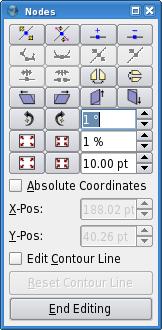
>> Scribus "Use contour" button proposes the actual frame as a starting
>> point for contourline edition.
>> With a click of a button you can make it wider in all directions.
>> You can define "how wider" you want it to be with a percentage (10%
>> wider) or an absolute value (1cm wider).
>> It seems to fit your need and wishes, doesnt it ?
>
> Yes, it does indeed. Just tried it... but it stretches the bounding box by
> making it wider and higher only and keeps the
> X and Y origin coordinates. This lets it stick to the left and upper edge of
> the box, which is not the effect I had in
> mind.
Of course what you describe is not the wished effect,
but here, i dont have this undesired behaviour.

Here, Scribus stretches the bounding box in all directions,
and it makes the X and Y coordinates also move toward top left,
with the same change as the other boundaries.

This is also what the iconic buttons expresses visually :
make contour frame wider *in all direction*.
http://wiki.scribus.net/wiki/images/a/ae/Editshape.jpg

When you'd not have this behaviour, it would be a bug.

JL