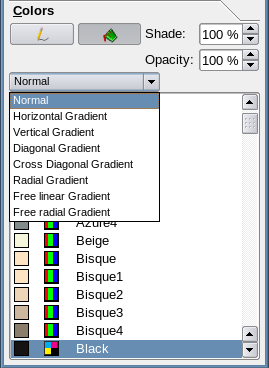
Background:
For those not familiar with Gradients, here is an explanation:
http://wiki.scribus.net/canvas/Color_Tab_and_Gradients
How to get there:
Select an image
Go to Properties Panel
Choose 'Colors' > Fill > Fill Mode: Gradient > Show the dropdown with
different Gradient options

In Scribus 1.4.x we could choose different types of (i guess we're calling
them) 'linear' gradients. Like horizontal, vertical, diagonal etc.. (see:
https://www.dropbox.com/s/u1b6hwl83yh1h6q/Gradients1.4.png or
http://wiki.scribus.net/wiki/images/6/6f/Colorgradients.png)

In 1.5svn we have new gradient options (very cool but not all functioning
well yet). More to the point all the 1.4 'linear' options are disappeared.
Gone are horizontal, vertical, diagonal etc.. gradients. Now there is only
the 'Move Vector' menu, which is frankly... quite confusing. Are we being
expected to manually configure the vector orientation of the gradient each
time?


Am I missing something?
Thanks for your attention,
/Kunda

PS
What is the function of the 'Custom' dropdown line under the Gradient
effect options?
-------------- next part --------------
An HTML attachment was scrubbed...
URL:
<http://lists.scribus.net/pipermail/scribus/attachments/20140617/8cca05b5/attachment.html>