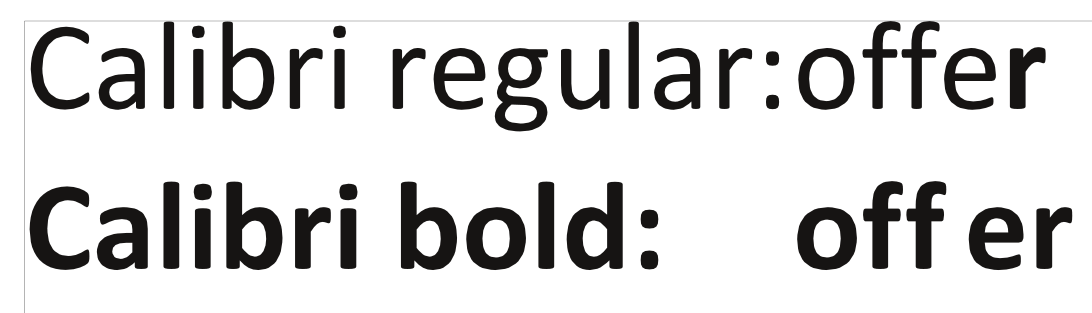
I tried to see this. On Windows 10 64bit and Scribus 1.4.6

Calibri bold version 6.12
All the combinations of lower case f with other characters look fine.

I am no expert on kerning, but since c and d are rounded similar to e
(on the left side where meeting the f) and since they show roughly the
same distance, it just looks right to me.

So do you really have 1.4.6 and 1.5.2 on the same machine, and using the
same font-file? Get around? I would first try to get a fresh copy of the
font and see what happens. Next I would try a fresh installation of the
offending Scribus.

I hope my non-confirmation will help you towards sleuthing out your problem.

Martin

On 27.02.2017 00:06, Michael wrote:
> Hello,
>
> I?ve got a question (bug?) about the space between letters under Windows
> 10 with Scribus 1.4.6.
>
> The problem is that the spacing between the letter ?f? followed by ?e?
> is too large with Calibri bold (only with this specific combination).
> This does not happen with 1.5.2 or with Scribus 1.4.6 on Windows 7 or
> Linux. Does anyone have an idea how to get around this? (I have to use
> Windows 10 with 1.4.6, compatibly mode did not help)
>
> Have a nice day
> Michael
>
> -------------- next part --------------
> An HTML attachment was scrubbed...
> URL:
> <http://lists.scribus.net/pipermail/scribus/attachments/20170227/3d15e8d8/attachment.html>
>
> -------------- next part --------------
> A non-text attachment was scrubbed...
> Name: jgkoddflfjpohchd.png
> Type: image/png
> Size: 45041 bytes
> Desc: not available
> URL:
> <http://lists.scribus.net/pipermail/scribus/attachments/20170227/3d15e8d8/attachment.png>
>
> ___
> Scribus Mailing List: scribus at lists.scribus.net
> Edit your options or unsubscribe:
> http://lists.scribus.net/mailman/listinfo/scribus
> See also:
> http://wiki.scribus.net
> http://forums.scribus.net


--
ZASKE Martin
responsable G?G?
BP 50 - Bassila - B?nin
tel G?G? 66.66.11.11
tel pers 97.44.62.95