Author: fabien
Date: 2010-04-01 07:26:56 +0200 (Thu, 01 Apr 2010)
New Revision: 28944
Modified:
doc/branches/1.4/gentle-introduction/en/02-Exploring-Symfony-s-Code.markdown
doc/branches/1.4/gentle-introduction/en/04-The-Basics-of-Page-Creation.markdown
doc/branches/1.4/gentle-introduction/en/06-Inside-the-Controller-Layer.markdown
doc/branches/1.4/gentle-introduction/en/07-Inside-the-View-Layer.markdown
doc/branches/1.4/gentle-introduction/en/08-Inside-the-Model-Layer.markdown
doc/branches/1.4/gentle-introduction/en/09-Links-and-the-Routing-System.markdown
doc/branches/1.4/gentle-introduction/en/12-Caching.markdown
doc/branches/1.4/gentle-introduction/en/14-Admin-Generator.markdown
doc/branches/1.4/gentle-introduction/en/16-Application-Management-Tools.markdown
doc/branches/1.4/gentle-introduction/en/19-Mastering-Symfony-s-Configuration-Files.markdown
Log:
[doc] [gentle-introduction] fixed image references
Modified:
doc/branches/1.4/gentle-introduction/en/02-Exploring-Symfony-s-Code.markdown
===================================================================
---
doc/branches/1.4/gentle-introduction/en/02-Exploring-Symfony-s-Code.markdown
2010-03-31 22:42:13 UTC (rev 28943)
+++
doc/branches/1.4/gentle-introduction/en/02-Exploring-Symfony-s-Code.markdown
2010-04-01 05:26:56 UTC (rev 28944)
@@ -18,7 +18,7 @@
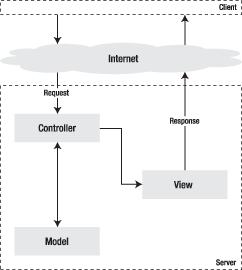
Figure 2-1 - The MVC pattern
-
+
### MVC Layering
@@ -332,7 +332,7 @@
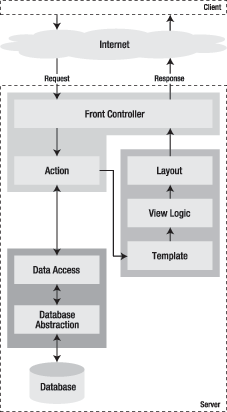
Figure 2-2 - Symfony workflow
-
+
That means that the list of posts described in our example would require only
three files to work in symfony, as shown in Listings 2-11, 2-12, and 2-13.
@@ -419,7 +419,7 @@
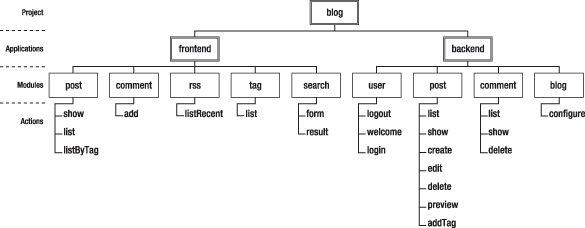
Figure 2-3 - Example of code organization
-
+
### File Tree Structure
Modified:
doc/branches/1.4/gentle-introduction/en/04-The-Basics-of-Page-Creation.markdown
===================================================================
---
doc/branches/1.4/gentle-introduction/en/04-The-Basics-of-Page-Creation.markdown
2010-03-31 22:42:13 UTC (rev 28943)
+++
doc/branches/1.4/gentle-introduction/en/04-The-Basics-of-Page-Creation.markdown
2010-04-01 05:26:56 UTC (rev 28944)
@@ -53,7 +53,7 @@
Figure 4-1 - The default generated index page
-
+
Adding a Page
-------------
Modified:
doc/branches/1.4/gentle-introduction/en/06-Inside-the-Controller-Layer.markdown
===================================================================
---
doc/branches/1.4/gentle-introduction/en/06-Inside-the-Controller-Layer.markdown
2010-03-31 22:42:13 UTC (rev 28943)
+++
doc/branches/1.4/gentle-introduction/en/06-Inside-the-Controller-Layer.markdown
2010-04-01 05:26:56 UTC (rev 28944)
@@ -627,7 +627,7 @@
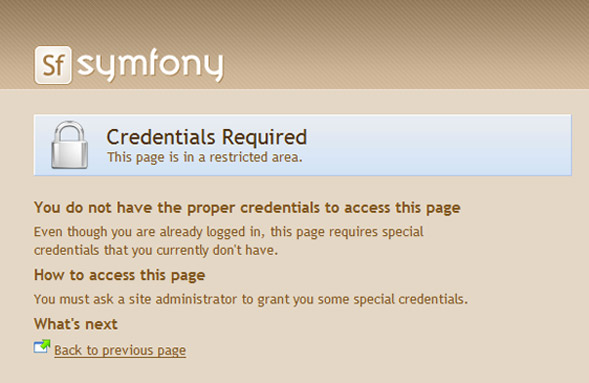
Figure 6-1 - The default secure action page
-
+
Listing 6-22 - Default Security Actions Are Defined in
`apps/frontend/config/settings.yml`
@@ -745,7 +745,7 @@
Figure 6-3 - Sample filter chain
-
+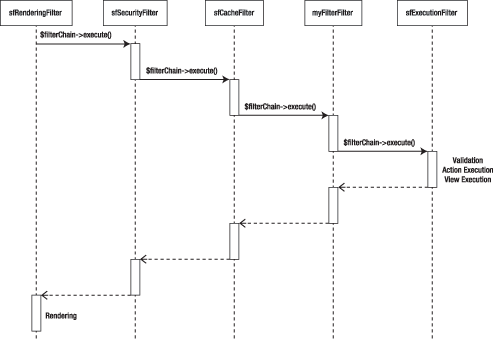
This process justifies the structure of the filter classes. They all extend
the `sfFilter` class, and contain one `execute()` method, expecting a
`$filterChain` object as parameter. Somewhere in this method, the filter passes
to the next filter in the chain by calling `$filterChain->execute()`. See
Listing 6-28 for an example. So basically, filters are divided into two parts:
Modified:
doc/branches/1.4/gentle-introduction/en/07-Inside-the-View-Layer.markdown
===================================================================
--- doc/branches/1.4/gentle-introduction/en/07-Inside-the-View-Layer.markdown
2010-03-31 22:42:13 UTC (rev 28943)
+++ doc/branches/1.4/gentle-introduction/en/07-Inside-the-View-Layer.markdown
2010-04-01 05:26:56 UTC (rev 28944)
@@ -130,7 +130,7 @@
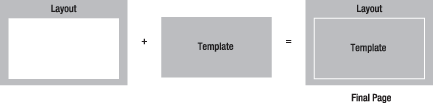
Figure 7-1 - Decorating a template with a layout
-
+
Listing 7-5 shows the default page layout, located in the application
`templates/` directory.
@@ -226,7 +226,7 @@
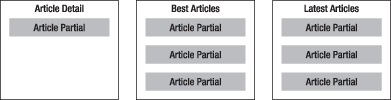
Figure 7-2 - Reusing partials in templates
-
+
Just like templates, partials are files located in the `templates/` directory,
and they contain HTML code with embedded PHP. A partial file name always starts
with an underscore (`_`), and that helps to distinguish partials from
templates, since they are located in the same `templates/` folders.
@@ -318,7 +318,7 @@
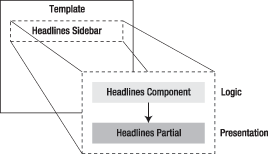
Figure 7-3 - Using components in templates
-
+
Listing 7-11 - The Components Class, in
`modules/news/actions/components.class.php`
@@ -384,7 +384,7 @@
Figure 7-4 - Layout slots defined in a template
-
+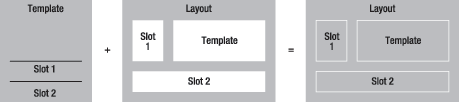
Seeing some code will clarify things further. To include a slot, use the
`include_slot()` helper. The `has_slot()` helper returns `true` if the slot has
been defined before, providing a fallback mechanism as a bonus. For instance,
define a placeholder for a `'sidebar'` slot in the layout and its default
content as shown in Listing 7-14.
Modified:
doc/branches/1.4/gentle-introduction/en/08-Inside-the-Model-Layer.markdown
===================================================================
--- doc/branches/1.4/gentle-introduction/en/08-Inside-the-Model-Layer.markdown
2010-03-31 22:42:13 UTC (rev 28943)
+++ doc/branches/1.4/gentle-introduction/en/08-Inside-the-Model-Layer.markdown
2010-04-01 05:26:56 UTC (rev 28944)
@@ -63,7 +63,7 @@
Figure 8-1 - A blog database table structure
-
+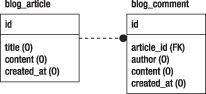
The related `schema.yml` file should look like Listing 8-3.
Modified:
doc/branches/1.4/gentle-introduction/en/09-Links-and-the-Routing-System.markdown
===================================================================
---
doc/branches/1.4/gentle-introduction/en/09-Links-and-the-Routing-System.markdown
2010-03-31 22:42:13 UTC (rev 28943)
+++
doc/branches/1.4/gentle-introduction/en/09-Links-and-the-Routing-System.markdown
2010-04-01 05:26:56 UTC (rev 28944)
@@ -26,7 +26,7 @@
Figure 9-1 - URLs appear in many places, such as in search results
-
+
* If one URL has to be changed (for instance, if a script name or one of its
parameters is modified), every link to this URL must be changed as well. It
means that modifications in the controller structure are heavyweight and
expensive, which is not ideal in agile development.
@@ -52,7 +52,7 @@
Figure 9-2 - URLs can convey additional information about a page, like the
publication date
-
+
* URLs written in paper documents are easier to type and remember. If your
company website appears as
`http://www.example.com/controller/web/index.jsp?id=ERD4` on your business
card, it will probably not receive many visits.
* The URL can become a command-line tool of its own, to perform actions or
retrieve information in an intuitive way. Applications offering such a
possibility are faster to use for power users.
Modified: doc/branches/1.4/gentle-introduction/en/12-Caching.markdown
===================================================================
--- doc/branches/1.4/gentle-introduction/en/12-Caching.markdown 2010-03-31
22:42:13 UTC (rev 28943)
+++ doc/branches/1.4/gentle-introduction/en/12-Caching.markdown 2010-04-01
05:26:56 UTC (rev 28944)
@@ -36,7 +36,7 @@
Figure 12-1 - Caching an action
-
+
For instance, consider a `user/list` action that returns the list of all users
of a website. Unless a user is modified, added, or removed (and this matter
will be discussed later in the "Removing Items from the Cache" section), this
list always displays the same information, so it is a good candidate for
caching.
@@ -96,7 +96,7 @@
Figure 12-2 - Caching a partial or component
-
+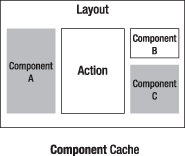
For instance, Listing 12-4 shows how to edit the `cache.yml` file to enable
the cache on a `_my_partial.php` partial located in the `user` module. Note
that the `with_layout` setting doesn't make sense in this case.
@@ -141,7 +141,7 @@
Figure 12-3 - Caching a template fragment
-
+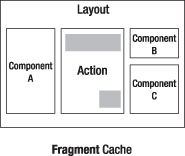
For instance, you may have a list of users that shows a link of the
last-accessed user, and this information is dynamic. The `cache()` helper
defines the parts of a template that are to be put in the cache. See Listing
12-5 for details on the syntax.
@@ -485,7 +485,7 @@
Figure 12-4 - Web debug toolbar for pages using caching
-
+
The debug toolbar also shows the number of database queries executed during
the processing of the request, and the detail of the durations per category
(click the total duration to display the detail). Monitoring this data, in
conjunction with the total duration, will help you do fine measures of the
performance improvements brought by the cache.
@@ -501,7 +501,7 @@
Figure 12-5 - Identification for cached elements in a page
-
+
HTTP 1.1 and Client-Side Caching
--------------------------------
Modified: doc/branches/1.4/gentle-introduction/en/14-Admin-Generator.markdown
===================================================================
--- doc/branches/1.4/gentle-introduction/en/14-Admin-Generator.markdown
2010-03-31 22:42:13 UTC (rev 28943)
+++ doc/branches/1.4/gentle-introduction/en/14-Admin-Generator.markdown
2010-04-01 05:26:56 UTC (rev 28944)
@@ -48,7 +48,7 @@
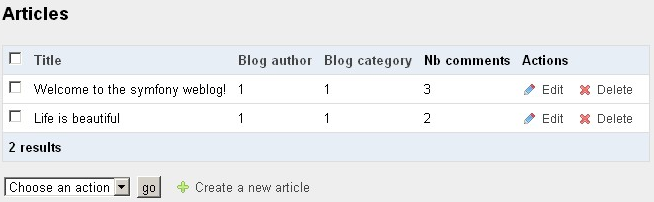
Figure 14-1 - Example data model
-
+
There is no particular rule to follow during the schema creation to allow code
generation. Symfony will use the schema as is and interpret its attributes to
generate an administration.
@@ -126,11 +126,11 @@
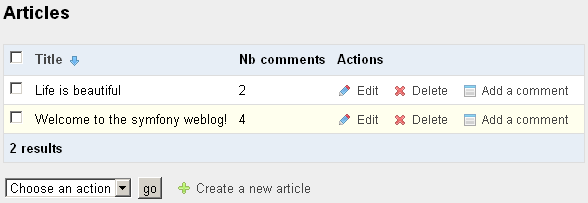
Figure 14-5 - `list` view of the `article` module in the `backend` application
-
+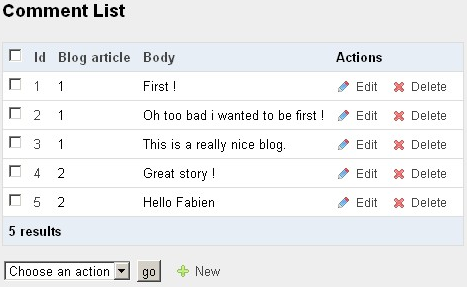
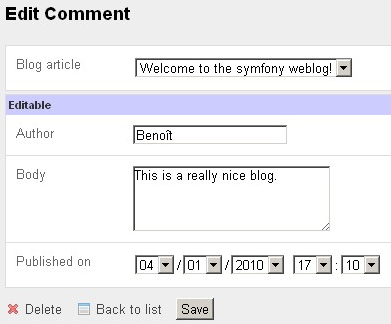
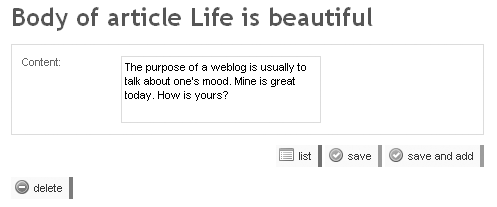
Figure 14-6 - `edit` view of the `article` module in the `backend` application
-
+
>**TIP**
>If you don't see the expected look and feel (no stylesheet and no image),
>this is because you need to install the assets in your project by running the
>`plugin:publish-assets` task:
@@ -283,7 +283,7 @@
Figure 14-7 - The administration generator cheat sheet
-
+
### Fields
@@ -352,11 +352,11 @@
Figure 14-8 - Custom column setting in the `list` view of the `comment` module
-
+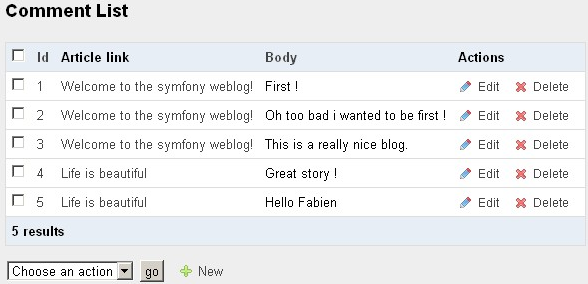
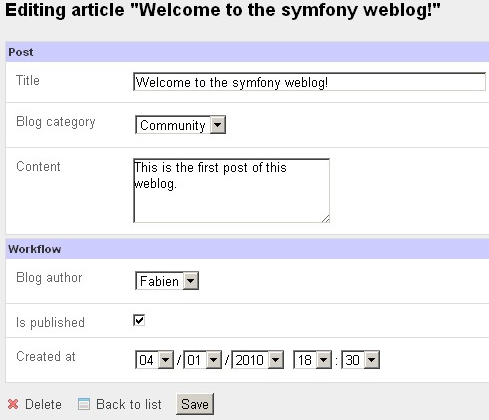
Figure 14-9 - Grouping fields in the `edit` view of the `comment` module
-
+
So you can use the `display` setting in two ways:
@@ -388,7 +388,7 @@
Figure 14-10 - Custom field in the `list` view of the `article` module
-
+
Custom fields can even return HTML code to display more than raw data. For
instance, you can extend the `BlogComment` class with a `getArticleLink()`
method as in Listing 14-12.
@@ -411,7 +411,7 @@
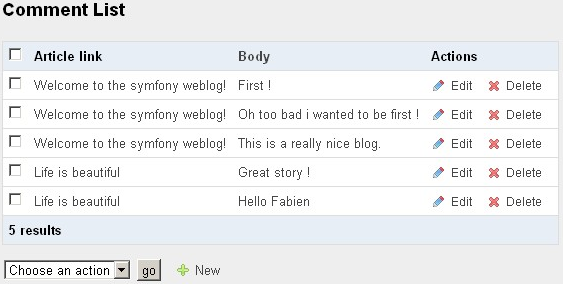
Figure 14-11 - Custom field in the `list` view of the `comment` module
-
+
#### Partial Fields
@@ -481,7 +481,7 @@
Figure 14-12 - Custom title in the `edit` view of the `article` module
-
+
As the default titles use the class name, they are often good enough--provided
that your model uses explicit class names.
@@ -502,7 +502,7 @@
Figure 14-13 - Tooltip in the `edit` view of the `comment` module
-
+
In the `list` view, tooltips are displayed in the column header; in the `new`,
`edit`, and `filter` views, they appear under the field tag.
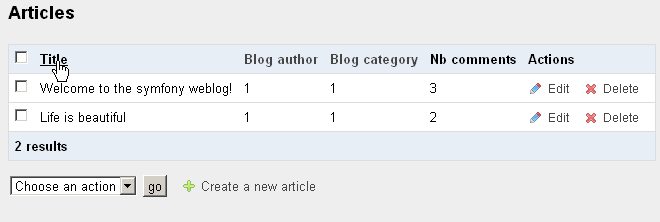
@@ -556,7 +556,7 @@
Figure 14-14 - Moving the link to the `edit` view on another column, in the
`list` view of the `comment` module
-
+
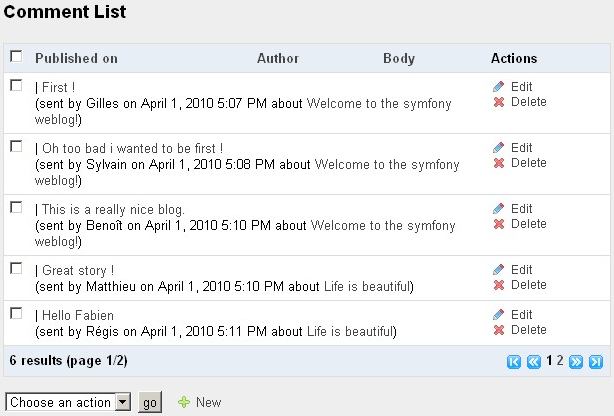
By default, the `list` view uses the `tabular` layout, where the fields appear
as columns, as shown previously. But you can also use the `stacked` layout and
concatenate the fields into a single string that expands on the full length of
the table. If you choose the `stacked` layout, you must set in the `params` key
the pattern defining the value of each line of the list. For instance, Listing
14-22 defines a stacked layout for the list view of the comment module. The
result appears in Figure 14-15.
@@ -573,7 +573,7 @@
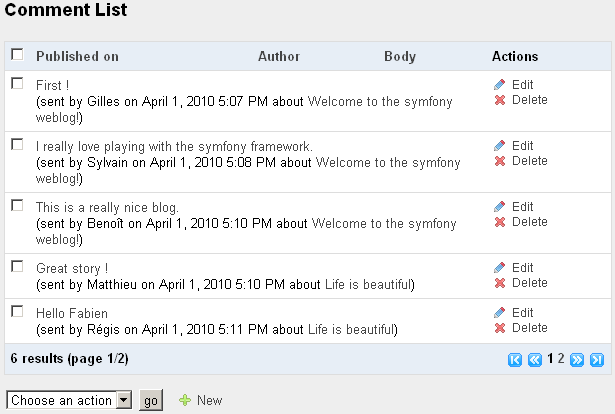
Figure 14-15 - Stacked layout in the `list` view of the `comment` module
-
+
Notice that a `tabular` layout expects an array of fields under the `display`
key, but a `stacked` layout uses the `params` key for the HTML code generated
for each record. However, the `display` array is still used in a `stacked`
layout to determine which column headers are available for the interactive
sorting.
@@ -597,7 +597,7 @@
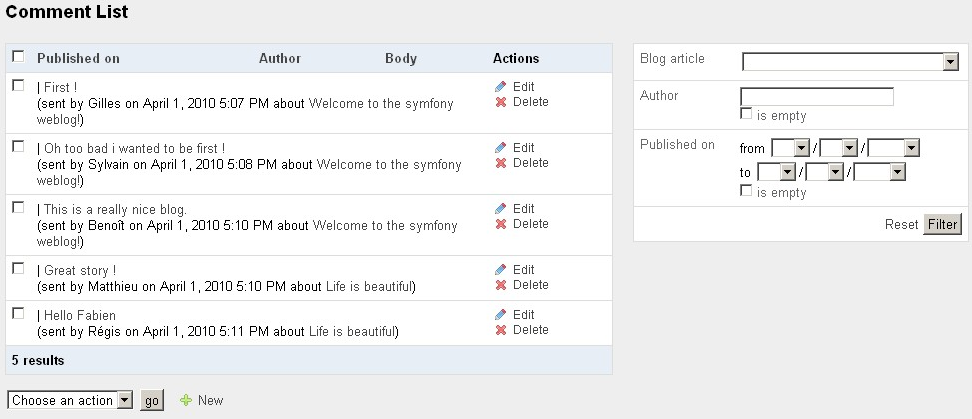
Figure 14-16 - Filters in the `list` view of the `comment` module
-
+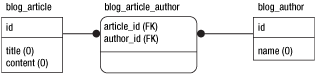
The filters displayed by symfony depend on the column type defined in the
schema, and can be customized in the filter form class:
@@ -636,7 +636,7 @@
Figure 14-18 - Table headers of the `list` view are sort controls
-
+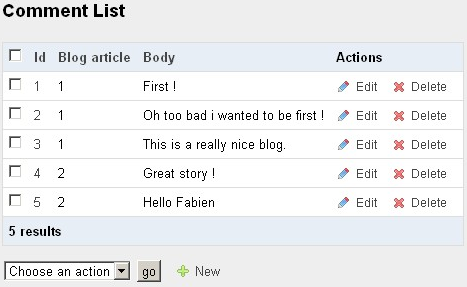
You can reuse the syntax to point to a list directly sorted according to a
column:
@@ -663,7 +663,7 @@
Figure 14-19 - Pagination controls appear on long lists
-
+
You can customize the number of records to be displayed in each page with the
`max_per_page` parameter:
@@ -729,13 +729,13 @@
Figure 14-20 - Many-to-many relationships
-
+
By customizing the widget used to render the relationship, you can tweak the
rendering of the field (illustrated in Figure 14-21):
Figure 14-21 - Available controls for many-to-many relationships
-
+
### Adding Interactions
@@ -767,7 +767,7 @@
Figure 14-22 - Interactions in the `list` view
-
+
In a `new` and `edit` views, as there is only one record edited at a time,
there is only one set of actions to define (under `actions`). The `edit`
interactions defined in Listing 14-31 render like in Figure 14-23. Both the
`save` and the `save_and_add` actions save the current edits in the records,
the difference being that the `save` action displays the `edit` view on the
current record after saving, while the `save_and_add` action displays a `new`
view to add another record. The `save_and_add` action is a shortcut that you
will find very useful when adding many records in rapid succession. As for the
position of the `delete` action, it is separated from the other buttons so that
users don't click it by mistake.
@@ -775,7 +775,7 @@
Figure 14-23 - Interactions in the `edit` view
-
+
But you can also add a custom interaction, in which case you must specify a
name starting with no underscore, and a target action in the current module, as
in Listing 14-32.
@@ -793,7 +793,7 @@
Figure 14-24 - Custom interaction in the `list` view
-
+
The `addComment` action can be implemented as in Listing 14-33.
Modified:
doc/branches/1.4/gentle-introduction/en/16-Application-Management-Tools.markdown
===================================================================
---
doc/branches/1.4/gentle-introduction/en/16-Application-Management-Tools.markdown
2010-03-31 22:42:13 UTC (rev 28943)
+++
doc/branches/1.4/gentle-introduction/en/16-Application-Management-Tools.markdown
2010-04-01 05:26:56 UTC (rev 28944)
@@ -195,7 +195,7 @@
Figure 16-1 - Sample exception message for a symfony application
-
+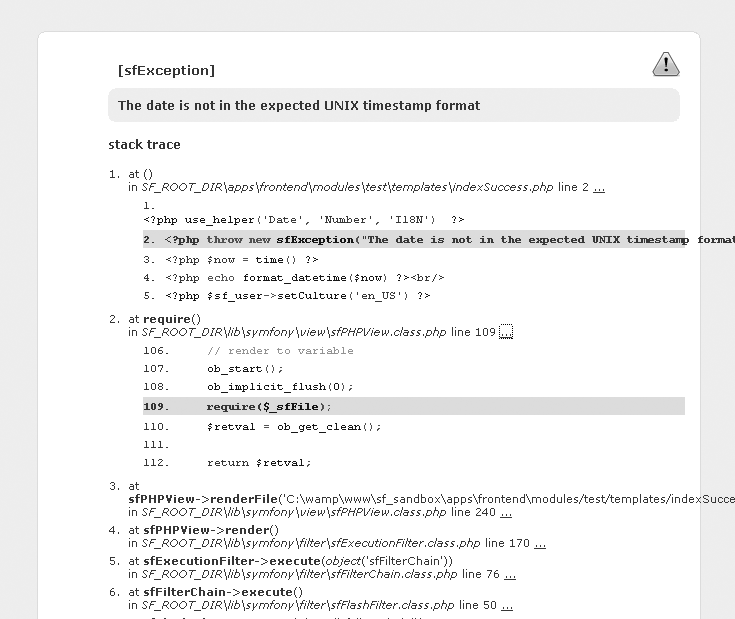
During the development phase, the symfony exceptions will be of great use as
you debug your application.
@@ -234,7 +234,7 @@
Figure 16-2 - The web debug toolbar appears in the top-right corner of the
window
-
+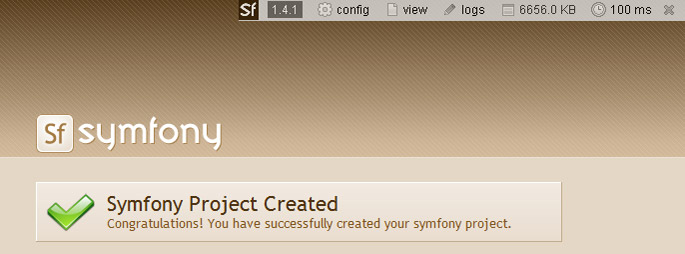
The color of the debug toolbar background depends on the highest level of log
message issued during the request. If no message passes the `debug` level, the
toolbar has a gray background. If a single message reaches the `err` level, the
toolbar has a red background.
@@ -256,14 +256,14 @@
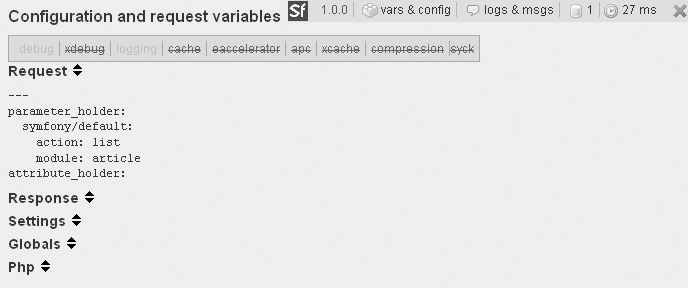
Figure 16-3 - The "config" section shows all the variables and constants of
the request
-
+
* When the cache is enabled, a green arrow appears in the toolbar. Click
this arrow to reprocess the page, regardless of what is stored in the cache
(but the cache is not cleared).
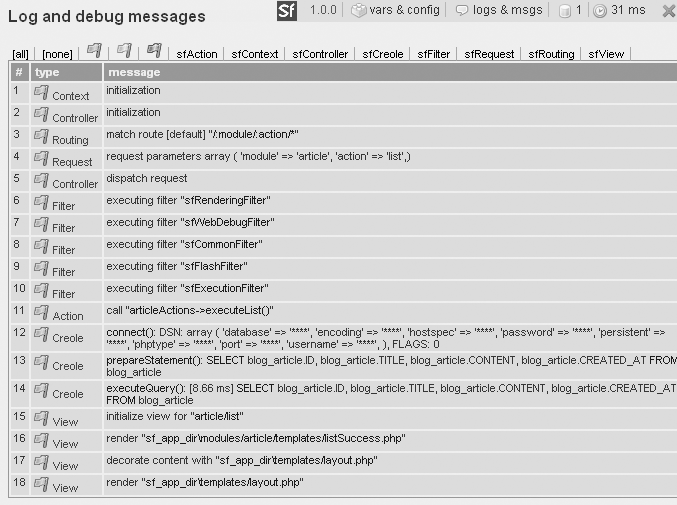
* Click the "logs" section to reveal the log messages for the current
request, as shown in Figure 16-4. According to the importance of the events,
they are displayed in gray, yellow, or red lines. You can filter the events
that are displayed by category using the links displayed at the top of the list.
Figure 16-4 - The "logs" section shows the log messages for the current request
-
+
>**NOTE**
>When the current action results from a redirect, only the logs of the latest
>request are present in the "logs" pane, so the log files are still
>indispensable for good debugging.
@@ -274,11 +274,11 @@
Figure 16-5 - The database queries section shows queries executed for the
current request
-
+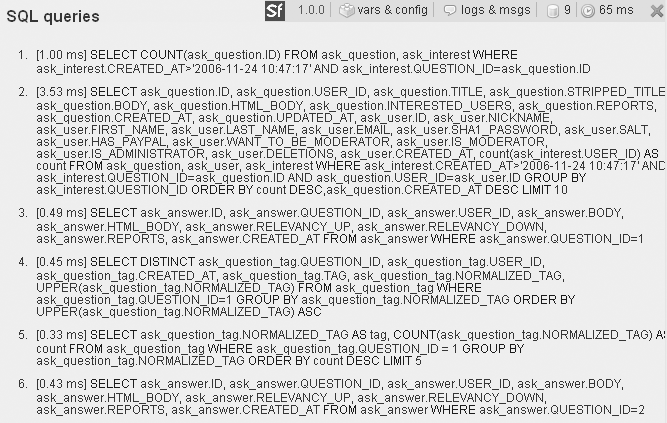
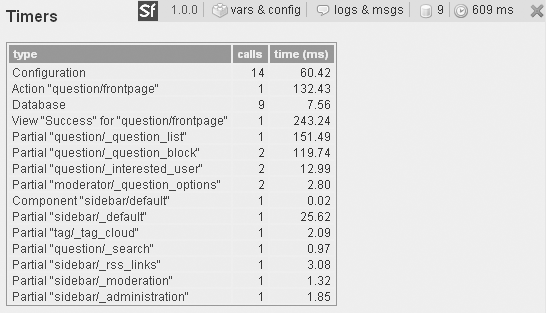
Figure 16-6 - The clock icon shows execution time by category
-
+
>**SIDEBAR**
>Adding your own timer
@@ -333,7 +333,7 @@
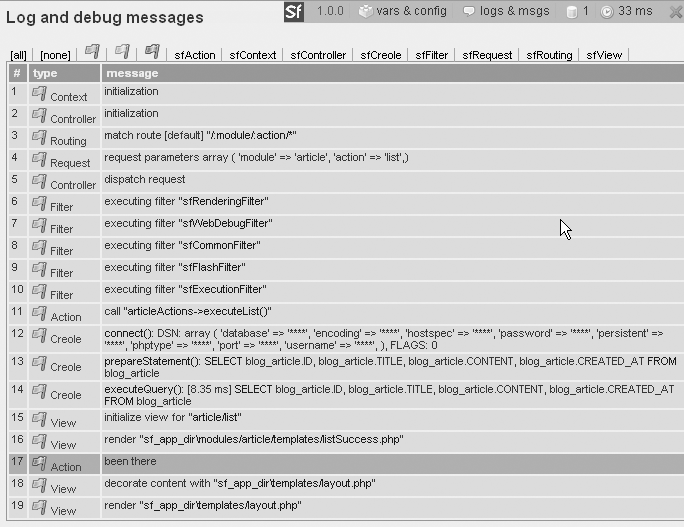
Figure 16-7 - A custom log message appears in the "logs" section of the web
debug toolbar
-
+
Using symfony outside of a web context
--------------------------------------
@@ -504,7 +504,7 @@
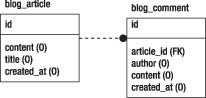
Figure 16-8 - A sample database relational model
-
+
This is where the labels given to the records become really useful. To add a
`Comment` field to the `first_post` article, you simply need to append the
lines shown in Listing 16-17 to the `import_data.yml` data file.
Modified:
doc/branches/1.4/gentle-introduction/en/19-Mastering-Symfony-s-Configuration-Files.markdown
===================================================================
---
doc/branches/1.4/gentle-introduction/en/19-Mastering-Symfony-s-Configuration-Files.markdown
2010-03-31 22:42:13 UTC (rev 28943)
+++
doc/branches/1.4/gentle-introduction/en/19-Mastering-Symfony-s-Configuration-Files.markdown
2010-04-01 05:26:56 UTC (rev 28944)
@@ -23,7 +23,7 @@
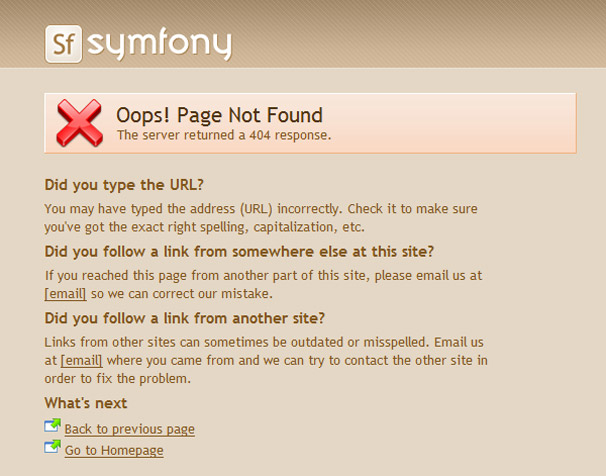
Figure 19-1 - Default 404 error page
-
+
You can override the default pages in two ways:
--
You received this message because you are subscribed to the Google Groups
"symfony SVN" group.
To post to this group, send email to [email protected].
To unsubscribe from this group, send email to
[email protected].
For more options, visit this group at
http://groups.google.com/group/symfony-svn?hl=en.













































