Author: maksim_ka
Date: 2010-05-21 17:47:05 +0200 (Fri, 21 May 2010)
New Revision: 29572
Modified:
plugins/sfPhpunitPlugin/branches/1.2-4/README
Log:
[sfPhpunitPlugin] update readme for next release.
Modified: plugins/sfPhpunitPlugin/branches/1.2-4/README
===================================================================
--- plugins/sfPhpunitPlugin/branches/1.2-4/README 2010-05-21 15:01:52 UTC
(rev 29571)
+++ plugins/sfPhpunitPlugin/branches/1.2-4/README 2010-05-21 15:47:05 UTC
(rev 29572)
@@ -17,7 +17,7 @@
or
- svn checkout
http://svn.symfony-project.com/plugins/sfPhpunitPlugin/branches/1.4
+ svn checkout
http://svn.symfony-project.com/plugins/sfPhpunitPlugin/branches/1.2-4
2.enable it in ProjectConfiguration:
@@ -46,18 +46,33 @@
## Features
-### Directores hierarchy
+### The plugin infrastructure
-The plugin is in need of some directory structure.
+The plugin is in need of some directories and files.
It can create them for itself automaticaly or you can create them manualy
using command:
php symfony phpunit:init
+
+This is a result of the command execution:
-Next folders will be created:
+ >> phpunit Created dir /home/maksim/tmp/sf_sandbox/test/phpunit
+ >> phpunit Created dir /home/maksim/tmp/sf_sandbox/test/phpunit/units
+ >> phpunit Created dir
/home/maksim/tmp/sf_sandbox/test/phpunit/functionals
+ >> phpunit Created dir /home/maksim/tmp/sf_sandbox/test/phpunit/models
+ >> phpunit Created dir /home/maksim/tmp/sf_sandbox/test/phpunit/fixtures
+ >> phpunit Created dir
/home/maksim/tmp/sf_sandbox/test/phpunit/fixtures/units
+ >> phpunit Created dir
/home/maksim/tmp/sf_sandbox/test/phpunit/fixtures/functionals
+ >> phpunit Created dir
/home/maksim/tmp/sf_sandbox/test/phpunit/fixtures/models
+ >> phpunit Generate file
/home/maksim/tmp/sf_sandbox/test/phpunit/BasePhpunitTestSuite.php
+ >> phpunit Generate file
/home/maksim/tmp/sf_sandbox/test/phpunit/AllTests.php
+
+As you can see some folders and files were created:
-* The root dir for all tests and fixtures: sf_root_dir/test/phpunit
+* The root dir for all tests and fixtures: sf_root_dir/test/phpunit
* A subdirectory called "fixtures" used to store all "fixture" data.
* Three subdirectory for tests: "models", "units", "functionals"
+* BasePhpunitTestSuite.php - it is a root suite for all the project tests.
if you want do something before (or after) all the tests running _start method
of this class just for you.
+* AllTests.php - the file need to run all test using standart phpunit command
### Test Running
@@ -104,17 +119,82 @@
test/phpunit/AllTest.php
If you are using [Eclipse PDT](http://www.eclipse.org/pdt/)
-there is a way how to run single test or test in a folder just from the
Eclipse.
+there is a way how to run single test or all tests in a folder (just in folder
but not in subfolders) just from the Eclipse.
All you want to do is add Extra Tool called phpunit for example and with
options as on the picture:
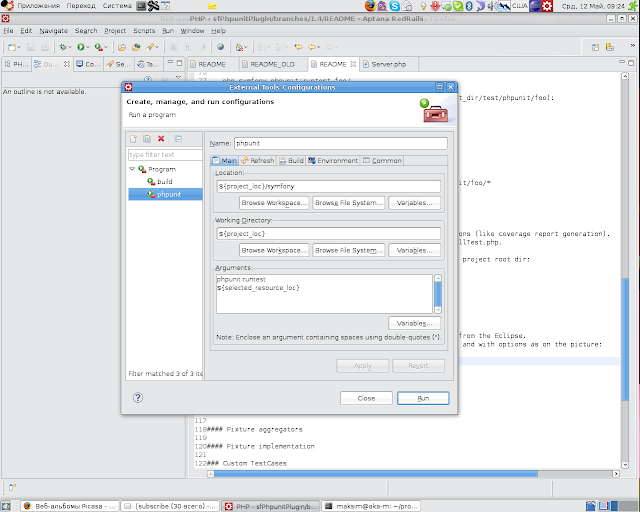
-That's it. Now you can select a test file and run your external tool.
+That's it. Now you can select a test file and run it from eclipse.
### Suite Handling
+To setup or teardown something you should use _start and _end methods instead
of phpunit standart's setUp and tearDown.
+If you overwrite setUp or tearDown methods you can miss (broke?) some plugin
functionallity.
+The same is right for test case classes.
+Let's look at the BasePhpunitTestSuite.php in test/phpunit folder. Pay
attenteion to _start and _end methods. You have to use them.
+
+ class BasePhpunitTestSuite extends sfBasePhpunitTestSuite
+ implements sfPhpunitContextInitilizerInterface
+ {
+ /**
+ * Dev hook for custom "setUp" stuff
+ */
+ protected function _start()
+ {
+ // do your initialization here
+ }
+
+ /**
+ * Dev hook for custom "tearDown" stuff
+ */
+ protected function _end()
+ {
+ // clean up something here
+ }
+ }
+
+There is a test loader for collecting tests and builing a tree.
+If you choose a test and try to execute it the loader will do next job:
+
+* the loader always starts its work from the root diretocy and go in
direction of the test which you want to run.
+* on its way it looks for test suite file in each folder the loader visited.
+* if the loader finds a testsuite in a folder it will add all tests in this
folder to this suite and after add suite to suite tree.
+* if the loader don't find a testsuite it will add all tests to the last
suite that was found in a parent folder.
+
+If there is not any of yors suites all tests will be added to the root suite
BasePhpunitTestSuite.
+It was done this way to solve the problem of same environment run you single
test or all or subfolder.
+
### Context Managing
+You can simply manage symfony's contexts.
+What you need to do is implement sfPhpunitContextInitilizerInterface to a
TestSuite and implement methods.
+For example the autogenerated root BasePhpunitTestSuite implement this
interface for the firts application was found in your project.
+So all tests that are running will have a context with application 'frontend'
and environment 'test'.
+You can change it modifing the file.
+
+ class BasePhpunitTestSuite extends sfBasePhpunitTestSuite
+ implements sfPhpunitContextInitilizerInterface
+ {
+
+ public function getApplication()
+ {
+ return 'frontend';
+ }
+
+ /**
+ *
+ * This function is also required by the interface but implemented in
the parent class: sfBasePhpunitTestSuite.
+ *You can always overwride it on your own.
+ */
+ //public function getEnvironment()
+ //{
+ // return sfConfig::get('sf_environment', 'test');
+ //}
+ }
+
+If You don't need a context at all you can remove the interface and methods
from the testsuite.
+If You want to init context just for a subfolder (for example models) create
there a testsuite implement there the interface and all your model tests will
have a sfContext initialazied.
+
### Fixtures
#### Basic workflow
--
You received this message because you are subscribed to the Google Groups
"symfony SVN" group.
To post to this group, send email to [email protected].
To unsubscribe from this group, send email to
[email protected].
For more options, visit this group at
http://groups.google.com/group/symfony-svn?hl=en.

