Author: maksim_ka
Date: 2010-05-24 13:33:43 +0200 (Mon, 24 May 2010)
New Revision: 29599
Modified:
plugins/sfPhpunitPlugin/branches/1.2-4/README
Log:
[sfPhpunitPlugin] readme fix syntax errors.
Modified: plugins/sfPhpunitPlugin/branches/1.2-4/README
===================================================================
--- plugins/sfPhpunitPlugin/branches/1.2-4/README 2010-05-24 11:16:35 UTC
(rev 29598)
+++ plugins/sfPhpunitPlugin/branches/1.2-4/README 2010-05-24 11:33:43 UTC
(rev 29599)
@@ -41,15 +41,15 @@
* Manage fixtures, separate them to different folders.
* Manage symfony contexts.
* Configure phpunit in a symfony configuration way.
-* Create testing infrustructure in one touch.
-* Provide custom TestCases for example SeleniumTestCase, AmfTestCase,
UnitTestCase.
+* Create testing infrastructure in one touch.
+* Provide custom TestCases for example SeleniumTestCase, AmfTestCase.
## Features
### The plugin infrastructure
The plugin is in need of some directories and files.
-It can create them for itself automaticaly or you can create them manualy
using command:
+It can create them for itself automatically or you can create them manually
using command:
php symfony phpunit:init
@@ -108,7 +108,7 @@
php symfony phpunit:runtest 'test/phpunit/foo/*'
But in this case you cannot use any of the phpunit command options (like
coverage report generation).
-To solve this problem we have autogenerated file test/phpunit/AllTest.php.
+To solve this problem we have auto generated file test/phpunit/AllTest.php.
It can be used with a phpunit command to run all project tests.
Example of calling all test with extra phpunit options from the project root
dir:
@@ -119,7 +119,7 @@
test/phpunit/AllTest.php
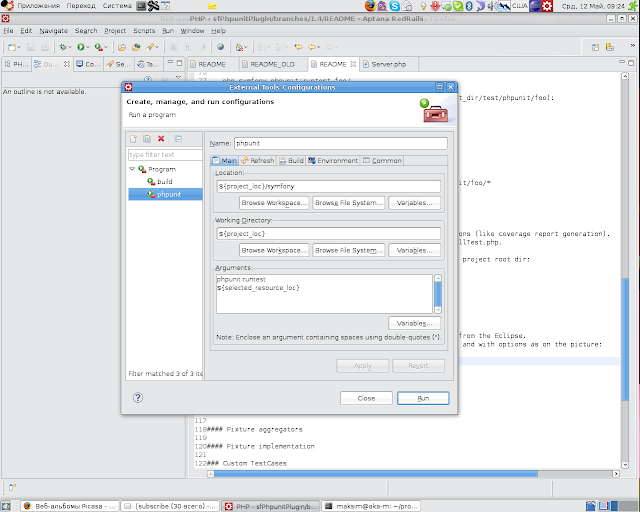
If you are using [Eclipse PDT](http://www.eclipse.org/pdt/)
-there is a way how to run single test or all tests in a folder (just in folder
but not in subfolders) just from the Eclipse.
+there is a way how to run single test or all tests in a folder (just in folder
but not in sub folders) just from the Eclipse.
All you want to do is add Extra Tool called phpunit for example and with
options as on the picture:
@@ -129,9 +129,9 @@
### Suite Handling
To setup or teardown something you should use _start and _end methods instead
of phpunit standart's setUp and tearDown.
-If you overwrite setUp or tearDown methods you can miss (broke?) some plugin
functionallity.
+If you overwrite setUp or tearDown methods you can miss (broke?) some plugin
functionality.
The same is right for test case classes.
-Let's look at the BasePhpunitTestSuite.php in test/phpunit folder. Pay
attenteion to _start and _end methods. You have to use them.
+Let's look at the BasePhpunitTestSuite.php in test/phpunit folder. Pay
attention to _start and _end methods. You have to use them.
<?php
@@ -155,24 +155,24 @@
}
}
-There is a test loader for collecting tests and builing a tree.
+There is a test loader for collecting tests and building a tree.
If you choose a test and try to execute it the loader will do next job:
-* the loader always starts its work from the root diretocy and go in
direction of the test which you want to run.
+* the loader always starts its work from the root directory and go in
direction of the test which you want to run.
* on its way it looks for test suite file in each folder the loader visited.
* if the loader finds a testsuite in a folder it will add all tests in this
folder to this suite and after add suite to suite tree.
* if the loader don't find a testsuite it will add all tests to the last
suite that was found in a parent folder.
-If there is not any of yors suites all tests will be added to the root suite
BasePhpunitTestSuite.
-It was done this way to solve the problem of same environment run you single
test or all or subfolder.
+If there is not any of yours suites all tests will be added to the root suite
BasePhpunitTestSuite.
+It was done this way to solve the problem of same environment run you single
test or all or sub folder.
### Context Managing
You can simply manage symfony's contexts.
What you need to do is implement sfPhpunitContextInitilizerInterface to a
TestSuite and implement methods.
-For example the autogenerated root BasePhpunitTestSuite implement this
interface for the firts application was found in your project.
+For example the auto generated root BasePhpunitTestSuite implement this
interface for the first application was found in your project.
So all tests that are running will have a context with application 'frontend'
and environment 'test'.
-You can change it modifing the file.
+You can change it modifying the file.
<?php
@@ -197,7 +197,7 @@
}
If You don't need a context at all you can remove the interface and methods
from the testsuite.
-If You want to init context just for a subfolder (for example models) create
there a testsuite implement there the interface and all your model tests will
have a sfContext initialazied.
+If You want to init context just for a sub folder (for example models) create
there a testsuite implement there the interface and all your model tests will
have a sfContext initialized.
### Fixtures
@@ -212,10 +212,10 @@
* Own - Fixtures from this directory can be used only be the current
(executing) test.
* Package - Fixtures from this directory can be used only be tests from the
same directory.
* Common - Fixtures from this directory can be used from every test case.
-* Symfony - Fixtures from this directory stored in standart symfony folder
(data/fixtures) and can be used from every test case.
+* Symfony - Fixtures from this directory stored in standard symfony folder
(data/fixtures) and can be used from every test case.
First of all you need to choose which fixtures you will use.
-There are two types currently avalable:
+There are two types currently available:
* Doctrine
* Propel
@@ -278,7 +278,7 @@
It is init task helps you with directories for fixture storing.
It creates package and own directory if they are not exist.
-If you don't want to do even defining methods manualy you can
+If you don't want to do even defining methods manually you can
extends from sfBasePhpunitTestCase (where all that methods are already
implemented) and implement interface.
sfBasePhpunitTestCase also contain fixture method which returns instance of
fixture so you need not create it manually.
@@ -297,12 +297,12 @@
}
}
-In this case you get standart plugin fixture directories.
+In this case you get standard plugin fixture directories.
Whole fixture directories are subdirectory of
sf_root_dir/test/phpunit/fixtures dir.
You can always overwrite any of that methods.
Let's say we have FooTestCase.php file in sf_root_dir/test/phpunit/units
directory.
-Standart directories for the testcase will be:
+Standard directories for the testcase will be:
* Own - sf_root_dir/test/phpunit/fixtures/units/FooTestCase
* Package - sf_root_dir/test/phpunit/fixtures/units
@@ -311,7 +311,7 @@
#### File fixtures
-This example show you how to get path to file stored in fixture direcoties.
+This example show you how to get path to file stored in fixture directories.
<?php
@@ -370,7 +370,7 @@
#### Database fixtures
-You can even load fixtures to the database. The database fixtures file is
standart propel\doctrine fixture files.
+You can even load fixtures to the database. The database fixtures file is
standard propel\doctrine fixture files.
Loads users.doctrine.yml to the database.
<?php
@@ -454,11 +454,11 @@
#### Snapshots
-It is very important to keep speed of the testing as fast as posible.
+It is very important to keep speed of the testing as fast as possible.
Yml fixture loading is expensive operation and can slow down your testing.
To avoid this you can use snapshot feature.
-And second thing where snapshots can be usefull to group some fixtures file
under single name, load all of them using this name.
+And second thing where snapshots can be usefully to group some fixtures file
under single name, load all of them using this name.
For example you can create some snapshots in root test suite and use them in
any test case.
@@ -553,7 +553,7 @@
password: test
is_super_admin: true
-And how it wotks in test case:
+And how it works in test case:
class FooTestCase extends sfBasePhpunitTestCase
implements sfPhpunitFixtureDoctrineAggregator
@@ -575,11 +575,11 @@
}
}
-This functionallity wotks perfectly with propel. For doctrine there are some
bugs known.
+This functionality works perfectly with propel. For doctrine there are some
bugs known.
### Custom TestCases
-This test cases are not nessesary to be used but can be helpful for you.
+This test cases are not necessary to be used but can be helpful for you.
#### Selenium
@@ -610,7 +610,7 @@
wait: false
Create your own phpunit.yml file in sf_root_dir/config for example and define
yours own options there.
-The phpunit.yml files works the same as all other symfony configs (cascad,
merging, project config dir, app config dir).
+The phpunit.yml files works the same as all other symfony configs (cascade,
merging, project config dir, app config dir).
The config can be look like:
@@ -647,9 +647,9 @@
It depends on [SabreAMF](http://code.google.com/p/sabreamf/downloads/list)
library.
So you have to be sure you install it before.
-It is a kind of functional tests becuase it emulates flex client and sends
data throught the lan using http protocol.
+It is a kind of functional tests because it emulates flex client and sends
data throught the lan using http protocol.
-First of you need to set a amfendpoint in phpunit.yml.
+First of you need to set a amf endpoint in phpunit.yml.
It highly recommended to make test in the same project (run test and send
request on this server).
all:
@@ -718,7 +718,7 @@
It can be used only for stubs object.
The method has the same interface as getMock method.
-This method allows you to create stubs objects simplier then getMock method:
+This method allows you to create stubs objects simpler then getMock method:
Compare this two ways:
@@ -752,14 +752,14 @@
}
}
-getStub method used $this->any() method to set numbers of the stubed methods
called.
+getStub method used $this->any() method to set numbers of the stubbed methods
called.
You can use more strict version of this method:
$this->getStubStrict( ... );
This method used $this->atLeastOnce(),
-If you need create two stubs with cross referance to each other. The next way
can help:
+If you need create two stubs with cross reference to each other. The next way
can help:
<?php
@@ -778,7 +778,7 @@
### Good practices
-#### Use a diferent database for testing and dev (prod the same idea):
+#### Use a different database for testing and dev (prod the same idea):
test:
doctrine:
@@ -798,14 +798,14 @@
### Plans
* Finish DbUnit fixture
-* fix autoloading bug in AllTests.php
+* fix auto loading bug in AllTests.php
* several drivers for selenium
* form testing
-* fix retriving objects by fixture name (doctrine)
-* More inteligent init task
+* fix retrieving objects by fixture name (doctrine)
+* More intelligent init task
* move models directory to units one
* fixture options to phpunit.yml config.
-* standart phpunit config in phpunit.yml.
+* standard phpunit config in phpunit.yml.
* fresh sfConfig for each test case.
-### Feedback
\ No newline at end of file
+### Feedback
--
You received this message because you are subscribed to the Google Groups
"symfony SVN" group.
To post to this group, send email to [email protected].
To unsubscribe from this group, send email to
[email protected].
For more options, visit this group at
http://groups.google.com/group/symfony-svn?hl=en.

