On Sat, Jun 16, 2012 at 7:56 AM, Tom Parker <[email protected]> wrote:
> Testing Summary, Auckland - 16 June 2012
> Who: Fabiana, John, Tabitha, Tom
>
> Tested 12.1.0 build 14 on XO-1.5s and XO-1.75s.
>
> Ivy (an XO-1.5):
> Speak works. Why does Alice think my name is Seeker? Why can’t Alice find my
> laptop name?
> Wikipedia EN. Loads, tried a few pages, worked.
> Ruler works
> Maze works
> Implode works
> Welcome works. Quite nice. Could attribution be displayed?
> Memorize all preloaded games work but when pressed stop get “keep error: all
> changes will be lost”.
> Tamtam mini works
> Physics works, grab tool works.
> Moon works
> Record works, took and viewed high and low quality picture, took and watched
> high and low quality video, took audio recordings and played back but not
> sure about quality as the option is greyed out but can be changed by altering
> it in picture or video mode. Should you be able to see low and high in the
> audio view? Should the low and high options be enabled in audio?
> Clock works
> Stopwatch works
> Chart works
> Help works
> Image viewer works
> Fototoon works
> Typing turtle works
> Measure starts and shows input from mic on 2 channels
:)

> Paint works
> Finance works
> Scratch - tried some example games, worked. Would be good if there was a stop
> button like Sugar has so you can stop playing Scratch using the Sugar known
> method.
> Labyrinth - works
> Chat on adhoc network 1 works (with Kiwi)
> Jukebox crashed after playing one audio file from the journal when trying to
> add second file. Repeated and reoccurs.
> Tamtam jam works, can add instruments and loops
> Tamtam edit plays but don’t know how to use it yet
> Pippy - tried playing a few examples and they all worked
> Infoslicer - works, can access from Browse in the books area
> HelloWorld works
> Portfolio works
> Get Books works - got an epub and used Read to look at it.
> Read works to view books downloaded using Get Books. Can use game keys either
> side of screen to scroll up and down / page up and down, as well as use the
> keys to resize the text.
> Turtleart basic test worked
> Calculate basic test worked
> eToys tutorial castle series halo worked, there is no stop button but you
> have to find the X to quit which is confusing as other activities use X as
> the delete / erase option.
> Words starts and if you type you do get translations, don’t know accuracy
> (especially given that you see a translation without giving command to say
> you have finished typing the word you want translated so lots had ci as
> translation).
>
>
> Rosella (an XO-1.5):
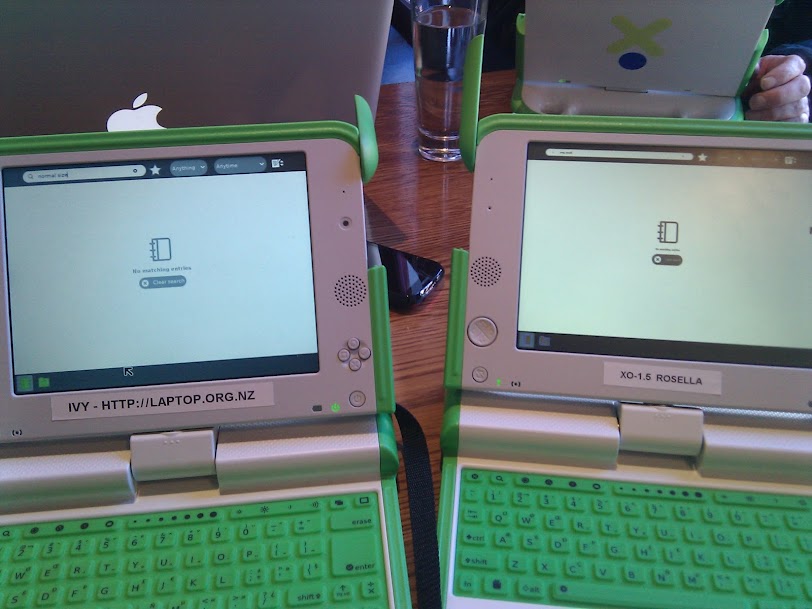
> As reported before, everything is very small on rosella:
> https://lh4.googleusercontent.com/-u9RLaA1IhBs/T9vGEwlGJjI/AAAAAAAAC0A/9VeT6WMJne0/s812/IMG_20120616_113209.jpg
> Froze while idle on the screen in the above screenshot. It was idle for about
> 10 minutes. Power light is on solid and does not go out briefly when you
> short press the power button
>
>
> Whio (an XO-1.75):
> Wikipedia EN much faster to open and do things today.
> Record takes video but when playing back from Journal it gives error message
> (previously reported).
> Write works.
> Get books works.
> Jukebox gives error “resource busy or not available - gstalsasink.c(689)” …
> when you try to add audio files from the journal
> Tamtam edit works
> Calculate works. x to the power of y is a little bit confusing. The button in
> the menu inserts pow() with no prompt about where to put the x and y, you
> actually want to do pow(x, y). The x^y syntax also works, which is arguably a
> more common way to express this in texts without superscript.
>
>
> Kiwi (an XO-1.75):
> Memorise seems ok.
> Physics: still has that odd behaviour at the top of the canvas that was
> reported i think two weeks ago. Rosella (an XO-1.5 does not seem to have the
> same issue in physics as kiwi.
> Record: Low and hi quality pix ok. Movie high Q begins to freeze within 15
> secs of recording. Measure: The two channels are in the same colour -
> confusing.
> Chart: Tried opening a measure file that I captured but it tells me “the
> selected object must be a measure file’ Something odd, this was working last
> time.

Will investigate. Measure is on my To Do list this weekend.

> Maze seems ok . 90 deg rotation leaves some of the maze off screen. When 180
> rotation down arrow moves image upwards - anti-intuitive.
> Paint seems ok.
> Chat with ivy: seems ok.
> Clock seems ok
> Stopwatch seems ok
> My Brain - does not seem ok, it feels like it is freezing.
> Turtle art seems ok
>
>
> Moa (an XO-1.75):
> Browse almost works for google docs as reported last time. After some initial
> errors, I managed to get in to this week’s document and performed all my note
> taking without experiencing any errors or slowdowns or pauses.
>
> The vmeta accelerated video decoding works after installing the
> libvmeta-marvell and gstreamer-plugins-marvell rpms and setting up the udev
> rules (see #11933).
>
> It appears there there is no accelerated codec for webm, the video does play
> but very very very slowly (like 1 frame every few seconds).
>
> If you sign up to youtube’s html5 trial, video almost works in browse. Sound
> works, but video displays the first frame and does not update. It’s not clear
> if this is because youtube is favouring webm or because browse is having
> trouble with a supported video format. The youtube html5 trial signup page
> HTML5 - YouTube claims webm is supported by browse.
>
> Is it possible to disable the software codecs which use the main cpu instead
> of vmeta? I’m not sure that it is worth supporting a 1 frame per second or
> slower decode.
>
> Jukebox-24 doesn’t work at all as reported above. Jukebox-26 from aslo does
> play video recorded in record, however it cannot play .flv videos or .mp4
> videos that whaawmp (available via yum) can play well. It also appears that
> .flv files have a video icon but are not associated with Jukebox.
>
> Videos downloaded with youtube-dl (available via yum) don’t always work. I
> found format 34 consistently returned video that could be played in whaawmp
> with good performance. Format 18 sometimes returned webm (which does not play
> well) even though wikipedia says (in http://en.wikipedia.org/wiki/YouTube )
> format 18 is H.264. When format 18 returns an H.264 video, cpu use during
> playback is almost 100%, half of which is decoding the audio (you can see
> this by stripping the audio out of the file using ffmpeg).
>
> You can also test with gst-launch:
> gst-launch filesrc location=...mov ! qtdemux ! vmetadec ! ffmpegcolorspace !
> autovideosink
> Use flvdemux and matraoskademux for .flv and .mp4 files respectively. This
> seemed to be able to play larger videos than whaawmp. The above doesn’t play
> sound.
>
> There is only one vmeta engine, so if browse is using it, you can’t use
> whaawmp or gst-launch with vmeta. The error reporting here is rather poor,
> hopefully jukebox can do better or can signal browse to release the vmeta
> engine?
>
> Playing the 720p H.264 version of
> http://www.bigbuckbunny.org/index.php/download isn’t possible with whaawmp,
> it complains about no memory for dma stream buffers. It plays in the
> gst-launch command line above but not quite at full speed. The cubox uses a
> Marvell Armada 510 and apparently can play back 1080p, is this platform more
> capable than the XO?
>
> Among the attached power logs there is pwr-SHC2050026A-120613_041209.csv
> which contains about an hour of playing format 18 H.264 from youtube on build
> 13 with full screen brightness.
>
> Thanks testers.
>
> _______________________________________________
> Devel mailing list
> [email protected]
> http://lists.laptop.org/listinfo/devel
>


thanks.

-walter

--
Walter Bender
Sugar Labs
http://www.sugarlabs.org
_______________________________________________
Testing mailing list
[email protected]
http://lists.laptop.org/listinfo/testing