http://dottech.org/tipsntricks/13949 How To: Find your mouse cursor after
you have lost it <http://dottech.org/tipsntricks/13949>
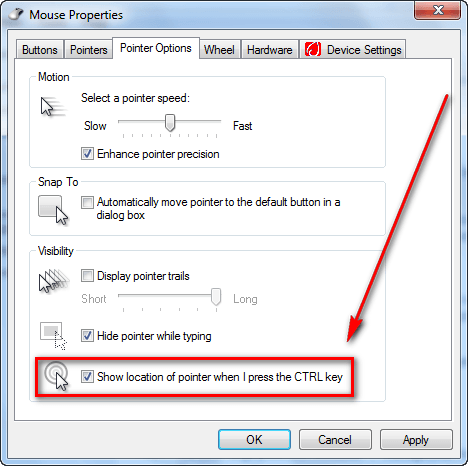
We move our mouse (or trackpad) but the cursor is no where to be found. Sometimes it camouflages with the background while other times our eyes just play tricks on us. Nonetheless, it has happened to the best of us. I just came across a simple trick to help out in situations like these and figured I should better human-kind by sharing it with all dotTechies. The trick is very simple; it involves enabling an option in your mouse settings so every time you press the Ctrl key (left or right Ctrl) on your keyboard, your mouse cursor will be highlighted with circles so you can easily find it. In other words, every time you press the Ctrl key something like this will happen: The round circles around the mouse pointer are what show up when you press the Ctrl key. To enable this feature (it is built into Windows) follow these simple directions: - Open "Start Menu". - Go to "Control Panel". - Find "Mouse" and click on it. "Mouse Properties" should open. - Go to "Pointer Options" and check "Show location of pointer when I press the CTRL key": <http://dottech.org/wp-content/uploads/2010/01/2010-01-24_185953.png> - Click "Apply" and "OK". Now whenever you press the Ctrl key (left or right) the round circles should surround your mouse pointer indicating where it is located. *Thanks : Ashraf<>* ----------Aum.V.Subramanian---------- ---------- Forwarded message ---------- From: dotTech [.org] <[email protected]> Date: Mon, Jan 25, 2010 at 8:08 PM Subject: New Comment Posted On: How To: Find your mouse cursor after you have lost it To: [email protected] There is a new comment on the post "How To: Find your mouse cursor after you have lost it". http://dottech.org/tipsntricks/13949 Author: icacream Comment: Thanks Ashraf & Someguy ! This is indeed precious ! See all comments on this post here: http://dottech.org/tipsntricks/13949#comments To manage your subscriptions or to block all notifications from this site, click the link below: http://dottech.org/?wp-subscription-manager=1&email=v.dotthusg%40gmail.com&key=812e12b2bc6da46393253a39bb7e0354