Just out of curiosity...is there anything you *don't* know?

--
William Sutton
On Tue, 20 Feb 2007, Aaron S. Joyner wrote:

> Scott Chilcote wrote:
> > Hi Folks,
> >
> > I have a piece of equipment that has an internal 2.5" IDE drive
> > (notebook size).  It would be very useful to have an LED that shows
> > drive activity, and there is a place on the cabinet for one.
> >
> > Has anyone seen a wiring diagram or a cable sold anywhere that would let
> > me attach an activity LED to a drive this size?
> >
> > Thanks,
> >
> > Scott C.
>
> So I don't know what your application is, if it's a PC or what.  You say
> "notebook size", which leads me to believe it's not a notebook...
>
> Typically there is a pair of pins on the motherboard that provide
> something that might be called an "IDE Activity" light, which you can
> hook up a standard 0.100" centered jumper pin to, with an LED on it.
> These could be scavenged from most any old PC case, or also assembled
> from parts via Mouser or Digikey.  It'd be better to just ask around
> before the next meeting, surely someone on this list can cannibalize an
> old case and give you an appropriate LED and cable.
>
> If on the other hand, you don't have a motherboard involved, and want an
> answer to your actual question...
>
> General consensus from some Googling around seems to indicate that on a
> standard 40-pin IDE connection, it's pin 39.  The extra 4 pins on a 2.5"
> hard drive are for power and I think a master/slave setting, so they
> shouldn't matter for purposes of this discussion.  If you're comfortable
> with a soldering iron inside the case in question, tapping into the pin
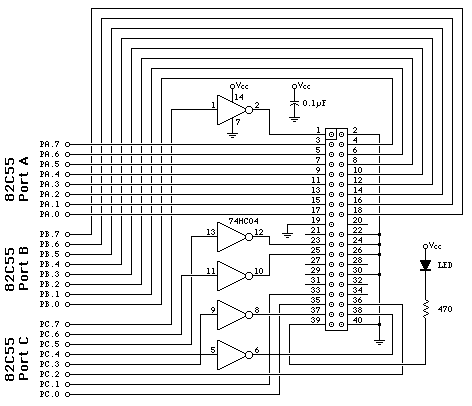
> shouldn't be too hard.  This diagram will probably get you started:
>
> http://www.pjrc.com/tech/8051/ide/ide-sch.gif
>
> It's part of this article about using an IDE hard drive with an 8051 chip;
> http://www.pjrc.com/tech/8051/ide/
>
> Note the 470 Ohm resistor in series with the LED.  Note: according to
> the diagram the pin sinks current, as opposed to sourcing it, as I would
> have sort of expected.
>
> Best of luck, let us know how it turns out!
> Aaron S. Joyner
>
--
TriLUG mailing list        : http://www.trilug.org/mailman/listinfo/trilug
TriLUG Organizational FAQ  : http://trilug.org/faq/
TriLUG Member Services FAQ : http://members.trilug.org/services_faq/