I like the idea, at least for the launcher. I'm not sure how this would work
in a menu, unless you out a menu option that would create a new document,
but this is an extra click or motion, for functionality that may or may not
be used. Putting it in the launcher icon sounds like a good idea, though.
On Nov 16, 2007 1:44 PM, Carlos Moreno <[EMAIL PROTECTED]> wrote:

>
> I recently came up with an idea of what could be a nice/useful detail
> for a  desktop, so I thought I'd throw the idea here  (not sure if the
> idea is original/unexplored, or even if it has been already done).
>
> Anyway, it's related to the Recent Documents, or rather, the Recently
> Used Files in the applications.  The idea is quite simple;  instead of (or
> in addition to) having just one Recent Documents in the "Places" menu,
> each particular menu item for an application could/should have a sub-
> menu with the recent documents.  Also, and I think this is the nicer
> part of my idea, *the launchers* should have a sub-menu as soon as
> there are documents recently used for the corresponding application.
>
> If the user clicks on the launcher itself, then the application opens as
> usual (e.g., with a blank document);  if the user clicks on the little
> arrow next to the launcher (the "drop-down" arrow), then the Recent
> Documents list opens underneath the icon.
>
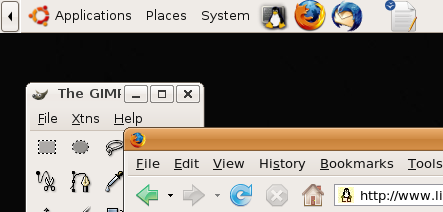
> I put two silly images to illustrate the idea.  This is what the Panel,
> with an OpenOffice Writer launcher, would look like when I have
> not opened any Writer documents:
>
> http://www.mochima.com/tmp/gnome-launcher_no_recent_docs.png
>
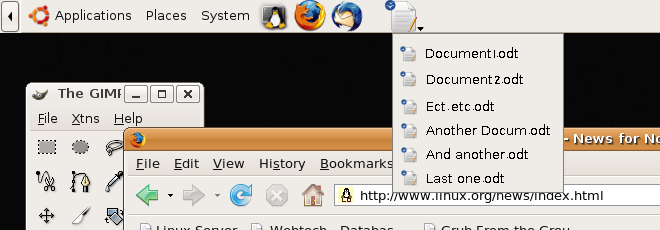
> Then, as the user opens/saves Writer documents, the launcher would
> now look like this:
>
> http://www.mochima.com/tmp/gnome-launcher_with_recent_docs.png
>
> (notice that this one is what it looks like *when the user clicks on the
> little arrow* at the right bottom corner of the launcher icon).
>
> The launcher could have an effect like the toolbar buttons (what I'm
> describing here is typically done with toolbar icons --- for instance,
> the "New Document" icon in OpenOffice has a drop-down selection
> of Writer / Calc / Presentation / etc.), where the button gets a "double
> outline" to make it obvious that we want the drop-down list.
>
> Of course, for the menus I didn't create an image --- it is quite obvious
> for the menus --- the menu item corresponding to the application gets
> a sub-menu with its related recent documents;  and it is obvious for
> the user what it means and what to do about it.
>
> Does it sound like an interesting and implementable idea?
>
> Carlos
> --
>
> _______________________________________________
> Usability mailing list
> [email protected]
> http://mail.gnome.org/mailman/listinfo/usability
>
_______________________________________________
Usability mailing list
[email protected]
http://mail.gnome.org/mailman/listinfo/usability