Yes and as i told you there is no exception :)

The output from the console window is
Error occurred during initialization of VM
Unable to load native library: Can't find dependent libraries


2017-09-29 18:37 GMT+02:00 Pavel Tupitsyn <[email protected]>:

> You said "without any exception" above, but it turns out there is a very
> good and descriptive exception :)
> Please make sure to get the exception details and attach them here.
>
> If you run Apache.Ignite.exe, do so from a console window, so that you can
> see the output.
>
> On Fri, Sep 29, 2017 at 7:32 PM, Patrick Brunmayr <
> [email protected]> wrote:
>
>> Yes but that is not the problem. I came across that exception and changed
>> to a x64 build config and rebuilt all. But it still crashes without any
>> exception
>>
>> 2017-09-29 18:30 GMT+02:00 Pavel Tupitsyn <[email protected]>:
>>
>>> > C:\Program Files\Java\jdk1.8.0_144\jre\bin\server\jvm.dll, error=DLL
>>> could not be loaded (193: ERROR_BAD_EXE_FORMAT). This is often caused by
>>> x64/x86 mismatch. Current process runs in x86 mode, and DLL is not x86.]
>>>
>>> There is your problem. Ignite.NET found the dll, but there is x86-x64
>>> mismatch.
>>> Make sure your project runs in x64 mode.
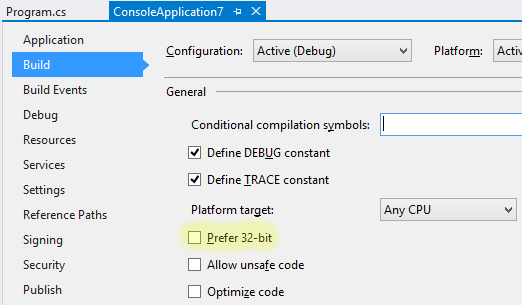
>>> Uncheck "Prefer 32 bit"  in project settings:
>>> https://ptupitsyn.github.io/images/prefer32bit.png
>>>
>>> > I still do not understand why Any CPU does not work.
>>> Because "Prefer 32 bit" is enabled by default for some reason, see above.
>>>
>>> On Fri, Sep 29, 2017 at 7:21 PM, Patrick Brunmayr <
>>> [email protected]> wrote:
>>>
>>>> Did the same like you but now its crashing
>>>>
>>>> 2017-09-29 18:19 GMT+02:00 Alexey Kukushkin <[email protected]>
>>>> :
>>>>
>>>>> Patrick,
>>>>>
>>>>> I fixed the problem by creating new x64 configuration (set Platform to
>>>>> "x64") since I have JDK x64 installed. I still do not understand why Any
>>>>> CPU does not work.
>>>>>
>>>>> On Fri, Sep 29, 2017 at 7:15 PM, Patrick Brunmayr <
>>>>> [email protected]> wrote:
>>>>>
>>>>>> I got the exact same message like you Alexey
>>>>>>
>>>>>> 2017-09-29 18:13 GMT+02:00 Alexey Kukushkin <
>>>>>> [email protected]>:
>>>>>>
>>>>>>> Pavel,
>>>>>>>
>>>>>>> It does not work for me - seems same problem. I also have
>>>>>>> VisualStudio 2017 and Oracle JDK 8.144. I suggest we open a ticket and
>>>>>>> investigate. I have jvm.dll inside jre\bin\server\jvm.dll but for some
>>>>>>> reason Ignite does not try it.
>>>>>>>
>>>>>>> Apache.Ignite.Core.Common.IgniteException: Failed to load jvm.dll:
>>>>>>> [option=JAVA_HOME, path=C:\Program
>>>>>>> Files\Java\jdk1.8.0_144\bin\server\jvm.dll,
>>>>>>> error=DLL could not be loaded (126: ERROR_MOD_NOT_FOUND). This can be
>>>>>>> caused by missing dependencies. Make sure that Microsoft Visual C++ 2010
>>>>>>> Redistributable Package is installed (https://www.microsoft.com/en-
>>>>>>> us/download/details.aspx?id=14632).]
>>>>>>> [option=JAVA_HOME, path=C:\Program
>>>>>>> Files\Java\jdk1.8.0_144\bin\client\jvm.dll,
>>>>>>> error=DLL could not be loaded (126: ERROR_MOD_NOT_FOUND). This can be
>>>>>>> caused by missing dependencies. Make sure that Microsoft Visual C++ 2010
>>>>>>> Redistributable Package is installed (https://www.microsoft.com/en-
>>>>>>> us/download/details.aspx?id=14632).]
>>>>>>> [option=JAVA_HOME, path=C:\Program
>>>>>>> Files\Java\jdk1.8.0_144\jre\bin\server\jvm.dll,
>>>>>>> error=DLL could not be loaded (193: ERROR_BAD_EXE_FORMAT). This is often
>>>>>>> caused by x64/x86 mismatch. Current process runs in x86 mode, and DLL is
>>>>>>> not x86.]
>>>>>>> [option=JAVA_HOME, path=C:\Program
>>>>>>> Files\Java\jdk1.8.0_144\jre\bin\client\jvm.dll,
>>>>>>> error=DLL could not be loaded (126: ERROR_MOD_NOT_FOUND). This can be
>>>>>>> caused by missing dependencies. Make sure that Microsoft Visual C++ 2010
>>>>>>> Redistributable Package is installed (https://www.microsoft.com/en-
>>>>>>> us/download/details.aspx?id=14632).]
>>>>>>> [option=JAVA_HOME, path=C:\Program
>>>>>>> Files\Java\jdk1.8.0_144\jre\bin\default\jvm.dll,
>>>>>>> error=DLL could not be loaded (126: ERROR_MOD_NOT_FOUND). This can be
>>>>>>> caused by missing dependencies. Make sure that Microsoft Visual C++ 2010
>>>>>>> Redistributable Package is installed (https://www.microsoft.com/en-
>>>>>>> us/download/details.aspx?id=14632).]
>>>>>>>    at Apache.Ignite.Core.Impl.IgniteUtils.LoadJvmDll(String
>>>>>>> configJvmDllPath, ILogger log)
>>>>>>>    at Apache.Ignite.Core.Impl.IgniteUtils.LoadDlls(String
>>>>>>> configJvmDllPath, ILogger log)
>>>>>>>    at Apache.Ignite.Core.Ignition.Start(IgniteConfiguration cfg)
>>>>>>>    at Apache.Ignite.Core.Ignition.Start()
>>>>>>>    at ConsoleApp1.Program.Main(String[] args) in
>>>>>>> C:\Users\kukushal\Documents\Samples\ConsoleApp1\ConsoleApp1\Program.cs:line
>>>>>>> 16
>>>>>>>
>>>>>>>
>>>>>>>
>>>>>>>
>>>>>>> On Fri, Sep 29, 2017 at 7:09 PM, Pavel Tupitsyn <
>>>>>>> [email protected]> wrote:
>>>>>>>
>>>>>>>> Ignite.NET uses multiple lookup paths to locate jvm.dll:
>>>>>>>>
>>>>>>>> https://github.com/apache/ignite/blob/master/modules/platfor
>>>>>>>> ms/dotnet/Apache.Ignite.Core/Impl/IgniteUtils.cs#L49
>>>>>>>>
>>>>>>>> // JRE paths@"bin\server",@"bin\client",
>>>>>>>>  // JDK paths@"jre\bin\server",@"jre\bin\client",@"jre\bin\default"
>>>>>>>>
>>>>>>>>
>>>>>>>> On my machine JAVA_HOME points to "c:\Program
>>>>>>>> Files\Java\jdk1.7.0_75", and Ignite.NET works fine.
>>>>>>>> Same with Java 8 on another machine.
>>>>>>>>
>>>>>>>> Which Java version do you have? Is it Oracle or something else?
>>>>>>>>
>>>>>>>> As a workaround you can set IgniteConfiguration.JvmDllPath
>>>>>>>> explicitly.
>>>>>>>>
>>>>>>>> On Fri, Sep 29, 2017 at 7:00 PM, Patrick Brunmayr <
>>>>>>>> [email protected]> wrote:
>>>>>>>>
>>>>>>>>> I just removed the JDK and reinstalled it properly.
>>>>>>>>>
>>>>>>>>> BUT
>>>>>>>>>
>>>>>>>>> I need JAVA_HOME for other applications like cassandra. According
>>>>>>>>> to internet JAVA_HOME should point to the JDK installation dir right ?
>>>>>>>>>
>>>>>>>>> But when i do this Ignite tries to load %JAVA_HOME%\bin\server.dll
>>>>>>>>> which is not present in the JDK folder. It's only available in the JRE
>>>>>>>>> folder.
>>>>>>>>>
>>>>>>>>> How can i fix that without altering my JAVA_HOME ?
>>>>>>>>>
>>>>>>>>> Thx
>>>>>>>>>
>>>>>>>>>
>>>>>>>>>
>>>>>>>>>
>>>>>>>>>
>>>>>>>>>
>>>>>>>>>
>>>>>>>>>
>>>>>>>>>
>>>>>>>>>
>>>>>>>>> 2017-09-29 17:44 GMT+02:00 Pavel Tupitsyn <[email protected]>:
>>>>>>>>>
>>>>>>>>>> You don't have to copy these files manually. Something is wrong
>>>>>>>>>> with your setup.
>>>>>>>>>> I would advise to remove and reinstall the JRE/JDK.
>>>>>>>>>>
>>>>>>>>>> By the way, JAVA_HOME is not necessary with Oracle JRE/JDK,
>>>>>>>>>> Ignite.NET detects it automatically.
>>>>>>>>>>
>>>>>>>>>> On Fri, Sep 29, 2017 at 6:39 PM, Patrick Brunmayr <
>>>>>>>>>> [email protected]> wrote:
>>>>>>>>>>
>>>>>>>>>>> JAVA_HOME points to my JDK folder!
>>>>>>>>>>>
>>>>>>>>>>> There was a problem first! There was no bin\server\jvm.dll there
>>>>>>>>>>> Dont know why so i copied the jvm.dl from the embedded
>>>>>>>>>>> jdk\jre\bin\server
>>>>>>>>>>> to jdk\bin\server
>>>>>>>>>>>
>>>>>>>>>>> the funny thing is! I was able to run my app about 10 times with
>>>>>>>>>>> no problems and suddenly it stopped working.
>>>>>>>>>>>
>>>>>>>>>>>
>>>>>>>>>>>
>>>>>>>>>>>
>>>>>>>>>>>
>>>>>>>>>>> Pavel Tupitsyn <[email protected]> schrieb am Fr. 29. Sep.
>>>>>>>>>>> 2017 um 17:34:
>>>>>>>>>>>
>>>>>>>>>>>> > Error occurred during initialization of VM
>>>>>>>>>>>> > Unable to load native library: Can't find dependent libraries
>>>>>>>>>>>>
>>>>>>>>>>>> What is your JAVA_HOME?
>>>>>>>>>>>> Looks like either JAVA_HOME is incorrect, or JRE/JDK install
>>>>>>>>>>>> is corrupted.
>>>>>>>>>>>>
>>>>>>>>>>>> On Fri, Sep 29, 2017 at 6:33 PM, Patrick Brunmayr <
>>>>>>>>>>>> [email protected]> wrote:
>>>>>>>>>>>>
>>>>>>>>>>>>> I run my app now from a cmd and this is the output
>>>>>>>>>>>>>
>>>>>>>>>>>>> Error occurred during initialization of VM
>>>>>>>>>>>>> Unable to load native library: Can't find dependent libraries
>>>>>>>>>>>>>
>>>>>>>>>>>>>
>>>>>>>>>>>>>
>>>>>>>>>>>>> Patrick Brunmayr <[email protected]> schrieb am
>>>>>>>>>>>>> Fr. 29. Sep. 2017 um 17:30:
>>>>>>>>>>>>>
>>>>>>>>>>>>>> There is no output from visual studio! When i set a break
>>>>>>>>>>>>>> point to Ignition.Start and try to step over it crashes
>>>>>>>>>>>>>> imediately! No
>>>>>>>>>>>>>> output!
>>>>>>>>>>>>>> The only output visual studio gives me is that the app exited
>>>>>>>>>>>>>> with code ox1
>>>>>>>>>>>>>>
>>>>>>>>>>>>>> The output i got was from running the Apache.Ignite.exe
>>>>>>>>>>>>>> directly that was copied to the bin\Debug folder!
>>>>>>>>>>>>>>
>>>>>>>>>>>>>>
>>>>>>>>>>>>>>
>>>>>>>>>>>>>> Alexey Kukushkin <[email protected]> schrieb am Fr.
>>>>>>>>>>>>>> 29. Sep. 2017 um 17:22:
>>>>>>>>>>>>>>
>>>>>>>>>>>>>>> Patrick,
>>>>>>>>>>>>>>>
>>>>>>>>>>>>>>> Is that output from Visual Studio console window? Ignite
>>>>>>>>>>>>>>> writes information to standard output and error and not to the
>>>>>>>>>>>>>>> Visual
>>>>>>>>>>>>>>> Studio console. Can you either run your app from cmd.exe or put
>>>>>>>>>>>>>>> a
>>>>>>>>>>>>>>> breakpoint on the last line and see output in the cmd.exe that
>>>>>>>>>>>>>>> Visual
>>>>>>>>>>>>>>> Studio opens?
>>>>>>>>>>>>>>>
>>>>>>>>>>>>>>> On Fri, Sep 29, 2017 at 6:13 PM, Patrick Brunmayr <
>>>>>>>>>>>>>>> [email protected]> wrote:
>>>>>>>>>>>>>>>
>>>>>>>>>>>>>>>> I use an embedded version of ignite! Does this help
>>>>>>>>>>>>>>>>
>>>>>>>>>>>>>>>> I got some more details. Launching Ignite.Exe gives me
>>>>>>>>>>>>>>>>
>>>>>>>>>>>>>>>> Error occurred during initialization of VM
>>>>>>>>>>>>>>>>> Unable to load native library: Can't find dependent
>>>>>>>>>>>>>>>>> libraries
>>>>>>>>>>>>>>>>
>>>>>>>>>>>>>>>>
>>>>>>>>>>>>>>>> My JAVA_HOME is properly set to my JDK path
>>>>>>>>>>>>>>>>
>>>>>>>>>>>>>>>> Where should ignite logs reside or how can i activate them ?
>>>>>>>>>>>>>>>>
>>>>>>>>>>>>>>>> Thx
>>>>>>>>>>>>>>>>
>>>>>>>>>>>>>>>>
>>>>>>>>>>>>>>>>
>>>>>>>>>>>>>>>> 2017-09-29 17:09 GMT+02:00 Andrey Mashenkov <
>>>>>>>>>>>>>>>> [email protected]>:
>>>>>>>>>>>>>>>>
>>>>>>>>>>>>>>>>> Hi Patrick,
>>>>>>>>>>>>>>>>>
>>>>>>>>>>>>>>>>> Would you please share ignite logs?
>>>>>>>>>>>>>>>>>
>>>>>>>>>>>>>>>>> On Fri, Sep 29, 2017 at 5:51 PM, Patrick Brunmayr <
>>>>>>>>>>>>>>>>> [email protected]> wrote:
>>>>>>>>>>>>>>>>>
>>>>>>>>>>>>>>>>>> Hello
>>>>>>>>>>>>>>>>>>
>>>>>>>>>>>>>>>>>> I am using Visual Studio 2017 and have installed Apache
>>>>>>>>>>>>>>>>>> Ignite via NuGet. Also checked the VC++ Redis is installed.
>>>>>>>>>>>>>>>>>>
>>>>>>>>>>>>>>>>>> Tried to run this little code
>>>>>>>>>>>>>>>>>>
>>>>>>>>>>>>>>>>>> try
>>>>>>>>>>>>>>>>>> {
>>>>>>>>>>>>>>>>>> var ignite = Ignition.Start();
>>>>>>>>>>>>>>>>>> }
>>>>>>>>>>>>>>>>>> catch (Exception e)
>>>>>>>>>>>>>>>>>> {
>>>>>>>>>>>>>>>>>> Console.WriteLine(e);
>>>>>>>>>>>>>>>>>> }
>>>>>>>>>>>>>>>>>>
>>>>>>>>>>>>>>>>>> My app terminates with following output
>>>>>>>>>>>>>>>>>>
>>>>>>>>>>>>>>>>>>  ConsoleApp1.exe' has exited with code 1 (0x1)
>>>>>>>>>>>>>>>>>>
>>>>>>>>>>>>>>>>>> It just crashes without any information
>>>>>>>>>>>>>>>>>>
>>>>>>>>>>>>>>>>>> My setup
>>>>>>>>>>>>>>>>>>
>>>>>>>>>>>>>>>>>>
>>>>>>>>>>>>>>>>>>    - Windows 10 64 Bit
>>>>>>>>>>>>>>>>>>    - Visual Studio 2017
>>>>>>>>>>>>>>>>>>    - jdk1.8.0_144
>>>>>>>>>>>>>>>>>>    - Ignite 2.2
>>>>>>>>>>>>>>>>>>
>>>>>>>>>>>>>>>>>>
>>>>>>>>>>>>>>>>>> How can i know whats going on without any information.
>>>>>>>>>>>>>>>>>> Any ideas ?
>>>>>>>>>>>>>>>>>>
>>>>>>>>>>>>>>>>>> Thx
>>>>>>>>>>>>>>>>>>
>>>>>>>>>>>>>>>>>>
>>>>>>>>>>>>>>>>>>
>>>>>>>>>>>>>>>>>
>>>>>>>>>>>>>>>>>
>>>>>>>>>>>>>>>>> --
>>>>>>>>>>>>>>>>> Best regards,
>>>>>>>>>>>>>>>>> Andrey V. Mashenkov
>>>>>>>>>>>>>>>>>
>>>>>>>>>>>>>>>>
>>>>>>>>>>>>>>>>
>>>>>>>>>>>>>>>
>>>>>>>>>>>>>>>
>>>>>>>>>>>>>>> --
>>>>>>>>>>>>>>> Best regards,
>>>>>>>>>>>>>>> Alexey
>>>>>>>>>>>>>>>
>>>>>>>>>>>>>>
>>>>>>>>>>>>
>>>>>>>>>>
>>>>>>>>>
>>>>>>>>
>>>>>>>
>>>>>>>
>>>>>>> --
>>>>>>> Best regards,
>>>>>>> Alexey
>>>>>>>
>>>>>>
>>>>>>
>>>>>
>>>>>
>>>>> --
>>>>> Best regards,
>>>>> Alexey
>>>>>
>>>>
>>>>
>>>
>>
>