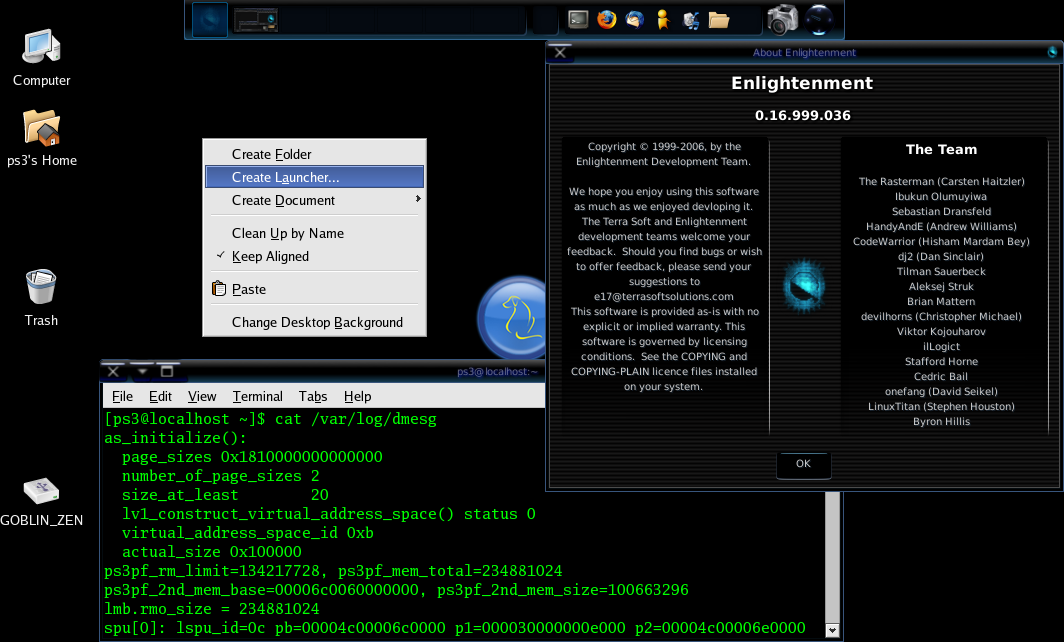
David, the other user sent me a screenshot of his PS3 Enlightenment desktop
with the right click context menu showing.

  http://i86.photobucket.com/albums/k90/goblinlordx/2006-12-19-214819.png

  Open up this photobucket pic and you can see that his PS3 E17 desktop has
right click enabled.  Are there different compile versions out there that would
account for this?
  How can we enable this right click in YDL 5.0 E17?

  thankyou,


  Message: 6
Date: Wed, 20 Dec 2006 04:57:23 +1000
From: David Seikel
Subject: Re: [ydl-gen] Right click - should it work on Enlightenment
desktop?
To: [email protected]
Message-ID: <[EMAIL PROTECTED]>
Content-Type: text/plain; charset="us-ascii"
On Tue, 19 Dec 2006 10:34:16 -0800 (PST) "[EMAIL PROTECTED]"
wrote:

> My left mouse button click on the YDL Enlightenment desktop brings up
> the expected menu of configuration, system and apps choices. Should
> right mouse button click on the desktop bring up a menu as well, as
> in other windows manager systems? Another user is telling me that
> "Create Launcher" should be an option upon a right mouse button
> click on the desktop, and I am getting no menu upon a right click.
> Is this controlled somewhere? Related question: where is "create
> launcher"?, I want to create an icon that launches a script that
> reboots the PS3 into game os from the desktop.

Under Enlightenment E17 right click normally brings up the Favorites
menu. This can be disabled at the compile stage, and in YDL it is
disabled. The IBar can be used to hold you favourite applications
instead. IBar is the bar with application icons in it. On a fresh
install it has terminal, firefox, gaim, rhythmbox, various open office
programs, and nautilus.

There already is a menu item to boot the PS3 into Game OS, left click
on the Yellow Dog button, select Applications->Applications->System
Tools->Boot PS3 Game OS (PS3 Game OS). You can drag'n'drop that menu
item to the IBar.

In E17 "Create launcher" is called "Create an Application". It is
available from the Applications configuration dialog. A right click on
the IBar and select "Add Application", the "Create an Application"
button is on the bottom of that dialog.

That other user is probably talking about a different window manager.
_______________________________________________
yellowdog-general mailing list
[email protected]
http://lists.terrasoftsolutions.com/mailman/listinfo/yellowdog-general
HINT: to Google archives, try  '<keywords> site:terrasoftsolutions.com'