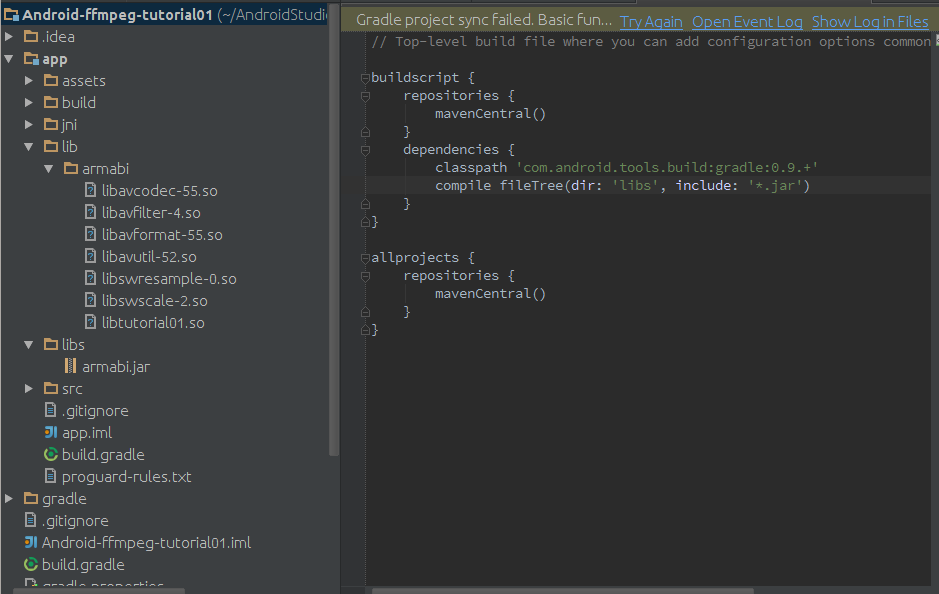
Thank you OP for the post and thank you to everyone who has contributed, it
is most helpful.
I believe my folder structure is correct, but I am still getting an error
(see below). Is there something I must do after I make the changes so that
Gradle recognizes it?

All help is greatly appreciated.

Error:


> *Error:(9) A problem occurred evaluating root project
> 'Android-ffmpeg-tutorial01'.*
>
>
> *> No signature of method:
> org.gradle.api.internal.artifacts.dsl.dependencies.DefaultDependencyHandler.compile()
>
> is applicable for argument types:
> (org.gradle.api.internal.file.collections.DefaultConfigurableFileTree)
> values: [directory 'libs']  Possible solutions: module(java.lang.Object)*
>
>
<https://lh4.googleusercontent.com/-78mGRMr2Zyc/UzjO0aiuCpI/AAAAAAAAORc/pmcuXoecJY0/s1600/Screenshot+from+2014-03-30+22%3A10%3A58.png>

On Wednesday, June 5, 2013 2:11:30 AM UTC-4, Yonnie Lu wrote:
>
> There is a topic we known as: "https://gist.github.com/khernyo/4226923";,
> But i have try this method in gradle plugin 0.4.0+, it doesn't copy the so
> libs to apk.
> So I'm confused. But I figured out a new way to hack this before gradle
> support.
> The way is: use jar to copy so libs. Is it amazing?right?. Let me show
> how-to:
> If you have the following structure:
> project
> |---libs
>       |---armeabi/xxx.so
>       |---xxx.jar
>       |---xxx.jar
> 1.We archive the armeabi folder to zip named:armeabi.zip with the folder
> in zip like: lib/armeabi/xxx.so
> 2.Rename armeabi.zip to armeabi.jar and put armeabi.jar into libs folder
> with the other jars.
> 3.And when we call
> dependencies {
> compile fileTree(dir: 'libs', include: '*.jar')
> }
> in our build.gradle file, it will extract the so libs to the apks.
>
> As we know, only class files will be packed into classes.dex file and
> other files will be extracted to the apk as the structure in the jars.
> So, That's how-to hack. Easy and amazing. Cool,right?
>

--
You received this message because you are subscribed to the Google Groups
"adt-dev" group.
To unsubscribe from this group and stop receiving emails from it, send an email
to [email protected].
For more options, visit https://groups.google.com/d/optout.