Hi Jurgen

I have to admit that it is complete mess. I am not core Android dev, just
ordinary user of Android SDK and I do not know what is where.
They have changed the layout on that directory structure of system-images,
is was regularly broken some time ago, I submitted bug to upstream and it
got fixed (it was basically not possible to create avd from the command
line which is totally ridiculous).

Anyway ... what I do not understand is how do I even create AVD of that
Google API.

I have installed _full_ Android SDK with every image possible.

Lets say android list target give me this:

----------
id: 36 or "Google Inc.:Google APIs:21"
     Name: Google APIs
     Type: Add-On
     Vendor: Google Inc.
     Revision: 1
     Description: Android + Google APIs
     Based on Android 5.0 (API level 21)
     Libraries:
      * com.google.android.media.effects (effects.jar)
          Collection of video effects
      * com.android.future.usb.accessory (usb.jar)
          API for USB Accessories
      * com.google.android.maps (maps.jar)
          API for Google Maps
     Skins: HVGA, QVGA, WQVGA400, WQVGA432, WSVGA, WVGA800 (default),
WVGA854, WXGA720, WXGA800, WXGA800-7in
 Tag/ABIs : google_apis/armeabi-v7a, google_apis/x86, google_apis/x86_64

So I try to create emulator like this:

android create avd -t "Google Inc.:Google APIs:21" -g {one of these
tag/abis value}

This does not work at all. When I look into add-ons/addon-google_apis-google-21
there is not images directory. How am I supposed to create such emulator
then?


On Thursday, November 27, 2014 5:38:46 PM UTC+1, Jürgen Cruz wrote:
>
> Hi everyone,
>
> Recently for API 19 and 21 some images were released which allowed to have
> google APIs in the x86 architecture so you can use HAXM and test faster in
> the emulator while still being able to use google services. To use this
> apparently you need to download the "Intel x86 Atom System Image" and the
> "Google APIs Intel x86 Atom System Image". Then you can create an AVD with
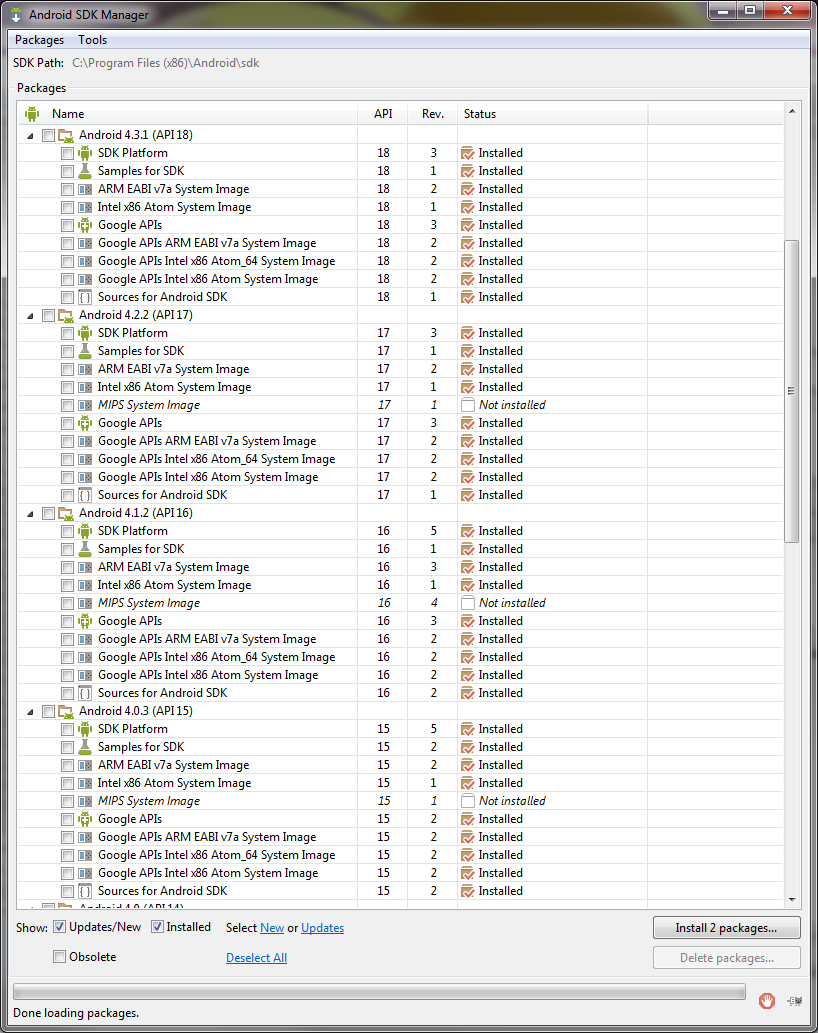
> the two system images. However, after downloading the Google APIs x86
> system image, I notice it appears as installed for APIs 14-18 but when I
> tried making an AVD for this API, there was no option for Google APIs in
> x86. I thought it might be corrupted so I uninstalled the google system
> image from API 18 and that uninstalled it from all APIs. Actually, after
> removing it, it was no longer in the list to redownload except for API 21.
>
> I then thought I could try to look for the files myself and see if I could
> get it working. I opened the config.ini for the API 21 AVD and found that
> it just points to one system image:
>
> image.sysdir.1=system-images\android-21\google_apis\x86_64\
>
> and inside the folder I could find the following structure:
>
> - system-images/android-21
>   - android-tv
>   - default
>     - armeabi-v7a
>     - x86
>     - x86_64
>   - google_apis
>     - armeabi-v7a
>     - x86
>     - x86_64
>
> Then I thought the same structure would be there for API18, but no, this
> is the structure:
>
> - system-images/android-18
>   - armeabi-v7a
>   - default
>     - x86
>
> And I thought, were are the google apis?. So I looked at the API 19 AVD
> config.ini and found that it uses 2 sys images instead of 1 like API 21:
>
> image.sysdir.1=add-ons\addon-google_apis_x86-google-19\images\x86\
> image.sysdir.2=system-images\android-19\default\x86\
>
> This looked more like the structure for API 18, so I gave that a try and
> tried to search in the add-ons folder. Turns out, there is no
> addon-google_apis_x86-google-18 folder, but there is a
> regular addon-google_apis-google-18 bu tit just have an armeabi image.
>
> TL;DR: apparently there is no way to have Google APIs and x86 for APIs 18
> and lower. Even though the SDK shows you there is an image installed.
>
> Here is the screen shot showing the images for all APIs from 14 to 18
> (Screenshot only got 15 to 18):
>
>
> <https://lh6.googleusercontent.com/-sKsTB5l8LPw/VHdS3KaKrEI/AAAAAAAAAgY/jgmHrjBAuv8/s1600/SDK%2Bsys%2Bimages.png>
> My respectful request is if we can get google apis for x86 for API 18 and
> below and if possible a more standard folder structure because it looks
> like a nightmare. Or if there is a workaround, to please tell me how to
> accomplish this.
>
> Thanks.
>

--
You received this message because you are subscribed to the Google Groups
"adt-dev" group.
To unsubscribe from this group and stop receiving emails from it, send an email
to [email protected].
For more options, visit https://groups.google.com/d/optout.