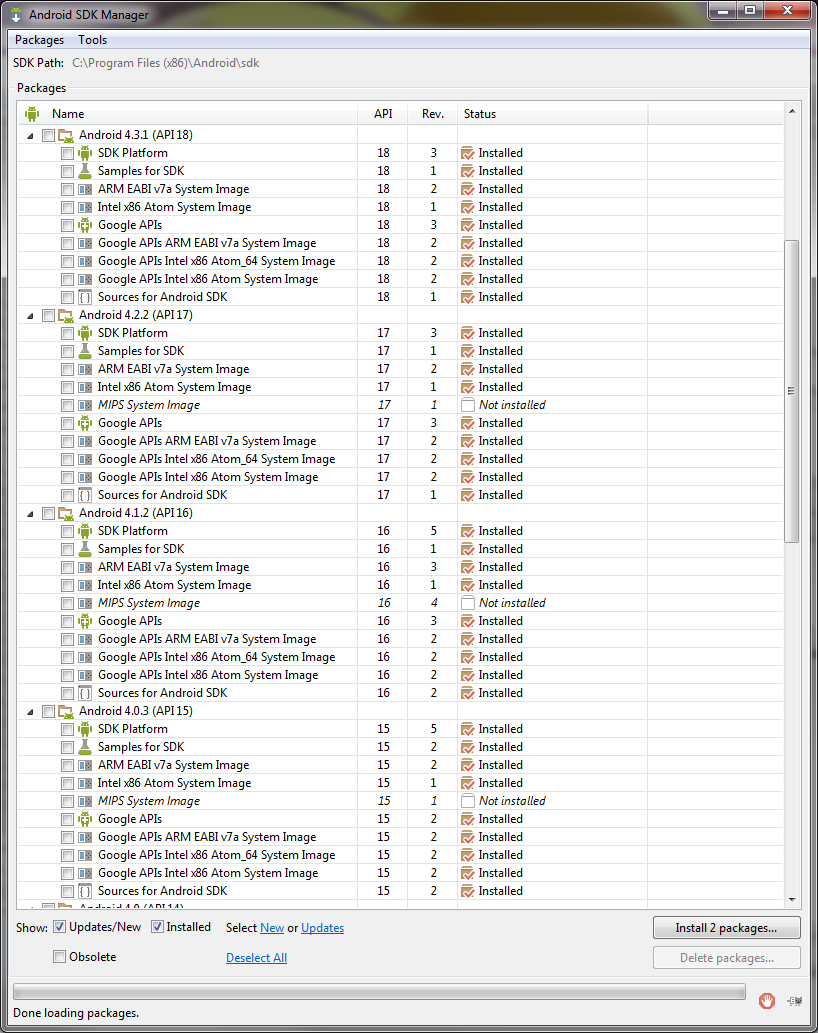
What you're seeing is a display bug in the SDK Manager.

Note that we very recently) changed how the add-ons package their system
image. It used to be that the addon came with the system image (on top of
some additional APIs). Now the "Google APIs" package that you see only
contains the APIs, and there are additional packages for the system images.
It's a better setup that having 2 Add-ons which both contains the API +
system image.

This was introduced in 21+, so it'll look differently in the SDK manager
for older API level, and it'll be different on disk as well. What you're
seeing is a broken display in the SDK manager that doesn't reflect reality.
We'll release a fix soon.

On Thu, Nov 27, 2014 at 8:38 AM, Jürgen Cruz <[email protected]> wrote:

> Hi everyone,
>
> Recently for API 19 and 21 some images were released which allowed to have
> google APIs in the x86 architecture so you can use HAXM and test faster in
> the emulator while still being able to use google services. To use this
> apparently you need to download the "Intel x86 Atom System Image" and the
> "Google APIs Intel x86 Atom System Image". Then you can create an AVD with
> the two system images. However, after downloading the Google APIs x86
> system image, I notice it appears as installed for APIs 14-18 but when I
> tried making an AVD for this API, there was no option for Google APIs in
> x86. I thought it might be corrupted so I uninstalled the google system
> image from API 18 and that uninstalled it from all APIs. Actually, after
> removing it, it was no longer in the list to redownload except for API 21.
>
> I then thought I could try to look for the files myself and see if I could
> get it working. I opened the config.ini for the API 21 AVD and found that
> it just points to one system image:
>
> image.sysdir.1=system-images\android-21\google_apis\x86_64\
>
> and inside the folder I could find the following structure:
>
> - system-images/android-21
>   - android-tv
>   - default
>     - armeabi-v7a
>     - x86
>     - x86_64
>   - google_apis
>     - armeabi-v7a
>     - x86
>     - x86_64
>
> Then I thought the same structure would be there for API18, but no, this
> is the structure:
>
> - system-images/android-18
>   - armeabi-v7a
>   - default
>     - x86
>
> And I thought, were are the google apis?. So I looked at the API 19 AVD
> config.ini and found that it uses 2 sys images instead of 1 like API 21:
>
> image.sysdir.1=add-ons\addon-google_apis_x86-google-19\images\x86\
> image.sysdir.2=system-images\android-19\default\x86\
>
> This looked more like the structure for API 18, so I gave that a try and
> tried to search in the add-ons folder. Turns out, there is no
> addon-google_apis_x86-google-18 folder, but there is a
> regular addon-google_apis-google-18 bu tit just have an armeabi image.
>
> TL;DR: apparently there is no way to have Google APIs and x86 for APIs 18
> and lower. Even though the SDK shows you there is an image installed.
>
> Here is the screen shot showing the images for all APIs from 14 to 18
> (Screenshot only got 15 to 18):
>
>
> <https://lh6.googleusercontent.com/-sKsTB5l8LPw/VHdS3KaKrEI/AAAAAAAAAgY/jgmHrjBAuv8/s1600/SDK%2Bsys%2Bimages.png>
> My respectful request is if we can get google apis for x86 for API 18 and
> below and if possible a more standard folder structure because it looks
> like a nightmare. Or if there is a workaround, to please tell me how to
> accomplish this.
>
> Thanks.
>
> --
> You received this message because you are subscribed to the Google Groups
> "adt-dev" group.
> To unsubscribe from this group and stop receiving emails from it, send an
> email to [email protected].
> For more options, visit https://groups.google.com/d/optout.
>


--
Xavier Ducrohet
Android SDK Tech Lead
Google Inc.
http://developer.android.com | http://tools.android.com

Please do not send me questions directly. Thanks!

--
You received this message because you are subscribed to the Google Groups
"adt-dev" group.
To unsubscribe from this group and stop receiving emails from it, send an email
to [email protected].
For more options, visit https://groups.google.com/d/optout.