Hi

here is my workflow:
I use a script, that actually calls dcraw with the following parameters:
dcraw -v -T -6 -H 5 -o 4 -g 1.8 0 -q 3 -w -m 5
(make sure you have the newest version of dcraw!) You can find my script
here: http://meterprosekun.de/xdcraw/xdcraw
It allwos to convert all RAF files in a folder or a single one (first
parameter). Nick Payne already posted a script 12/22/2013 on this list.
He also explained how to integrate this in a file manager. I call my
script from the command line. It requires exiftool and mogrify (from
imagemagic).

The resulting 16bit tiffs are placed in the folder, from which you call
the script. You can also set the value for the highlight recovery as
second parameter, which I think can make sense for (heavily) overexposed
images. However, in general you can compensate some magenta highlight in
dt, changing threshold value in highlight recovery. The basic settings
in the script worked fine for most of my images yet.
Please note, that my script create the tiffs in ProPhotoRGB color space,
because I wanted to avoid any early clipping. However, you have to set
this in dt as inpsut color space! (maybe you have to copy the icc into
~/.config/darktable/color/in first)

For X-E2 owners: dcraw does only create sRGB output for the X-E2, yet.
However, the X100s has the same sensor and is fully supported. So the
script creates a temporary copy of the original raw and changes the
model with exiftool to Fuji X100s.

In any case, after calling dcraw, mogrify compresses the tiff. Finally
exiftool is used to copy the original meta data from the rawto the tiff
file. Here some warnings are thrown, but I think one can ignore them.

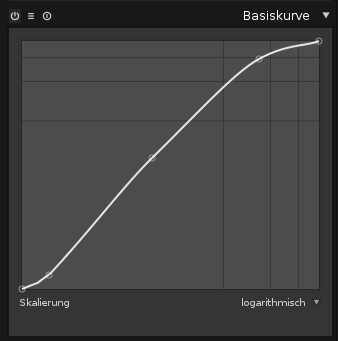
You can simply import the tiffs in darktable (I suggest to keep the RAF
files in a separate folder). Here you should set the color space and
apply a base curve (mine looks like this:
http://meterprosekun.de/xdcraw/xe2basecurve.png ). In many cases it
makes sens to do some (aggressive) color noise removal to remove color
shades:
Without color noise removal:
http://meterprosekun.de/xdcraw/xdcraw-tut-chromdenoiseoff.png
After using non-local means denoise (patch size 1, strength 100%, luma
0, chroma 1oo%): http://meterprosekun.de/xdcraw/xdcraw-tut-chromdenoise.png

Alternativly to creating tiffs it might make sense to create openExr
files (more precisely convert the tiff into exr). AFAIK openExr providea
at least 16 bit per channel as well, but compression is way more
efficient. Unfortunately, it seems that openExr cannot store meta data
(or at most very few).

Hopefully, I could help a little bit ;)

Sören


Am 19.01.2014 15:06, schrieb H. Mandemaker:
> Hello,
> I’m new to darktable and to this mailing list, so I’ll probably break a
> few rules. I have a few questions about workflow when using images
> recorded with non-Bayer sensors. I know support for those is not planned
> for darktable, and while I hope this may change at some point, I’m not
> complaining — priorities, resources, etcetera. But one of my cameras (a
> Fuji X-E1) does have a non-Bayer sensor, so I need a workaround. I’m
> guessing there are others with non-Bayer sensors on this list: how do
> you proceed? Do you simply use out-of-camera JPEGs, straightaway, in
> darktable? Or process RAWs with a RAW processor (which?) first, and then
> import the resulting files in darktable? I’m no coder, but some of you
> are: would it be possible to use scripts to import RAWs from within
> darktable, if those scripts would invoke dcraw, for instance? Questions,
> questions…
>
> Greetings from the Netherlands.
>
> Mandemaker
>
>
> ------------------------------------------------------------------------------
> CenturyLink Cloud: The Leader in Enterprise Cloud Services.
> Learn Why More Businesses Are Choosing CenturyLink Cloud For
> Critical Workloads, Development Environments & Everything In Between.
> Get a Quote or Start a Free Trial Today.
> http://pubads.g.doubleclick.net/gampad/clk?id=119420431&iu=/4140/ostg.clktrk
>
>
>
> _______________________________________________
> Darktable-users mailing list
> [email protected]
> https://lists.sourceforge.net/lists/listinfo/darktable-users
>


------------------------------------------------------------------------------
CenturyLink Cloud: The Leader in Enterprise Cloud Services.
Learn Why More Businesses Are Choosing CenturyLink Cloud For
Critical Workloads, Development Environments & Everything In Between.
Get a Quote or Start a Free Trial Today.
http://pubads.g.doubleclick.net/gampad/clk?id=119420431&iu=/4140/ostg.clktrk
_______________________________________________
Darktable-users mailing list
[email protected]
https://lists.sourceforge.net/lists/listinfo/darktable-users