Hi Sylvain,

cool live prototype ... wow!
Am Montag, den 14.03.2011, 19:44 +0100 schrieb ubuntulesjours:
> Hi Paulo, thank you for you comments !
> > Would you include an "move" option to the object inside to
> > make it possible?
> Yes, of course. I was thinking that we could "move" the image inside
> their margin when ,in example, "Ctrl" is down. This could give even
> more flexibility for margin resizing.

It would be great if it could be combined with the existing handles that
people know from within LibreOffice (e.g. Impress or Draw). So (although
it is always a bad idea to introduce modes), this could be something
like...

        X------------x-----------X
        |              [ A | B ] |
        |                        |
        x                        x
        |                        |
        |                        |
        X------------x-----------X

x = vertical/horizontal handle
X = diagonal handle
A = Symbol for resizing (mode switch)
B = Symbol for margins (mode switch)

This could even be extended to visualize rotating, ... something which
is (today) just visualized by other handle types (amongst another handle
in the center).

To pour in some more ideas (by other people), please have a look what
Andreas once made:
http://wiki.services.openoffice.org/wiki/Proposal_by_Andreas_Schuderer#Direct_Manipulation_and_Mouse_Gestures


Guys, it's amazing to see such involvement!

Cheers,
Christoph

> On 14/03/2011 15:51, Paulo José Amaro wrote:
> > Hi Sylain,
> >
> > It's very very nice! The interative mockup is a good approach to show the
> > workflow you are purposing. But I was thinking: how can I resize the
> > left/top borders? Would you include an "move" option to the object inside to
> > make it possible?(I don't know if I've been clear with my - not good -
> > english, so let me know if I didn't
> >
> > Thank you for your effort! :-)
> > ~Paulo
> > --
> > Paulo José O. Amaro
> > Estudante de Ciência da Computação / UFSJ
> > Webdesigner / Linked E.J.
> > Blogueiro / CasaTwain.com
> >
> >
> >
> > 2011/3/13 Rick Hansson<[email protected]>
> >
> >> Sylvain,
> >>
> >> This is great.
> >>
> >> Rick
> >>
> >> On Fri, Mar 11, 2011 at 8:06 AM, ubuntulesjours<[email protected]
> >>> wrote:
> >>> Hello everybody,
> >>>
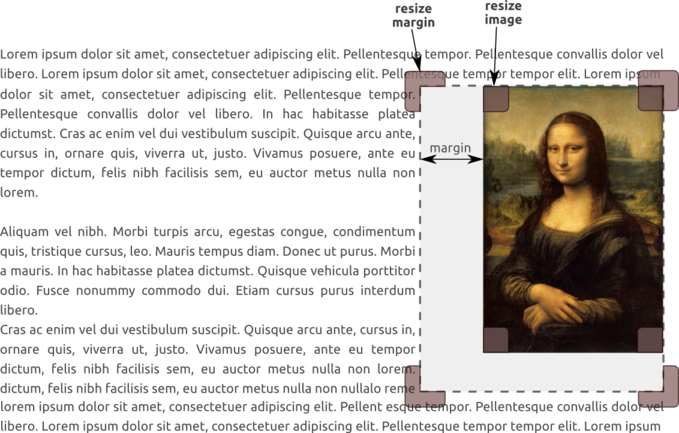
> >>> I have imagined a new way to*resize margin* around an image in
> >> LibreOffice
> >>> because it was quite difficult to do it in OpenOffice.
> >>>
> >>> - You can see it in this *picture* :
> >>> http://ubuntulesjours.free.fr/wp-content/uploads/lo_image.png
> >>> - I have also developed an *interactive mockup* in HTML to make it more
> >>> understandable :
> >>>
> >> http://ubuntulesjours.free.fr/wp-content/uploads/mockup_libreoffice.html(onlybottom
> >>  right corner is active)
> >>> I don't know if it could be interesting for LibreOffice but don't
> >> hesitate
> >>> to comment this idea.
> >>> Thank you !
> >>>
> >>> Sylvain.
> >>>
> >>> PS : sorry for my poor skills in English.
> >>>
> >>>
> >>> --
> >>> Unsubscribe instructions: E-mail to [email protected]
> >>> List archive: http://listarchives.libreoffice.org/www/design/
> >>> *** All posts to this list are publicly archived for eternity ***
> >>>
> >>>
> >> --
> >> Unsubscribe instructions: E-mail to [email protected]
> >> List archive: http://listarchives.libreoffice.org/www/design/
> >> *** All posts to this list are publicly archived for eternity ***
> >>
> >>
>
>
>


--
Unsubscribe instructions: E-mail to [email protected]
List archive: http://listarchives.libreoffice.org/www/design/
*** All posts to this list are publicly archived for eternity ***