>From my side, I cannot understand why you say Kylin 4 is 'very obviously'.
Can you give an example?
>From the source code, the basic logic of choosing the right cube/model are
similar.
------------------------
With warm regard
Xiaoxiang Yu
On Wed, Nov 1, 2023 at 3:01 PM Nam Đỗ Duy <[email protected]> wrote:

> Thank you for your kind reply, please answer 1 more question about version
> 5:
>
> In version 4.x we run query against a Cube very obviously, but in version
> 5, the cube usage is a implication socan you advise: for a given query,
> which model will be used, which index (cube) will be used for this query?
>
> Thank you
>
> On Wed, Nov 1, 2023 at 1:42 PM Xiaoxiang Yu <[email protected]> wrote:
>
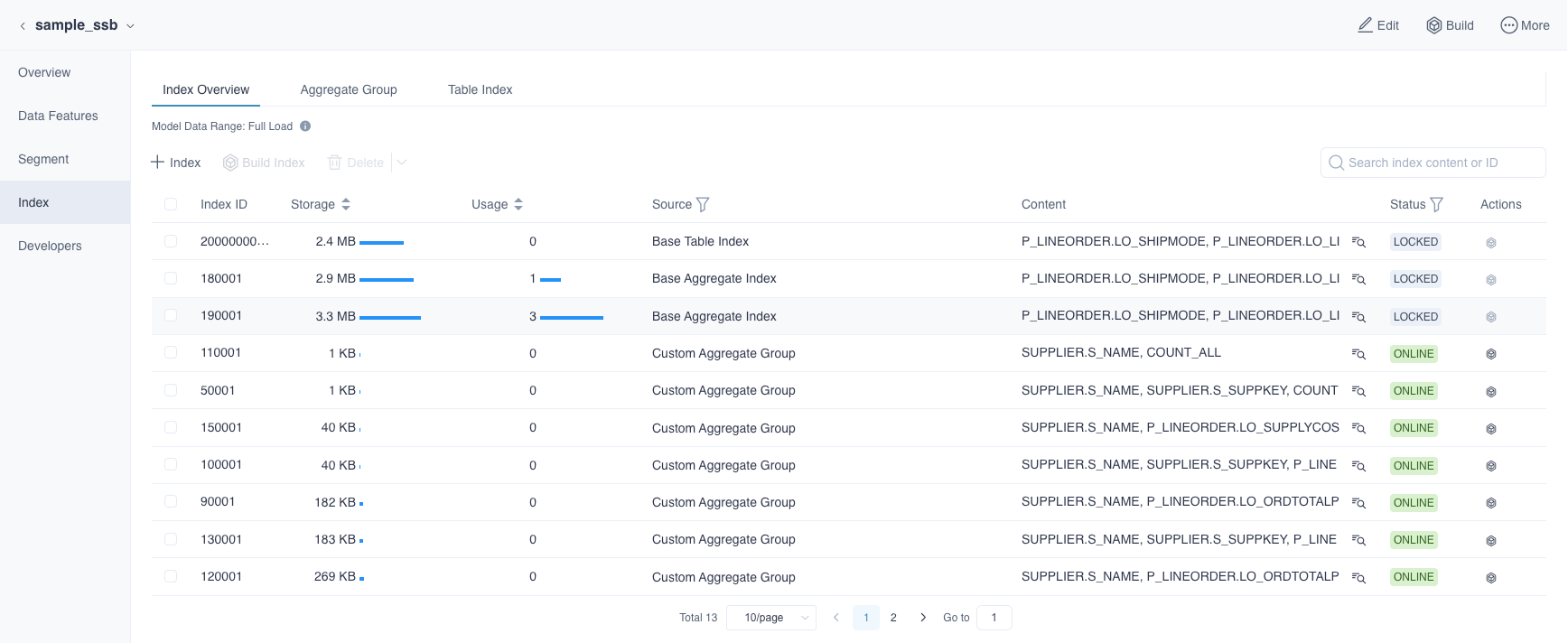
>> 1. How do I measure the size of the index (cube) in version 5?
>>    You can check storage of specific Indexes from the Index page.
>>
>> https://kylin.apache.org/5.0/docs/modeling/model_design/aggregation_group#view-aggregate-index
>> or
>> https://kylin.apache.org/5.0/assets/images/index_1-6ad3f55183d4ed61962359d9408ba192.png
>>
>>
>> 2. How to create the cardinality for each column?
>>    You should check this link :
>> https://kylin.apache.org/5.0/docs/datasource/data_sampling/ .
>>
>> 3. In your default project sample named SSB project, you have only 4
>> simple aggregate group index and no table index as in attached file
>> so what is the best strategy to select index for our OLAP?
>>     1. There does exist a 'Base Table Index'  by default actually, its
>> id is 20000000001.
>>     2. I think it is a good question and Kylin 5 lacks such a guide for
>> better modeling. You are free to ask your question to
>> mailing list and I will try to reply.
>>
>> ------------------------
>> With warm regard
>> Xiaoxiang Yu
>>
>>
>>
>> On Wed, Nov 1, 2023 at 2:12 PM Xiaoxiang Yu <[email protected]> wrote:
>>
>>> OK, I didn't read all the mail history so I misunderstand the situation.
>>> Looks like you need to analyse
>>> the cause why the query didn't hit the cube correctly.
>>>
>>> Please generate query diagnosis package and send it to me privately. I
>>> will analyse the query log.
>>> You can refer to the following steps in screenshots.
>>>
>>> [image: image.png]
>>>
>>> If the screenshots are not displaying correctly, please read this guide :
>>>
>>> https://kylin.apache.org/5.0/docs/operations/system-operation/diagnosis/#generate-query-diagnosis-package-in-web-ui
>>>
>>> By the way, you need to analyse the cause by reading kylin.query.log,
>>> not the kylin.log,
>>> refer to https://kylin.apache.org/5.0/docs/operations/logs/system_log
>>>
>>> ------------------------
>>> With warm regard
>>> Xiaoxiang Yu
>>>
>>>
>>>
>>> On Wed, Nov 1, 2023 at 12:18 PM Nam Đỗ Duy <[email protected]> wrote:
>>>
>>>> Thank you Xiaoxiang for your advice. As my title email shown, I guessed
>>>> that the OLAP functionalities has not been correctly set up in my computer.
>>>>
>>>> The evidence about it is that: when I disable the Pushdown option box
>>>> to use solely the precomputation cube only, it showed following error:
>>>> Please kindly advise how to properly build the OLAP
>>>>
>>>> LIMIT 500": No realization found for OLAPContext, MODEL_UNMATCHED_JOIN,
>>>> rel#2240:KapTableScan.OLAP.[](table=[VNEVENT_HIVE_DWH_400MILLION_ROWS,
>>>> FACTUSEREVENT],ctx=0@null,fields=[0, 1, 2, 3, 4, 5, 6, 7, 8, 9, 10, 11,
>>>> 12, 13, 14, 15, 16, 17, 18, 19, 20])
>>>>
>>>>
>>>>
>>>> On Wed, Nov 1, 2023 at 10:40 AM Xiaoxiang Yu <[email protected]> wrote:
>>>>
>>>>> Hi,
>>>>>
>>>>>     Yesterday, I tried to see if query pushdown functions work well in
>>>>> the Kylin5 docker, and all of my queries return proper responses .
>>>>>     After checking your logs from Shaofeng, I found these error
>>>>> messages repeated many times:
>>>>>     1. 'java.io.IOException: All datanodes DatanodeInfoWithStorage[
>>>>> 127.0.0.1:9866,DS-5093899b-06c7-4386-95d5-6fc271d92b52,DISK] are bad.
>>>>> Aborting...'
>>>>>     2. 'curator.ConnectionState : Connection timed out for connection
>>>>> string (localhost:2181) and timeout (15000) / elapsed (41794)
>>>>> org.apache.curator.CuratorConnectionLossException: KeeperErrorCode =
>>>>> ConnectionLoss'
>>>>>
>>>>>     I guess the root cause is that the container didn't not have
>>>>> enough resources. I found you query on a table called
>>>>> 'XXX_hive_dwh_400million_rows', looks like you gave a complex query on a
>>>>> table which contains 400 million rows?
>>>>>
>>>>>     Since I am the uploader of kylin5 's docker image, I want to give
>>>>> some explainment. Kylin5 docker is not a place for performance benchmarks,
>>>>> it is only for demonstration. It is only allocated with very little
>>>>> resources(8G memory) if you are using the default command from docker hub
>>>>> page. Before I uploaded my image, I only tested my image using the ssb
>>>>> dataset, which the biggest table only contains about 60k rows. If you are
>>>>> using a larger dataset and complexer queries, you have to scale the
>>>>> resource properly. Try querying tables which contain not more than 100k
>>>>> rows by default.
>>>>>
>>>>>     Here are some tips which may help you to check if the daemon
>>>>> service is in health status and resources(particularly disk space) is
>>>>> configured properly.
>>>>>
>>>>>     1. Checking HDFS 's web ui(
>>>>> http://localhost:9870/dfshealth.html#tab-datanode ) to confirm
>>>>> whether HDFS service is in 'In service' status.
>>>>>     2. Checking Datanode 's log in
>>>>> `/opt/hadoop-3.2.1/logs/hadoop-root-datanode-Kylin5-Machine.log`, check if
>>>>> there is any error message. Like: cat
>>>>> /opt/hadoop-3.2.1/logs/hadoop-root-datanode-Kylin5-Machine.log | grep
>>>>> ERROR
>>>>> | wc -l
>>>>>     3. Checking if your docker engine is configured with enough disk
>>>>> space, if you are using Docker Desktop like me,please go to "Settings" -
>>>>> "Resources" - "Advanced", make sure you have allocated 40GB+ disk space to
>>>>> the docker container.
>>>>>     4. Checking the available disk space of your container by `df -h`,
>>>>> make sure the 'Use%' of 'overlay' is less than 60% .
>>>>>     5. Checking the load average/ cpu usage/ jvm gc. Make sure these
>>>>> metrics are not really high when you send a query.
>>>>> ------------------------
>>>>> With warm regard
>>>>> Xiaoxiang Yu
>>>>>
>>>>>
>>>>>
>>>>> On Tue, Oct 31, 2023 at 5:13 PM Nam Đỗ Duy <[email protected]>
>>>>> wrote:
>>>>>
>>>>>> Hi ShaoFeng
>>>>>>
>>>>>> Thank you very much for your valuable feedback
>>>>>>
>>>>>> I saw the application to be there (if I see it right) as in the
>>>>>> attachment photo. Kindly advise so that I can run this query on OLAP.
>>>>>>
>>>>>> PS. I sent you the log file in private.
>>>>>>
>>>>>> [image: image.png]
>>>>>>
>>>>>> On Tue, Oct 31, 2023 at 3:11 PM ShaoFeng Shi <[email protected]>
>>>>>> wrote:
>>>>>>
>>>>>>> Can you provide the messages in logs/kylin.log when executing the
>>>>>>> SQL? and you can also check the Spark UI from yarn resource manager
>>>>>>> (there
>>>>>>> should be one running application called Spardar, which is Kylin's
>>>>>>> backend
>>>>>>> spark application). If the application is not there, it may indicates
>>>>>>> the
>>>>>>> yarn doesn't have resource to startup it.
>>>>>>>
>>>>>>> Best regards,
>>>>>>>
>>>>>>> Shaofeng Shi 史少锋
>>>>>>> Apache Kylin PMC,
>>>>>>> Apache Incubator PMC,
>>>>>>> Email: [email protected]
>>>>>>>
>>>>>>> Apache Kylin FAQ:
>>>>>>> https://kylin.apache.org/docs/gettingstarted/faq.html
>>>>>>> Join Kylin user mail group: [email protected]
>>>>>>> Join Kylin dev mail group: [email protected]
>>>>>>>
>>>>>>>
>>>>>>>
>>>>>>>
>>>>>>> Nam Đỗ Duy <[email protected]> 于2023年10月31日周二 10:35写道:
>>>>>>>
>>>>>>>> Dear Sir/Madam,
>>>>>>>>
>>>>>>>> I have a fact with 500million rows then I build model, index
>>>>>>>> according to the website help.
>>>>>>>>
>>>>>>>> I chose full incremental because this is the first times I load data
>>>>>>>>
>>>>>>>> I create both index types Aggregate group index, table index as
>>>>>>>> photo attached.
>>>>>>>>
>>>>>>>> But the query always failed after timeout of 300 seconds (I run in
>>>>>>>> docker), I dont want to increase the value of 300 seconds because I
>>>>>>>> wish
>>>>>>>> the OLAP can run within 1 minutes (is that possible?)
>>>>>>>>
>>>>>>>> It seems that the OLAP function in indexing not working to speedup
>>>>>>>> the query by precomputed cube.
>>>>>>>>
>>>>>>>> Can you advise to check whether the index did really work?
>>>>>>>>
>>>>>>>> It is quite urgent task for me so prompt response is highly
>>>>>>>> appreciated.
>>>>>>>>
>>>>>>>> Thank you very much
>>>>>>>>
>>>>>>>