Hi Karl-
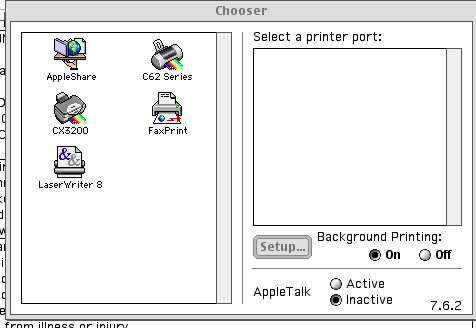
I just tried to print from Classic an old WordPerfect doc. and got the
following message which I have attached.
I'm using a CX 3200 but when I select it in the left window it does not
appear in the right window to show a printer port. How come?
regards,
doug
On Feb 21, 2006, at 9:22 AM, Karl.Winkelmann wrote:
On or about 2/20/2006 2:01 PM Tannis Baker AKA [EMAIL PROTECTED]
eruditely
mused the following:
I've run into a problem with CE in upgrading to OSX on my laptop. (On
top
of getting lots of duplicate mails....)

I haven't been able to print from Emailer directly.  Should this be
possible?
In Classic you must make sure that you have the correct drivers
properly
installed in the OS 9 System Folder, so maybe do a reinstall of the Mac
OS 9 drivers for your printer and then you should be able to select it
in
the Chooser. There is no reason you are unable to print unless the
drivers are not installed correctly otherwise something very odd is
going
on.

If this is an OS 9 bootable computer, go back to that and make sure the
printer works there, then after a reboot into OS X you will be able to
use it.  Just test it first.

Did you have this printer before migrating to OS X?  and what model
printer is it?

Cheers
Karl
_______________________________________________________________________
____
To unsubscribe send a mail message with a SUBJECT line of
"unsubscribe" to
<[EMAIL PROTECTED]> or
<[EMAIL PROTECTED]>

