On Tue, Jun 26, 2007 at 07:13:36PM -0500, RogerN wrote:
> Or maybe my question should be how do you set up the TLO table
> for lathes?
>
> Sorry for such a basic question but I'm new to EMC2 and lathes and
> haven't been able to find a procedure for this in the documentation or
> through google.
First make sure you have a lathe format tool table.  There are some
examples in CVS - here's one:

<http://cvs.linuxcnc.org/cgi-bin/cvsweb.cgi/emc2/configs/lathe-pluto/emc.tbl?rev=1.1>

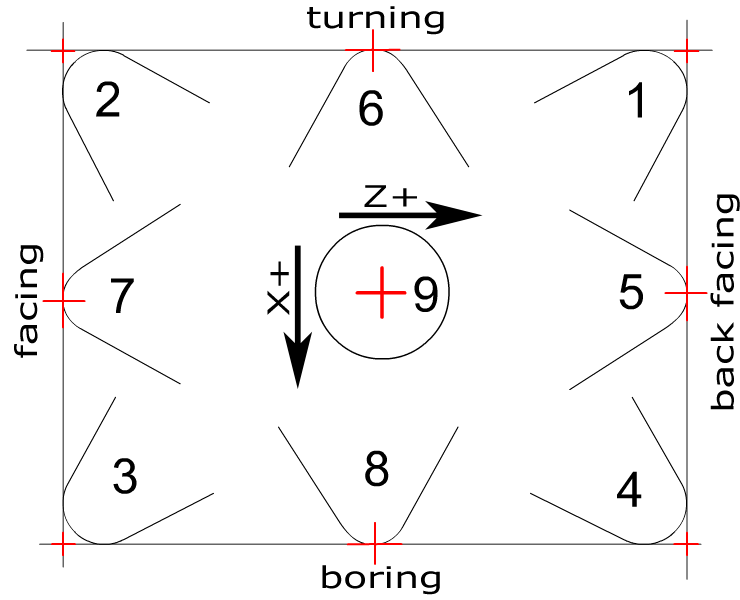
You'll want to set diameter (which is the diameter of the radiused
tool tip), orientation, and the two offsets for each tool.  The angles
are nice for seeing the tool shape in AXIS but are otherwise unused so
far.  The diameter and orientations are required for G41/G42 and of
course the offsets are required for G43.

Orientations:

<http://wiki.linuxcnc.org/uploads/cutting_orientation2.png>

How you set your offsets is a personal preference thing - I'm sure
people do it differently.  I like to set them relative to a reference
tool, which in my case is orientation 2 (left cutting turning tool).
I use that because I can both turn and face with it to do my touch
offs without worrying about G43.  You could also measure in both
directions from your tool holder etc (like measuring down from the
spindle on a mill).

Whether you get the measurements by turning material and measuring its
diameter or by measuring the tools in their holders or whatever is up
to you - you just need to somehow determine the offsets.  This
sometimes takes some creativity.  To get a threading tool's offset
exactly right, you'll probably have to cut a thread and measure it
with thread wires.  John K and I entertained (ha) a large group of
folks at cnc workshop trying to do this.

If you load that tool table I linked above and change tools in AXIS
you'll get a good feeling of the meaning of the angles and
orientations.

Good luck - this is intricate setup but it's rewarding to be able
to change tools and not worry about it once it's done.

Chris


-------------------------------------------------------------------------
This SF.net email is sponsored by DB2 Express
Download DB2 Express C - the FREE version of DB2 express and take
control of your XML. No limits. Just data. Click to get it now.
http://sourceforge.net/powerbar/db2/
_______________________________________________
Emc-users mailing list
[email protected]
https://lists.sourceforge.net/lists/listinfo/emc-users