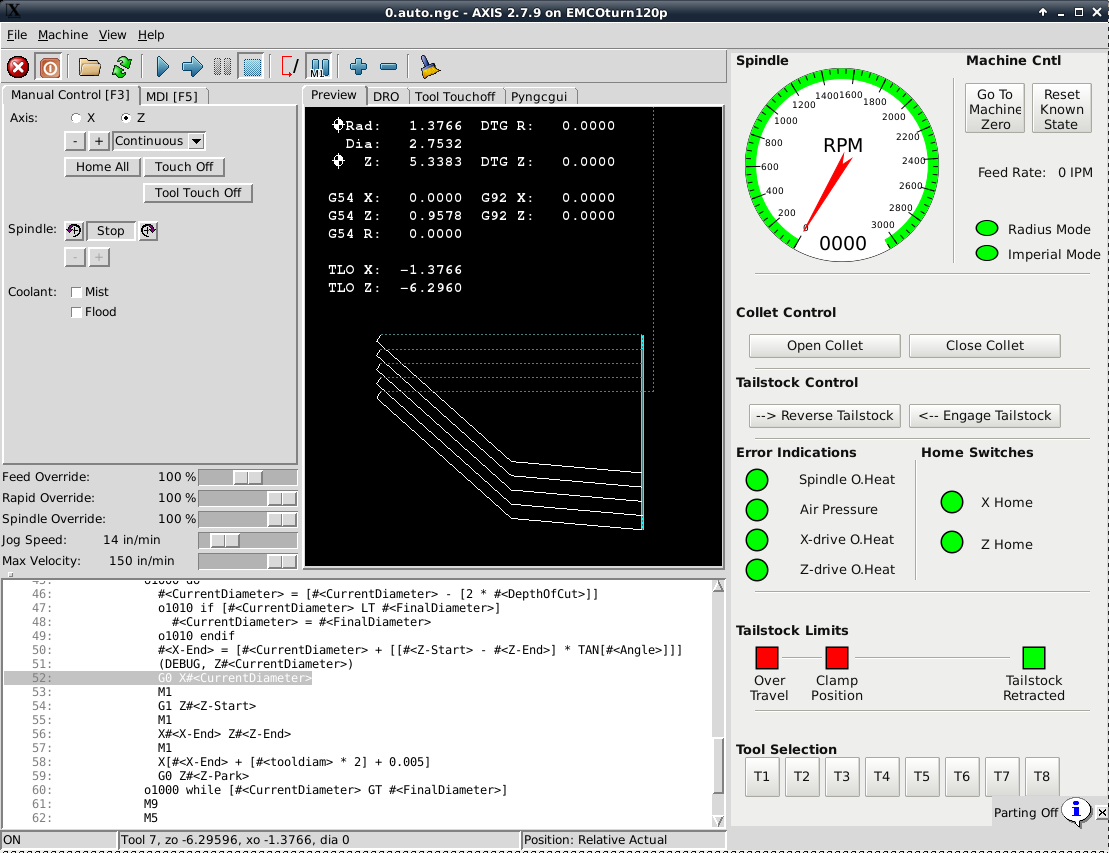
The motion I see in the link looks like I would expect it to look. Are you
expecting cutter comp on just the X axis or just the Z axis or both X and Z?
On Jul 2, 2017 5:12 PM, <[email protected]> wrote:

> I admit that compensation confuses me on a lathe.  I have no idea if it is
> cancelling or changing - but why would it change?  There is a single G42 at
> the beginning of the routine.  The routine is simply cutting a taper (as
> can be seen by the steeper lines in the back plot) starting at
> CurrentDiameter and ending at X-End, Z-End.
> -Tom
>
> > On Jul 2, 2017, at 5:54 PM, Stuart Stevenson <[email protected]> wrote:
> >
> > Are you sure it is cancelling cutter comp or is it changing cutter comp
> to
> > the other side of the programmed path?
> >
> > On Jul 2, 2017 4:50 PM, <[email protected]> wrote:
> >
> > Yes, I do see different results, the line becomes horizontal rather than
> > angled.  But my question is, why when cutter compensation IS on, are the
> > moves treated differently.  By the way, even if we change the first G0
> to a
> > G1, we still get the angled line.  So, it isn’t G0 vs G1, it is simply
> that
> > the first move is lower than it should be (by the tool diameter in the
> tool
> > table) and the second move in Z causes X to rise to the compensated
> value.
> > How/why?
> >
> > -Tom
> >
> >> On Jul 2, 2017, at 5:29 PM, Stuart Stevenson <[email protected]> wrote:
> >>
> >> You SHOULD see different results.
> >>
> >> On Jul 2, 2017 3:46 PM, <[email protected]> wrote:
> >>
> >>> I don’t disagree but am failing to see the connection to my question…?
> >>> -Tom
> >>>
> >>>> On Jul 2, 2017, at 4:16 PM, Stuart Stevenson <[email protected]>
> wrote:
> >>>>
> >>>> It has always been my experience G40 cancels cutter compensation.
> >>>>
> >>>> On Jul 2, 2017 2:44 PM, <[email protected]> wrote:
> >>>>
> >>>> Why would G0 to a given location in one axis (X) differ such that a G1
> >>>> movement in another axis (Z) causes the first axis to move?  Let me
> >>>> explain...
> >>>>
> >>>> Attached is a screenshot of the back plot from Axis:
> >>>> http://bgp.nu/~tom/pub/G0G1.png
> >>>>
> >>>> The highlighted line is "G0 X#<CurrentDiameter>"
> >>>>
> >>>> However, if you look at the back plot that IS NOT the CurrentDiameter
> >>> value
> >>>> where it landed.  It MIGHT be "CurrentDiameter - Cutter Compensation”.
> >>>>
> >>>> But then 2 lines down I move "G1  Z#<Z-Start>" and the line rises up
> to
> >>>> CurrentDiameter.    That is, the move “G1 Z#<Z-Start>” is also
> causing a
> >>>> move in X to CurrentDiameter (when it should already be there - but
> >>> isn’t).
> >>>> Why is this?  Why is the G0 move different from the G1 move? Or
> phrased
> >>>> another way, why is that first line at an angle rather than
> horizontal?
> >>>>
> >>>> According to the G-Code reference it appears both G1 and G0 are both
> >>>> affected by cutter compensation so they should be the same shouldn’t
> >>> they?
> >>>>
> >>>> -Tom
> >>>>
> >>>>
> >>>> ------------------------------------------------------------
> >>>> ------------------
> >>>> Check out the vibrant tech community on one of the world's most
> >>>> engaging tech sites, Slashdot.org! http://sdm.link/slashdot
> >>>> _______________________________________________
> >>>> Emc-users mailing list
> >>>> [email protected]
> >>>> https://lists.sourceforge.net/lists/listinfo/emc-users
> >>>> ------------------------------------------------------------
> >>> ------------------
> >>>> Check out the vibrant tech community on one of the world's most
> >>>> engaging tech sites, Slashdot.org! http://sdm.link/slashdot
> >>>> _______________________________________________
> >>>> Emc-users mailing list
> >>>> [email protected]
> >>>> https://lists.sourceforge.net/lists/listinfo/emc-users
> >>>
> >>>
> >>> ------------------------------------------------------------
> >>> ------------------
> >>> Check out the vibrant tech community on one of the world's most
> >>> engaging tech sites, Slashdot.org! http://sdm.link/slashdot
> >>> _______________________________________________
> >>> Emc-users mailing list
> >>> [email protected]
> >>> https://lists.sourceforge.net/lists/listinfo/emc-users
> >>>
> >> ------------------------------------------------------------
> > ------------------
> >> Check out the vibrant tech community on one of the world's most
> >> engaging tech sites, Slashdot.org! http://sdm.link/slashdot
> >> _______________________________________________
> >> Emc-users mailing list
> >> [email protected]
> >> https://lists.sourceforge.net/lists/listinfo/emc-users
> >
> >
> > ------------------------------------------------------------
> > ------------------
> > Check out the vibrant tech community on one of the world's most
> > engaging tech sites, Slashdot.org! http://sdm.link/slashdot
> > _______________________________________________
> > Emc-users mailing list
> > [email protected]
> > https://lists.sourceforge.net/lists/listinfo/emc-users
> > ------------------------------------------------------------
> ------------------
> > Check out the vibrant tech community on one of the world's most
> > engaging tech sites, Slashdot.org! http://sdm.link/slashdot
> > _______________________________________________
> > Emc-users mailing list
> > [email protected]
> > https://lists.sourceforge.net/lists/listinfo/emc-users
>
>
> ------------------------------------------------------------
> ------------------
> Check out the vibrant tech community on one of the world's most
> engaging tech sites, Slashdot.org! http://sdm.link/slashdot
> _______________________________________________
> Emc-users mailing list
> [email protected]
> https://lists.sourceforge.net/lists/listinfo/emc-users
>
------------------------------------------------------------------------------
Check out the vibrant tech community on one of the world's most
engaging tech sites, Slashdot.org! http://sdm.link/slashdot
_______________________________________________
Emc-users mailing list
[email protected]
https://lists.sourceforge.net/lists/listinfo/emc-users