#6:

Using your example, assume there is no  "debugit" function  and the script
block is closed after the login function definition (to simplify things).
What I'm describing is that I but a breakpoint on line 23. When I reload
the page, that breakpoint would be hit in the global execution and stop
somewhere like line 24 or 26. So I have to disable the L23 breakpoint,
reload the page, and then reapply it.

Files where this happens have the form (requirejs style):

define([],function() {
  function a() {
      someFunc();
  }

});

So, a breakpoint on "someFunc()" line will stop on the closing line " }); "
when the page is reloaded.

Cheers!


On Wed, Aug 13, 2014 at 7:54 PM, Sebastian Zartner <
[email protected]> wrote:

> On Monday, August 11, 2014 10:27:09 PM UTC+2, Christopher Broome wrote:
>>
>> I came here to report on #3 specifically.  Attached a screenshot.  This
>> happens quite frequently after a page refresh.
>>
> Can you provide a test case
> <https://getfirebug.com/wiki/index.php/Creating_a_Test_Case> for that,
> too, so this can be reproduced?
>
> In terms of #1: two reasons.
>>
> This was mentioned again in another thread
> <https://groups.google.com/d/msg/firebug/EDHH1M_tTbY/0HCB64vbKaAJ>, so I
> said it should be reported as issue.
>
> As for #4, the version I'm using 1.12.8 shows me the source file and line.
>>  If the browser is failing during parsing, and can tell me the exact line
>> of code, then I should be able to see that line of code in the debugger as
>> well. (that is, the file has been loaded already since the browser *tried*
>> to parse it, so it is in memory somewhere.)
>>
> Exactly. Though the info about the position within the code comes from
> Firefox APIs, not from Firebug itself, though we currently don't get the
> source itself through these APIs at the moment. That's why I created bug
> 1043825 <https://bugzilla.mozilla.org/show_bug.cgi?id=1043825>.
>
> #5 is likely more to do with animation than with d3, in that some print /
>> draw buffers are queuing up or something.
>>
> This still needs some test case, so it can be reproduced.
>
> #6 is probably unrelated to 7301. In my case, it's not stopping on phantom
>> breakpoints. It's stopping on breakpoints that exist. The problem is that
>> the breakpoints are getting triggered during parsing rather than execution.
>> This means I have to basically disable the breakpoint, reload the page, add
>> the breakpoint after the file has been parsed (code line numbers are
>> green). Sometimes the code never goes 'green', despite functioning
>> correctly. I can reproduce regularly, but I can't simplify. My project has
>> 50-100 js files being loaded via requirejs. (obviously they'll be compiled
>> for prod).
>>
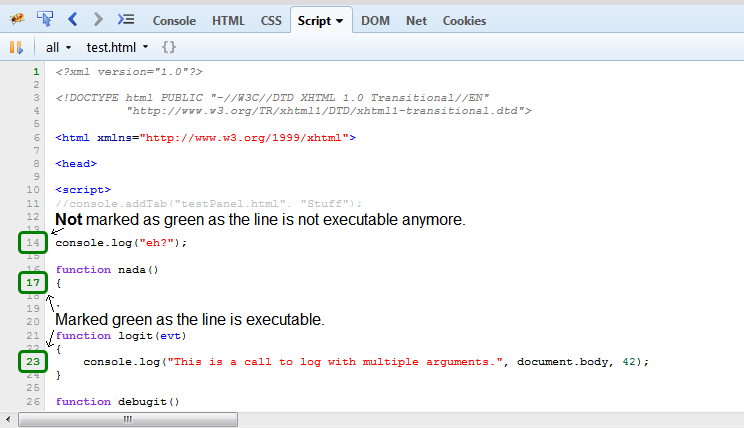
> Let me clarify how the marking of lines as executable works. Lines, which
> are in the global scope will just be executed once, so they will *not* be
> marked as executable once the page is loaded. See the following screenshot
> for an illustration.
>
>
>
> <https://lh4.googleusercontent.com/-Lnu3QEm6ukQ/U-sWg2cllVI/AAAAAAAAAac/Le0yFyq0ORM/s1600/executableLines.png>
>
> If you set a breakpoint at line 14, you'll see that it get's marked in
> green and hit when you reload the page.
>
> To get back to your statement about breakpoints being hit while the code
> is parsed: So this means you have a breakpoint within a function, which
> isn't executed yet, though the breakpoint is hit? What do you see inside
> the *Stack* side panel
> <https://getfirebug.com/wiki/index.php?title=Stack_Side_Panel> then?
>
> Sebastian
>
> --
> You received this message because you are subscribed to a topic in the
> Google Groups "Firebug" group.
> To unsubscribe from this topic, visit
> https://groups.google.com/d/topic/firebug/J1s4ZApnp-s/unsubscribe.
> To unsubscribe from this group and all its topics, send an email to
> [email protected].
> To post to this group, send email to [email protected].
> Visit this group at http://groups.google.com/group/firebug.
> To view this discussion on the web visit
> https://groups.google.com/d/msgid/firebug/615ffffb-52a4-4dd9-b8c0-fbf5729cd511%40googlegroups.com
> <https://groups.google.com/d/msgid/firebug/615ffffb-52a4-4dd9-b8c0-fbf5729cd511%40googlegroups.com?utm_medium=email&utm_source=footer>
> .
> For more options, visit https://groups.google.com/d/optout.
>

--
You received this message because you are subscribed to the Google Groups
"Firebug" group.
To unsubscribe from this group and stop receiving emails from it, send an email
to [email protected].
To post to this group, send email to [email protected].
Visit this group at http://groups.google.com/group/firebug.
To view this discussion on the web visit
https://groups.google.com/d/msgid/firebug/CAKdW-q0_ZM-cUd9SN3spgxBPxOfPZ7%2BLys1XCyefKF4msLH5MQ%40mail.gmail.com.
For more options, visit https://groups.google.com/d/optout.