Hello,

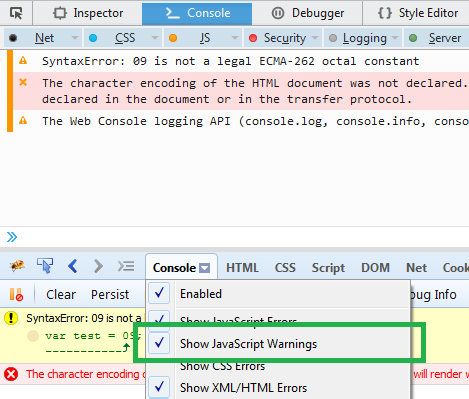
The Console panel displays everything ("Tous")
I changed my code and got rid of the syntax error, but I still have the
getPreventDefault warning, even after updating Firebug.
I can't update Firefox (business network).

It's just a warning, and in a jquery library, so it's not a real problem,
but I'm curious about the differences between Firebug and the element
inspector.


Le jeudi 29 octobre 2015 12:13:38 UTC+1, Sebastian Zartner a écrit :
>
> Please ensure you have the Console panel option *Show JavaScript Warnings*
> checked.
>
>
>
> <https://lh3.googleusercontent.com/-gYgUto6E9vs/VjH-43XPrvI/AAAAAAAAAh4/su4ql8_M_IQ/s1600/Show%2BJavaScript%2BWarnings.png>
>
> Sebastian
>
> PS: Your Firefox version is outdated. The latest ESR version is 38.3.0.
> Also, Firebug 2.0.13 got released recently
> <https://groups.google.com/d/topic/firebug/iuevWfsxRao/discussion>.
>
> On Thursday, October 29, 2015 at 10:54:08 AM UTC+1, Michaël Rehspringer
> wrote:
>>
>> Hello,
>>
>> I just realized that Firebug doesn't display some JS warnings, that are
>> present in the built-in Firefox's element inspector.
>>
>> For example :
>>
>>
>> The application works, but I'm a bit confused. Should I still use
>> Firebug? Is it as reliable as the element inspector?
>>
>> Firefox 31.7.0, Firebug 2.0.12.
>>
>

--
You received this message because you are subscribed to the Google Groups
"Firebug" group.
To unsubscribe from this group and stop receiving emails from it, send an email
to [email protected].
To post to this group, send email to [email protected].
Visit this group at http://groups.google.com/group/firebug.
To view this discussion on the web visit
https://groups.google.com/d/msgid/firebug/bd8e709b-e445-4ada-a9fc-6e202d341177%40googlegroups.com.
For more options, visit https://groups.google.com/d/optout.