Hi,

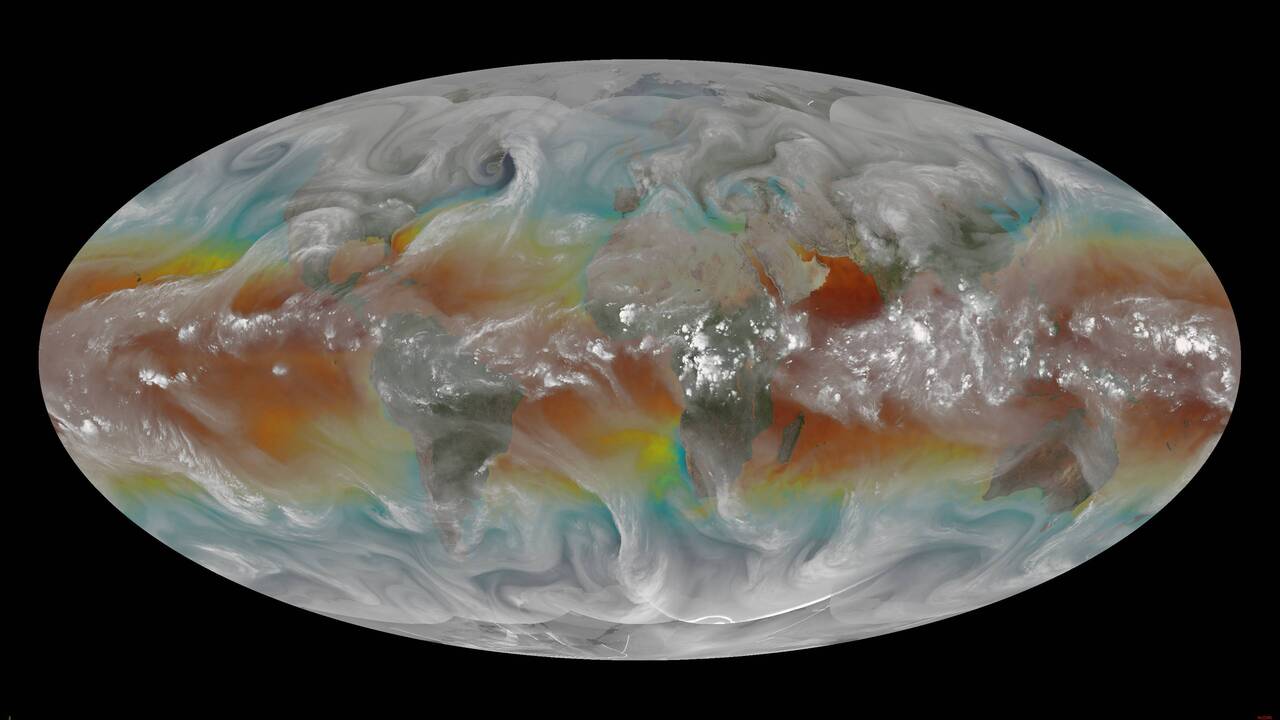
I do not really know how to georeference such Mollweide image, but certainly it
is not with -a_ullr -180 90 180 -90. The upper-left and lower-right corners
mean the corners of the raster, and both those corners are on the black area
outside the Earth. Look at the earth-egg and you can imagine that the
coordinates -180 90 180 -90 are at the poles and they are not at all at the
corners of the image. But even if you make the poles as ground control points
and save them into GeoTIFF with correct pixel coordinates (something like 630x
58y and 630x 660y), you will only have two GCPs on a vertical line and that is
not enough for warping. I apologize that I can't tell how to do it right and
where to get enough usable GCPs.
You wrote "The results are still in a mollweide projection" but that is not
true. You can use gdalinfo and see that the result is in EPSG:4326, but because
of using -a_ullr -180 90 180 -90 in the first step, there is no need to move
any pixel.

-Jukka Rahkonen-

Lähettäjä: gdal-dev <[email protected]> Puolesta Rick Kohrs via
gdal-dev
Lähetetty: maanantai 28. lokakuuta 2024 22.28
Vastaanottaja: [email protected]
Aihe: [gdal-dev] Mollweide to plate_carree

I have full earth mollweide projected images:

https://www.ssec.wisc.edu/~rickk/wvsst/latest.jpg

and need to reproject the image into plate_carree

I have the following script:
gdal_translate -of GTiff -a_srs "+proj=moll +lon_0=0 +datum=WGS84" -a_ullr -180
90 180 -90 global-wvsst_24291_1800.jpg intermediate_mollweide_georef.tif
gdal_edit.py -tr 0.1 -0.1 intermediate_mollweide_georef.tif
gdalinfo intermediate_mollweide_georef.tif
gdalwarp -t_srs "EPSG:4326" -r bilinear intermediate_mollweide_georef.tif
final_output_plate_carree.tif
gdalinfo final_output_plate_carree.tif

The results are still in a mollweide projection.  Any assistance would be
greatly appreciated.

Rick
_______________________________________________
gdal-dev mailing list
[email protected]
https://lists.osgeo.org/mailman/listinfo/gdal-dev