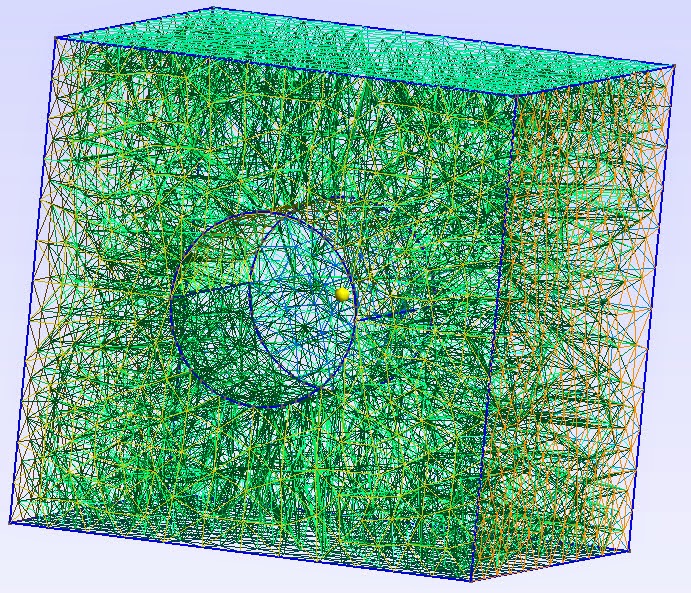
Hi Omid,
Solidworks found errors when trying to import your original iges file; it
did not fix the file. The recent object was newly created in Solidworks and
exported to a STEP file. The STEP file was loaded into Gmsh where it was
3D-meshed and saved as a mesh and exported  as a GEO file.
Erroll
On Wednesday, September 3, 2014 11:31:25 AM UTC-7, Omid Mahabadi wrote: > > Hi Errol, > This is exactly what I wanted. Did Solidworks automatically find and > correct the errors? Do you have any other suggestions for modifying the > iges files? > > Thanks, > Omid > > On 14-09-03 01:03 PM, [email protected] <javascript:> wrote: > > Hi Omid, > Try the attached Block2.zip. > > Erroll > > > <https://lh5.googleusercontent.com/-EkE2FS91LsI/VAdJvqh3QUI/AAAAAAAAAAw/pfpGUvqDVdQ/s1600/Block2.jpg> > > > On Tuesday, September 2, 2014 9:39:45 PM UTC-7, Omid Mahabadi wrote: >> >> Hi Errol, >> In the version you sent me, the hole is through-going, in other words, it >> goes through the entire depth of the cube (along z). However, my desired >> geometry requires a hole that doesn't go through the entire depth (say it >> has half of the depth of the exterior cube). >> >> Thank you, >> Omid >> >> >> On 14-09-02 06:04 PM, [email protected] wrote: >> >> Hello Omid, >> Solidworks found errors in your IGES file. Try the attached STEP, GEO and >> MSH files. >> >> >> <https://lh4.googleusercontent.com/-nxF0eT1U3qQ/VAY-5mA30KI/AAAAAAAAAAg/aQ6Sqk53Fp8/s1600/Block%2BMesh.jpg> >> >> Erroll >> >> On Tuesday, September 2, 2014 1:28:00 PM UTC-7, Omid Mahabadi wrote: >>> >>> Hi Oliver, >>> Thanks for your response. I had also tried the variation that you sent >>> me. The issue is that I don't want to have the flat surface that is >>> interfacing the two volumes. I'd like the mesh to be continuous across that >>> interface. >>> >>> Also, when following your suggestion, I still cannot get the same exact >>> mesh as you did. Please see the attached screenshot. >>> >>> Is there any other thoughts on how to get the results I'm aiming for? >>> >>> Thank you, >>> Omid >>> >>> On 14-08-28 06:34 PM, Oliver Willekens wrote: >>> >>> You could delete the volume of the cylinder you’ve created by means of >>> extrusion and then delete one of the cylinder’s flat surfaces using the >>> Delete command. However, it won’t give you what you want, because the >>> box “holding the cylinder” will be unaware of the presence of the >>> cylindrical hole. >>> >>> I tried this: >>> >>> Plane Surface(1) = {1, 2}; // square minus the circle >>> out1[] = Extrude {0.0, 76.2, 0.0}{Surface{1};}; >>> Plane Surface(2) = {1}; >>> out2[] = Extrude {0.0, -76.2, 0.0} {Surface{2};}; >>> >>> Which results in the 2D mesh you find in the attachment. Perhaps this is >>> what you’re looking for? >>> >>> I also tried combining those two volumes using Compound Volume(4) = >>> {out1[1], out2[1]};, but like you, I got GRegion Compound errors. >>> Probably some basic restriction from triangulations I’m overlooking. This >>> only means your 3D meshes will be clearly stopped at a flat interface about >>> half-way through those two boxes, but you’ll still have a 3D mesh. I was >>> hoping that the Compound Volume would make some tetras across this boundary >>> though… But with the above lines, you’ll have a working mesh. >>> >>> >>> >>> 2014-08-28 17:08 GMT+02:00 Omid Mahabadi <[email protected]>: >>> >>>> Hi Christophe and Gmsh team, >>>> I've been trying to model a simple cube with a cylindrical hole that is >>>> NOT through-going (i.e., its depth is smaller than the depth of the cube), >>>> as shown in the attached picture. The Extrude command doesn't seem to work >>>> since it will extrude both surfaces (exterior and interior -- hole) at the >>>> same time. I know I can define all the surfaces, surface loops, and >>>> volumes >>>> manually, but is there a better way of defining something like this in >>>> Gmsh? >>>> >>>> I also tried to use the Compound Volume command by first defining two >>>> volumes from Extrude and then trying to combine them but I'm getting >>>> errors >>>> for the Compound Volume visualization (Error: Cannot evaluate bounds on >>>> GRegion Compound) and when I mesh the geometry, the actual shared >>>> interfaces are still existing, although by the notion of compound from the >>>> documentation, the internal interfaces should be neglected. Here is the >>>> geometry file: >>>> >>>> // Characteristic length (==> element size) >>>> cl_external = 25; >>>> cl_excavation = 5; >>>> >>>> // External boundaries >>>> Point(1) = {-127, 0.0, -127, cl_external}; >>>> Point(2) = {+127, 0.0, -127, cl_external}; >>>> Point(3) = {+127, 0.0, +127, cl_external}; >>>> Point(4) = {-127, 0.0, +127, cl_external}; >>>> Line(1) = {1, 2}; >>>> Line(2) = {2, 3}; >>>> Line(3) = {3, 4}; >>>> Line(4) = {4, 1}; >>>> Line Loop(1) = {1, 2, 3, 4}; >>>> >>>> // Excavation boundaries >>>> Point(5) = {0.0, 0.0, 0.0, cl_excavation}; >>>> Point(6) = {19.05, 0.0, 0.0, cl_excavation}; >>>> Point(7) = {0.0, 0.0, 19.05, cl_excavation}; >>>> Point(8) = {-19.05, 0.0, 0.0, cl_excavation}; >>>> Point(9) = {0.0, 0.0, -19.05, cl_excavation}; >>>> Circle(5) = {6, 5, 7}; >>>> Circle(6) = {7, 5, 8}; >>>> Circle(7) = {8, 5, 9}; >>>> Circle(8) = {9, 5, 6}; >>>> Line Loop(2) = {5, 6, 7, 8}; >>>> >>>> //Using compound volumes >>>> Plane Surface(1) = {1}; >>>> out1[] = Extrude {0.0, 76.2, 0.0}{Surface{1};}; >>>> >>>> Plane Surface(2) = {1}; >>>> out2[] = Extrude {0.0, -76.2, 0.0}{Surface{2};}; >>>> >>>> Compound Volume(3) = {1, 2}; >>>> >>>> >>>> I also tried to create the geometry in CAD software and imported it as >>>> iges, brep or step formats but for reason the hole is not there >>>> completely. >>>> See for instances the iges file attached. >>>> >>>> Can you kindly shed some light here? Am I doing something wrong? Or are >>>> there Gmsh tricks/commands that I can use to achieve my goal? >>>> >>>> Thank you, >>>> Omid >>>> >>>> -- >>>> Omid Mahabadi, Ph.D. >>>> Geomechanica, Inc.http://www.geomechanica.com/ >>>> Tel : +1-647-478-9767 >>>> Cell: +1-416-824-2408 >>>> >>>> >>>> _______________________________________________ >>>> gmsh mailing list >>>> [email protected] >>>> http://www.geuz.org/mailman/listinfo/gmsh >>>> >>>> >>> >>> >>> -- >>> Oliver Willekens >>> PhD Student >>> [image: LCP group logo] <https://lcp.elis.ugent.be/> >>> >>> Liquid Crystals & Photonics Group >>> Sint- Pietersnieuwstraat 41 >>> 9000 Gent >>> Phone: +32 9 264.89.51 >>> >>> >>> -- >>> Omid Mahabadi, Ph.D. >>> Geomechanica, Inc.http://www.geomechanica.com/ >>> Tel : +1-647-478-9767 >>> Cell: +1-416-824-2408 >>> >>> >> -- >> Omid Mahabadi, Ph.D. >> Geomechanica, Inc.http://www.geomechanica.com/ >> Tel : +1-647-478-9767 >> Cell: +1-416-824-2408 >> >> > -- > Omid Mahabadi, Ph.D. > Geomechanica, Inc.http://www.geomechanica.com/ > Tel : +1-647-478-9767 > Cell: +1-416-824-2408 > >
_______________________________________________
gmsh mailing list
[email protected]
http://www.geuz.org/mailman/listinfo/gmsh