On Sun, 10 Mar 2013 14:57:09 +0100, Fred Kiefer wrote:
On 09.03.2013 20:11, Fred Kiefer wrote:
On 09.03.2013 19:58, Fred Kiefer wrote:
As you can see the problem is order dependent. In your case it may
help
to move some of the decoding steps around. But this isn't a general
solution. The non-keyed unarchiver has the method:
- (void) replaceObject: (id)anObject withObject: (id)replacement
That would allow the NSCustomView initWithCoder: method to replace
itself early on, but there isn't anything similar for keyed coding.
I was wrong in the last two paragraphs. We later added the
-replaceObject:withObject: for the NSKeyedUnarchiver. This method
just
needs to be used by NSCustomView. I will test that later on with a
lot
of NIB files to see whether there are other issues with that
solution.
Committed, please give it a try.


Richard,

I think we should move the -replaceObject:withObject: method for the
NSKeyedUnarchiver over to base. If this page here is correct:

https://github.com/Musixmatchdev/ObjectiveHeaders/blob/master/Headers/iPhoneOS6.0.sdk/Foundation/NSKeyedUnarchiver.h
Apple has that method as well.
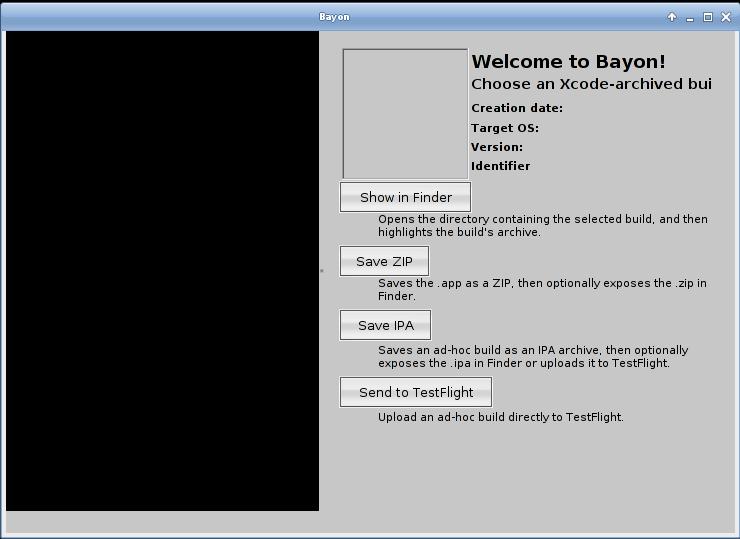
You fix has helped me with Bayon.

Though there's still some work left to get from this:
http://image.bayimg.com/6189103745d2fdeba6f7466cc772907a06ad15b6.jpg

to this:
https://itunes.apple.com/us/app/bayon/id532348700?mt=12
In the console, I can only see "Could not load NSCustomResource
NSRefreshFreestandingTemplate for class NSImage". That possibly explains
the empty bezeled rectangle in the middle, but not the black area on the
left.
I'll look into it again.

--
Luboš Doležel

_______________________________________________
Gnustep-dev mailing list
[email protected]
https://lists.gnu.org/mailman/listinfo/gnustep-dev