Hi Mark,

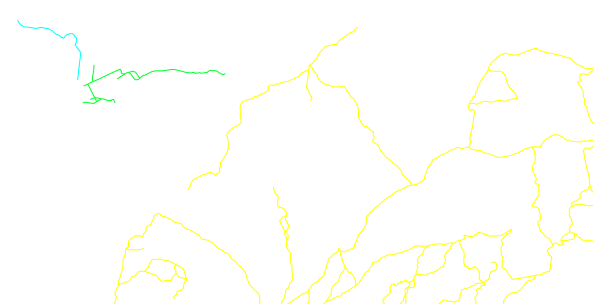
I tried using v.clean with break, rmdup and snap. However, when I try to
run v.net.components I get an error saying that
v.net.components input=rede_brk_rmdup_snap@PERMANENT node_layer=1
output=component_brk_rmdup_snap method=weak
Building graph...
Registering arcs...
Flattening the graph...
Graph was built
ERROR: Cannot insert new record: insert into component_brk_rmdup_snap
values (3689, 1)

I'm using Grass v7RC1 on Windows and v.net.components work if I use only
the snap tool in my roads network

Cheers
Daniel

On Thu, Jan 15, 2015 at 7:40 PM, Mark Wynter <[email protected]>
wrote:

> Hi Daniel
> When you ran v.clean, did you v.clean tool=break,rmdupl ?
>
> I suspect you still may encounter a problem with road T junctions if the
> vectors don't cross or intersect.  Take this simple example of 2 roads -
> NS, and EW.  Each line has only 2 nodes - at the line’s  start and end
> points.
> |—
> The problem is when the horizontal line “undershoots” the vertical line.
> The break command will have no effect, and snapping won’t make any
> difference because there is no midpoint node to which the horizontal line
> can attach itself to.
>
> I’d be interested to hear how others have dealt with what is essentially a
> “data preparation” issue in GRASS?
>
> [The solution I ended up implementing used a PostGIS SQL custom function
> to “break” overshoots and undershoots, with rules for correct treatment of
> bridges and tunnels. The function is fast, and can be run in parallel when
> working with continental-sized road networks.
> After PostGIS, I import the “broken-up” network into GRASS and use v.clean
> to snap the nodes, but NOT break the lines - as my PostGIS function has
> already dealt with this.
> The GRASS procedure involves running the v.clean in 5 steps, to avoid
> inadvertently snapping a tunnel node to say a bridge node, just because
> they are spatially close.
> 1) v.clean tool=snap # no bridges, no tunnels
> 2) v.clean tool=snap # bridges only
> 3) v.clean tool=snap # tunnels only
> 4) v.patch (steps 1-3)
> 5) v.clean tool=snap # on the patched layer, with a much smaller tolerance
> to that used in steps 1-3 to again avoid say tunnel nodes inadvertently
> snapping to bridge nodes.
> We’re then good to go with v.net analysis.]
>
> This may sound like a complicated process, but when using imperfect data
> to model complex road networks in dense urban areas, its important to get
> the vector topology as close as possible to the real world.  I’ve found
> this process generates a highly representative, routable vector topology
> from imperfect OSM data.
>
> Your situation might be much simpler, which is not to say you won’t
> encounter anomalies like you’ve already identified.
>
> Mark
>
>
>
> ----------------------------------------------------------------------
>
> Message: 1
> Date: Thu, 15 Jan 2015 15:22:27 -0200
> From: Daniel Victoria <[email protected]>
> To: grass <[email protected]>
> Subject: [GRASS-user] Checking and fixing roads for network analysis
> Message-ID:
>         <
> ca+irsjjekzq9eqq7igzcgl92k7umfdkujv6a-kvbtp7wn-x...@mail.gmail.com>
> Content-Type: text/plain; charset="utf-8"
>
> Hi List,
>
> I'll need to perform some network analysis and right now I'm trying to see
> if my roads map is all good. I know that there are some clearly isolated
> areas on my roads network but I'd like to identify and fix the less obvious
> ones.
>
> Here is what I did:
> 1) Import road lines (v.in.ogr)
> 2) Clean the topology with snap tool, thresh=0.0001 (it's a latlong
> location)
> 2) Create network (v.net using the nodes option --not sure if that was the
> correct option)
> 3) Ran v.net.components to find the weakly connected components, not
> setting any cost columns
> 4) Color roads lines according to the component number
>
> By doing that I could spot the lines that were clearly disconnected
> (net_components_unlink.png).
> But I also found some lines that where disconnected even thou there are
> nodes (red squares) linking them (apparently) -
> net_components_pseudo_link.png
>
> Should I increase my snapping threshold?
> How can I see if my nodes are endnodes or located between two lines?
>
> Thanks
> Daniel
> -------------- next part --------------
> An HTML attachment was scrubbed...
> URL: <
> http://lists.osgeo.org/pipermail/grass-user/attachments/20150115/0dd532a1/attachment.html
> >
> -------------- next part --------------
> A non-text attachment was scrubbed...
> Name: net_components_unlink.png
> Type: image/png
> Size: 25250 bytes
> Desc: not available
> URL: <
> http://lists.osgeo.org/pipermail/grass-user/attachments/20150115/0dd532a1/attachment.png
> >
> -------------- next part --------------
> A non-text attachment was scrubbed...
> Name: net_components_pseudo_link.png
> Type: image/png
> Size: 15279 bytes
> Desc: not available
> URL: <
> http://lists.osgeo.org/pipermail/grass-user/attachments/20150115/0dd532a1/attachment-0001.png
> >
>
> ------------------------------
>
> _______________________________________________
> grass-user mailing list
> [email protected]
> http://lists.osgeo.org/mailman/listinfo/grass-user
>
> End of grass-user Digest, Vol 105, Issue 25
> *******************************************
>
> _______________________________________________
> grass-user mailing list
> [email protected]
> http://lists.osgeo.org/mailman/listinfo/grass-user
>
_______________________________________________
grass-user mailing list
[email protected]
http://lists.osgeo.org/mailman/listinfo/grass-user