Aman-Mittal opened a new issue, #494:
URL: https://github.com/apache/fineract-backoffice-ui/issues/494
## What happens
On `/clients/create` step 1, the **Office** select renders as a floating
label over empty space with a bare chevron — no text inside the control, no
hint that a choice is required before the form can proceed.
```js
document.querySelectorAll('ion-select')
// [{ name: "legalFormId", placeholder: null, label: "Legal Form" },
// { name: "officeId", placeholder: null, label: "Office" }]
```
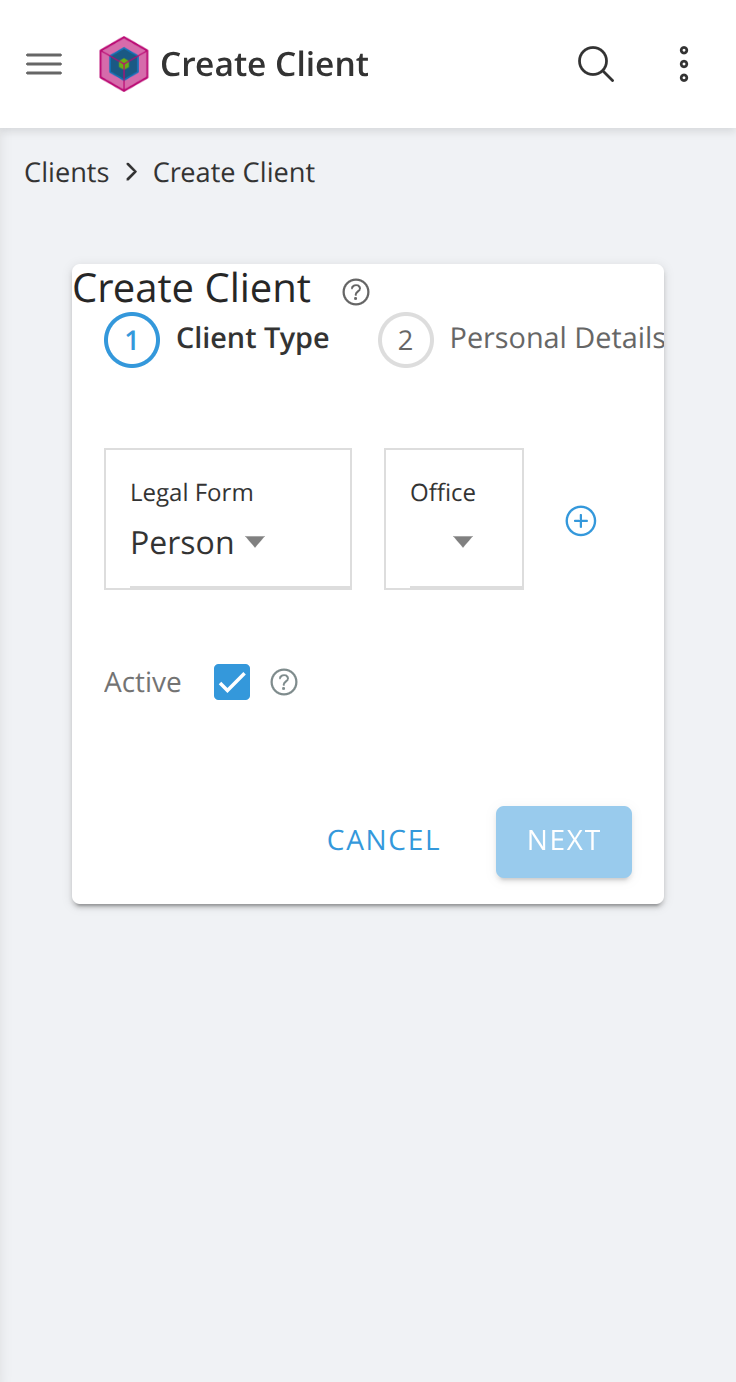
In the screenshot, Legal Form reads "Person" while Office is visually blank
— the two controls look like different kinds of thing when they are the same
kind in different states.
## Why only Office
Both selects lack a `placeholder`, but Legal Form always has a value
pre-selected (Person / Entity), so it never renders in the empty state. Office
is the one that does, and it is required to continue — so the field the user
must act on is the field giving them the least indication of what to do.
## Suggested fix
Add a placeholder to the Office `ion-select`, sourced from an i18n key
rather than a literal string (per the project's i18n convention):
```html
[placeholder]="'CLIENTS.SELECT_OFFICE' | translate"
```
with `CLIENTS.SELECT_OFFICE` = "Select an office" added to `en.json` next to
the existing `ADD_NEW_OFFICE` key.
## Possible follow-up
`ion-select` is used for form controls across the app, and any of them that
can render with no value has the same blank-control problem. A sweep adding
placeholders to every empty-capable select would be worth doing separately — it
is a larger change than this one screen, and better not bundled here.
## Environment
Reproduced against a clean checkout of `main` (`a24a06ba`) served with `ng
serve`, backend `sandbox.mifos.community`, Chrome. Present at both desktop and
mobile viewports.
--
This is an automated message from the Apache Git Service.
To respond to the message, please log on to GitHub and use the
URL above to go to the specific comment.
To unsubscribe, e-mail: [email protected]
For queries about this service, please contact Infrastructure at:
[email protected]

