Aman-Mittal opened a new issue, #584:
URL: https://github.com/apache/fineract-backoffice-ui/issues/584
Same class of defect as #575, different file: a literal hex that bypasses the theme. Here it hits the account name and every value in the detail cards, so in dark mode the labels are legible and the data is not. 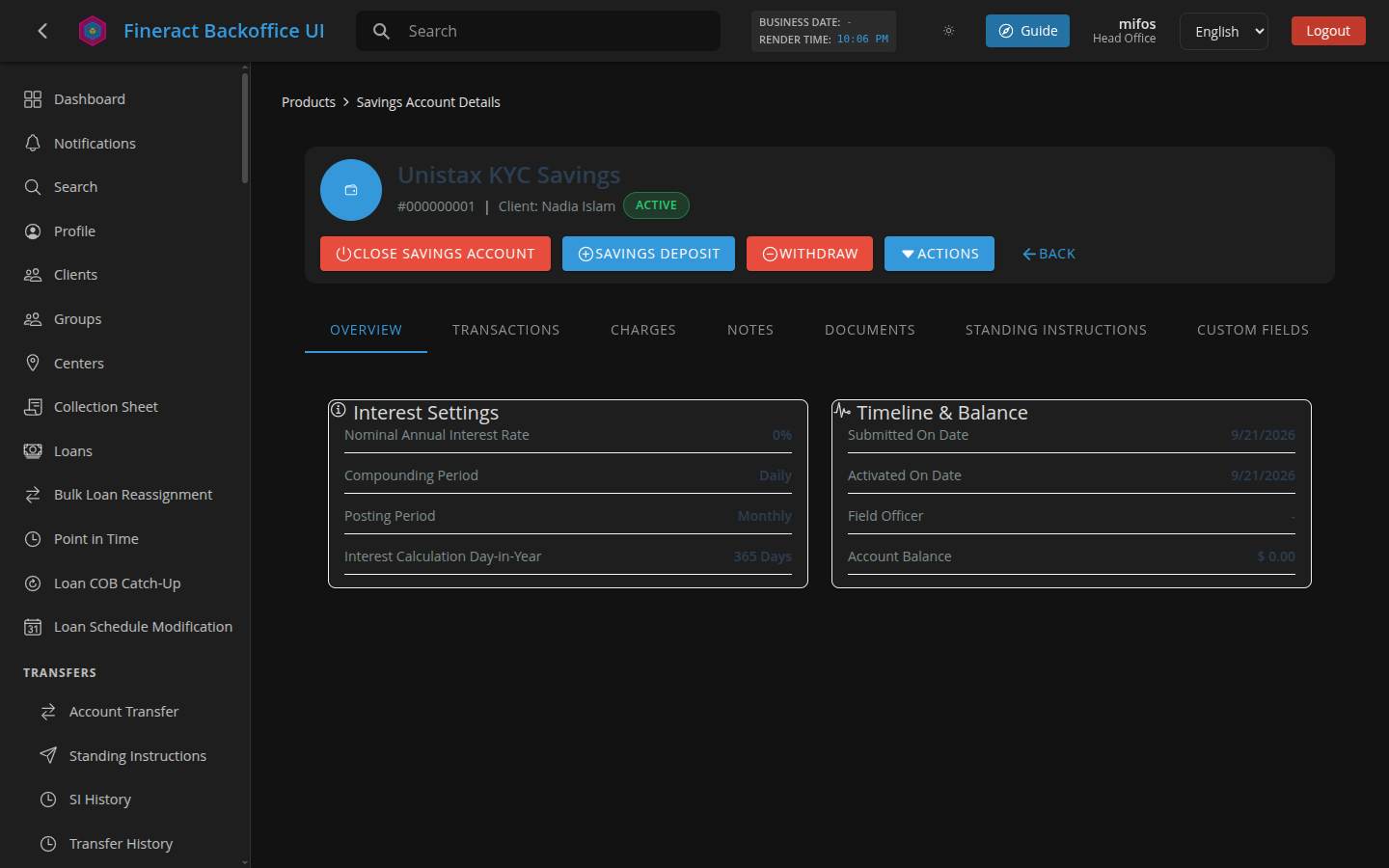 ## Measured | | | |---|---| | Foreground | `#2C3E50` (`rgb(44, 62, 80)`) | | Background | `#1E1E1E` (card surface) | | Contrast | **1.52:1** | | Required — account name at 24px (large text) | 3:1 | | Required — detail values at 14px | 4.5:1 | **9 elements** on the screen render at this colour: the account name `Unistax KYC Savings` at 24 px, and every value in *Interest Settings* and *Timeline & Balance* — `0%`, `Daily`, `Monthly`, `365 Days`, the dates, `$ 0.00`. The inversion is what makes it bad: the labels (`Nominal Annual Interest Rate`, `Compounding Period`, …) use a readable grey, while the **values** — the only part carrying information — are the unreadable ones. Scoped sweep: 9 hits on this screen, **0** on client detail, loan detail, dashboard and audit logs, so it is confined to these components. ## Root cause The dark theme already remaps the token correctly — `--secondary-color` resolves to `#ecf0f1` under `data-theme="dark"`. These rules just don't use it: ```scss .title-details h2 { ... color: #2c3e50; } ``` `src/app/features/products/savings-account-view.component.ts:700` ```scss .detail-item .value { color: #2c3e50; ... } ``` `src/app/features/products/savings-account-view.component.ts:762` There is a third copy in the action form used by deposit / withdraw / close: ```scss .summary-item .value { ... color: #2c3e50; } ``` `src/app/features/products/account-action-form.component.ts:340` I could not get `.summary-item` to render on the deposit form to measure it, so I am flagging it as the same hardcode rather than a confirmed failure — but it is on the transaction confirmation summary, which is a bad place to have unreadable values. ## Suggested fix Replace all three with `var(--secondary-color)`. Worth grepping for other literal hexes at the same time — `#7f8c8d` sits immediately above the second one, and #575 is the same bug with `#3f51b5` in the clients components. ## Reproduction 1. Sign in, switch to dark mode. 2. Open a savings account (**Clients → a client → Savings Accounts**, or `/products/savings-accounts/view/1`). 3. The account name and every value in the two cards are near-invisible; the labels beside them are fine. ## Tested against Deployed build of `main`, Chrome, 1440x900, dark theme. Line references are against `27d5a441`. -- This is an automated message from the Apache Git Service. To respond to the message, please log on to GitHub and use the URL above to go to the specific comment. To unsubscribe, e-mail: [email protected] For queries about this service, please contact Infrastructure at: [email protected]

