On 6/27/07, Nascif Abousalh-Neto <[EMAIL PROTECTED]> wrote:
Thanks for the tip, and sorry for the obvious mistake.

I got repreport to work now after adding the <ivy pattern> to my
configuration.
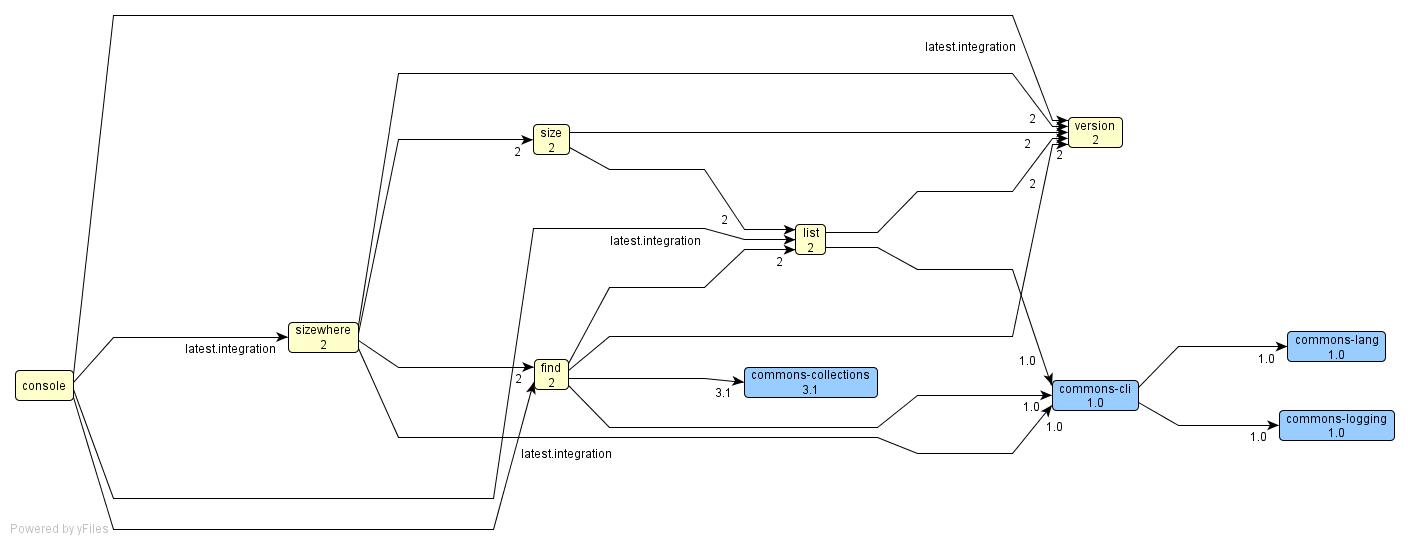
Unfortunately it doesn't include any information on the versions and
configurations, just the node names and the dependency arcs. I was hoping I
would see a graph similar to the one generated by the report task, like this
one:
http://www.jaya.free.fr/misc/ivy/samples/projects-dependencies-graph.jpg
Yes, this report is less useful than it could be, it has been developed
using a simple trick: we define a module depending on all latest versions of
all modules, then resolve the dependencies of this "module", and generate a
report in which we only remove this "module". It was a quick and easy way to
get an overview of the dependencies in a repository, but is not able to give
detailed information as you would like. Feel free to open an improvement
issue if you want.

It would really be useful once you have multiple versions installed to have
a report that shows how they depend on each other (A v1.0 depends on B
v4.0, A v1.1 depends on B v4.6, etc).

Two follow-up comments:
1) In the process of tinkering with multi-project example, I believe I
found a small problem.
In the top build.xml file, it defines "clean" as:

  <target name="clean" depends="clean-all" description="clean tutorial:
delete repository, ivy cache, and all projects">
    <delete dir="repository"/>
    <delete dir="ivy-cache"/>
  </target>

Shouldn't it be:
  <target name="clean" depends="clean-all" description="clean tutorial:
delete repository, ivy cache, and all projects">
    <delete dir="repository"/>
    <delete dir="${user.home}/.ivy/cache"/>
  </target>
Indeed, good catch. Could you open a jira issue?

I searched for an Ant property that points to the ivy cache location but I
couldn't find one. I know it can be set in ivyconf, it could be useful to
have it also available in a property to allow  for example for the cleaning
of the cache.
I think there is a jira issue suggesting this. Not sure though, but it would
be helpful indeed.

2) The HTML reports, although quite nice, do not scale. It is quite easy to
generate a report.html so large that your browser will refuse to load it
(or die trying)... a suggestion would be to take a page from JavaDoc and
generate multiple html files with a unifying html that uses frames to
present the whole thing.
I'm not a big fan of frames, but having an option like that would be
interesting. Please open a jira issue for that, xslt 2 has an option to have
multiple files in output, so it might not be too difficult to implement. In
case of html files too large to be opened by a browser, maybe we could also
try to provide a PDF report. Indeed what I like with the single file html is
that it's easy to print.

Regards,

Xavier

Regards,
  Nascif

-----Original Message-----
From: Xavier Hanin [mailto:[EMAIL PROTECTED]
Sent: Wednesday, June 27, 2007 3:31 AM
To: [email protected]
Subject: Re: repreport output - no edges?

On 6/26/07, Nascif Abousalh-Neto <[EMAIL PROTECTED]> wrote:
>
> I was able to make the necessary changes to the multi-project tutorial
> project (1.4.1 version) to get it to work using only local
> repositories (including one that holds the apache common libraries). I
> struggled a bit with the configurations, which I believe were
> broken/missing in some of the files, but in the end I got a
top-to-bottom succesful compilation.
>
> Then I proceeded to run the repreport task, and to my disappointment
> it produces a graph with all the nodes - but no edges or version
information!
> This is the .dot file:
>
>
> /* * directed graph dot input file. * * generated by ivy report */
>             digraph G
> {"commons-lang""commons-logging""commons-collections""commons-cli""ver
> sion""find""size""sizewhere""console""list"}
>
> The .graphml is just like that.
> Any ideas? This is how it looks like in my Ant file:
>
>   <target name="configure">
>     <!-- setup ivy default configuration with some custom info -->
>     <property name="ivy.local.default.root" value="${repository.dir
> }/sas/"/>
>     <property name="ivy.shared.default.root" value="${repository.dir
> }/tpj/"/>
>
>     <!-- here is how we would have configured ivy if we had our own
> ivyconf file -->
>     <ivy:configure file="${common.dir}/ivyconf.xml" />
>   </target>
>
>   <target name="repreport" depends="configure">
>     <ivy:repreport graph="true" dot="true"/>
>   </target>
>
> And ivyconf.xml is:
> <ivyconf>
>   <conf defaultResolver="chain"/>
>   <resolvers>
>     <chain name="chain">
>       <filesystem name="local">
>         <artifact pattern="${repository.dir
}/local/[organisation]/[module]/[revision]/[artifact]-[revision].[ext]"
> />
>       </filesystem>
>       <filesystem name="shared">
>         <artifact pattern="${repository.dir
}/shared/[organisation]/[module]/[revision]/[artifact]-[revision].[ext]"
> />
>       </filesystem>
>       <filesystem name="tpj">
>         <artifact pattern="${repository.dir
}/tpj/[organisation]/[module]/[revision]/[artifact]-[revision].[ext]"
> />
>       </filesystem>
>     </chain>
>   </resolvers>
> </ivyconf>


Your ivyconf doesn't contain pattern for ivy files, so Ivy can't find any
metadata about the modules it finds (and thus no dependencies). You should
add <ivy pattern=""/> to your filesystem resolvers, pointing to your ivy
files, and it should work better.

Please keep us informed of the result.

Xavier

Thanks,
>   Nascif
>


--
Xavier Hanin - Independent Java Consultant Manage your dependencies with
Ivy!
http://incubator.apache.org/ivy/
--
Xavier Hanin - Independent Java Consultant
Creator of Ivy, xooki and xoocode.org
More about me: http://xhab.blogspot.com/