https://www.arcadeshopper.com/wp/store/#!/Crystal-Oscillator-32-768-KHz-32-768KHZ-32-768K-Hz-Cylinder-3x8mm-quartz/p/237308514
arcade shopper has the crystals from time to time, or you can get a bag of
them on ebay pretty easily.


On Fri, Jul 4, 2025 at 9:57 AM Stephen Adolph <[email protected]> wrote:

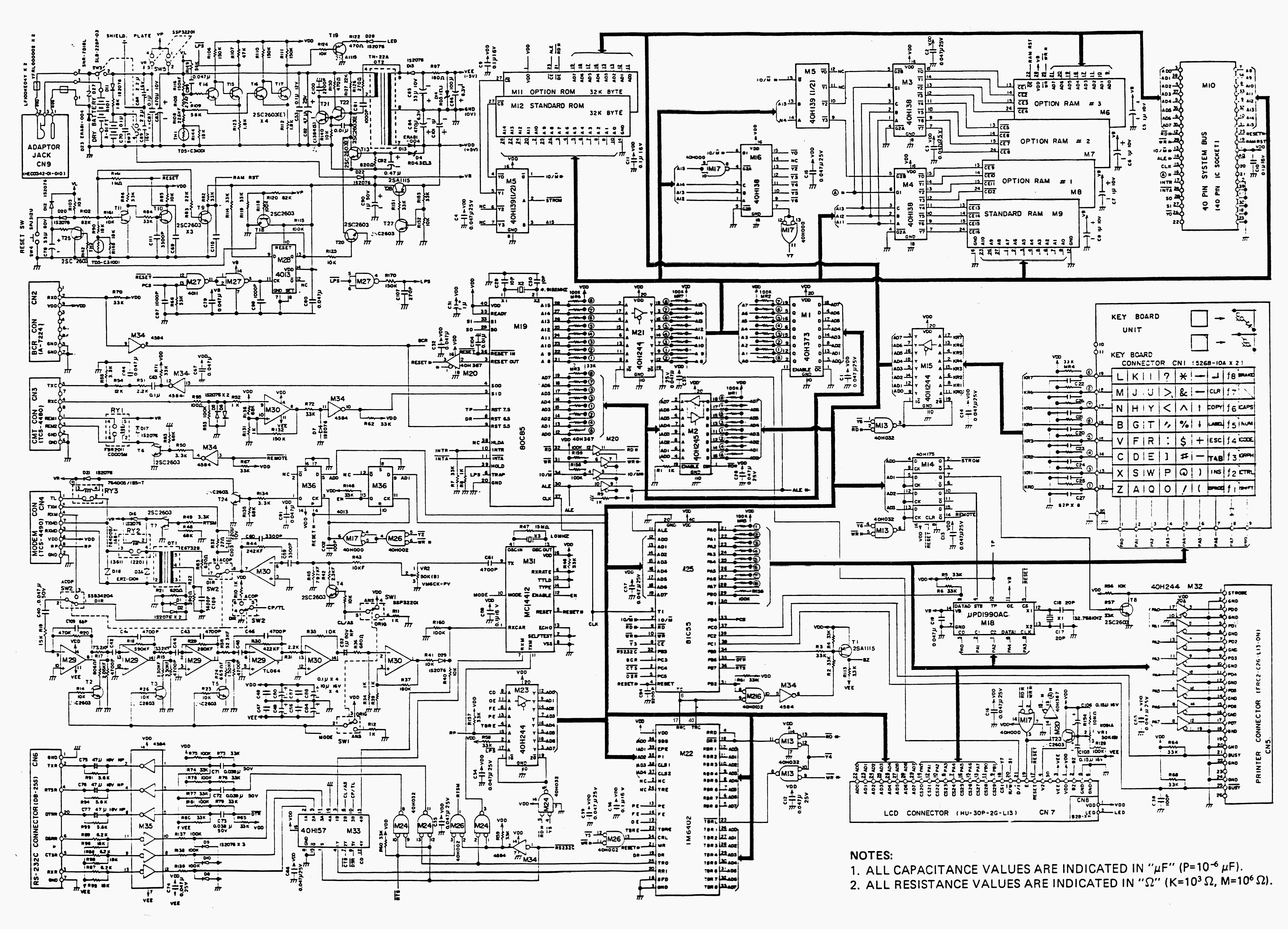
> https://digilander.libero.it/rar2k/TRS80/Images/M100-Pcb.gif
>
> Do you have a scope?  You could check that the timer interrupt input
> RST7.5 is toggling every 4msec.
>
> Timer interrupt  TP is generated at M18, which is the RTC chip.  It is fed
> from 32.768kHz crystal X1.
>
> Not saying for sure this is the problem but it looks similar to other
> machines I have fixed where that crystal was dead.
>
>
>
> On Fri, Jul 4, 2025 at 9:06 AM Thomas Morehouse <[email protected]>
> wrote:
>
>> Thanks Steve.  Can someone point me to appropriate schematics or
>> diagrams, finding a replacement crystal, and how to perform the surgery?
>> TM
>>
>>
>> On Fri, Jul 4, 2025 at 9:01 AM Stephen Adolph <[email protected]>
>> wrote:
>>
>>> it is suffering from excessive interrupt-itis.
>>>
>>> On Fri, Jul 4, 2025 at 8:58 AM Stephen Adolph <[email protected]>
>>> wrote:
>>>
>>>> looks to me like the 32768 hz crystal is dead.
>>>>
>>>> On Fri, Jul 4, 2025 at 8:56 AM Thomas Morehouse <[email protected]>
>>>> wrote:
>>>>
>>>>> Friday update:
>>>>>
>>>>> Batteries replaced with fresh AA alkalines yesterday (Thursday).  Left
>>>>> powered off overnight to recharge backup battery.  Powered up this
>>>>> morning,
>>>>> but no change.  See attached screen photo.
>>>>>
>>>>> The screen clock seems to be working, but date never changes from
>>>>> 1/1/1900.
>>>>> Top four lines of screen appear normal, but below that, definitely not
>>>>> normal.
>>>>>
>>>>> The "center" screen line consists of constantly changing characters.
>>>>> Lowest screen line appears to be reiterations of "Bytes free" - without
>>>>> the
>>>>> "Byt".
>>>>>
>>>>> None of the keyboard keys have any effect; when "cursor" is over
>>>>> BASIC, hitting Enter changes nothing - screen remains unchanged.
>>>>>
>>>>> I've done several Cold Starts (CTRL+Pause/Break+Reset) and
>>>>> (CTRL+Pause/Break+Power switch), but no apparent change.
>>>>>
>>>>> Note:  when I do a Power On, the screen quickly shows the correct
>>>>> original default M100 screen, then immediately changes to the garbled
>>>>> screen.
>>>>>
>>>>> Onward through the fog!
>>>>> Thanks.
>>>>> Tom M.
>>>>>
>>>>