Hello everyone,

Thanks for your good comments over the weekend about the Opt-out feature for
Media Viewer!
Based on your feedback, we now plan to provide an ‘enabled' user preference
(option A), as described on our discussion page. (1)

Today, we would like your guidance on another Media Viewer feature: the link to
Commons (or other file repository). (2)

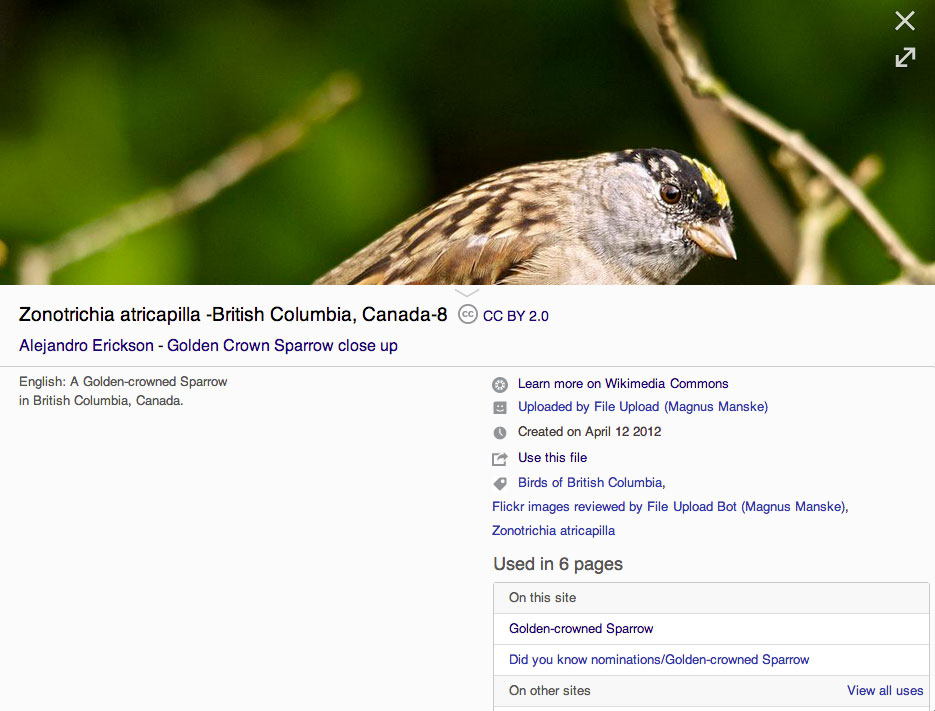
Many people have raised concerns on our discussion pages that the current link
is not prominent enough to help power users go to Commons — or to make new
users aware of what Commons is. Right now, that link to the Commons file info
page is located below the fold, at the top of the right column in the meta-data
panel (3); the current label is “Learn more on Wikimedia Commons."

As recommended by many in our onwiki, email and IRC discussions, we have been
exploring different ways to make this link to Commons more prominent, as
outlined in this Mingle card #270 (4).

This link is trying to solve the needs of two very different user groups:
• Advanced users need a quick link to edit the Commons description page and
perform other related editorial tasks for that image.
• New users want to know more about the image, and also need information on
what Commons is and why they should go there.

To address these issues for each user group, we are considering different
design solutions, prepared by our designer Pau Giner:

A. Simple 'Edit’ button: (5)
Provide an ‘Edit’ tool above the fold, so that advanced users can quickly go to
the Commons description page to edit it. Restrict this to logged-in users only?
        • Pros: gives editors a much-needed edit tool, in a compact format that
is easy to understand (pencil icon), making it easier for them to do their work
        • Cons: readers could get confused by this tool, which takes them to a
completely different site (so we may want to not show it to them at all).

B. 'Edit’ button with tooltip: (6)
Provide the same ‘Edit’ tool above the fold, but show a tooltip on hover, to
explain to new users what it does. Show the edit tool to everybody.
        • Pros: gives editors the same useful, compact tool, to help them do
their editing work quickly
        • Cons: readers should like the tooltip, but it may annoy some editors
(don’t show the tooltip to advanced users?)

C. 'More details on Commons’: (7)
Provide a call to action inviting new users to check more details on Commons,
explaining what it is and how to get there. Shown below the fold, after key
details.
        • Pros: Clarifies what Commons is and why users might want to go there:
to get more details and share free media.  Larger panel makes it easier to find.
        • Cons: Below the fold position means many users will not see it.
Consider using it in combination with Options A or B above?

We would appreciate your advice on which of the options above would be most
helpful for both new users and power users. Note that we may want to use some
of these design ideas in combination (e.g.: Option B + C), to offer different
solutions to meet the specific needs of each user group.

Please respond via email on this list — or add your comments on this discussion
page:

https://www.mediawiki.org/wiki/Talk:Multimedia/About_Media_Viewer#Feedback_on_Links_to_Commons

Later this week, we will ask your advice about adding a button on Commons to
open an image in Media Viewer.

Thanks as always for your constructive advice — and speak with you soon!


Fabrice


(1) Discussion of Opt-out Feature for Media Viewer:
https://www.mediawiki.org/wiki/Talk:Multimedia/About_Media_Viewer#Feedback_on_Opt-out_Feature

(2) Discussion about Links to Commons:
https://www.mediawiki.org/wiki/Talk:Multimedia/About_Media_Viewer#Feedback_on_Links_to_Commons

(3) Media Viewer Meta-data panel:
https://upload.wikimedia.org/wikipedia/commons/4/4b/Media_Viewer_Screenshot_Metadata_Open_Panel_-_03-10-2014.jpg

(4) Prominent Links to Commons File Pages in Media Viewer - Mingle card #270:
https://wikimedia.mingle.thoughtworks.com/projects/multimedia/cards/270

(5) Mockup A: Edit Button - Helps power users quickly edit Commons page
https://commons.wikimedia.org/wiki/File:Media_viewer_access_to_Commons_through_edit_icon.png

(6) Mockup B: Edit Button w/ tooltip - Same tool, but gives new users a tooltip
to explain what it does
https://commons.wikimedia.org/wiki/File:Media_viewer_access_to_Commons_through_edit_icon_with_tooltip.png

(7) Mockup C: ‘Details on Commons’ - Call to action helps new users get more
details on Commons, and explains what it is
https://commons.wikimedia.org/wiki/File:Design_for_more_details_access_to_Commons.png


P.S.: Let's also look for ways to remind power users that they can use keyboard
shortcuts to bypass Media Viewer and access images files directly on Commons
(e.g.: Ctrl-click or Shift-click).

_______________________________

Fabrice Florin
Product Manager, Multimedia
Wikimedia Foundation

http://en.wikipedia.org/wiki/User:Fabrice_Florin_(WMF)
_______________________________________________
Multimedia mailing list
[email protected]
https://lists.wikimedia.org/mailman/listinfo/multimedia