Hi,
thank you for your hints. I reconnected the book scanner and was now
recognized as video2.
scanimage --list-devices
device `v4l:/dev/video2' is a Noname JY-VP216: JY-VP216 virtual device
device `v4l:/dev/video0' is a Noname USB2.0 HD UVC WebCam: USB2.0 HD
virtual device
Then I tried

scanimage -d v4l:/dev/video2 --help --all-options

with result

Usage: scanimage [OPTION]...
Start image acquisition on a scanner device and write image data to
standard output.
[...]
Options specific to device `v4l:/dev/video2':
Scan Mode:
--mode Gray|Color [Gray]
Selects the scan mode (e.g., lineart, monochrome, or color).
--channel Camera 1 [inactive]
Selects the channel of the v4l device (e.g. television or video-in.
Geometry:
-l 0..-513pel (in steps of 1) [inactive]
Top-left x position of scan area.
-t 0..-209pel (in steps of 1) [inactive]
Top-left y position of scan area.
-x 1280..767pel (in steps of 1) [inactive]
Width of scan-area.
-y 720..511pel (in steps of 1) [inactive]
Height of scan-area.
Enhancement:
--brightness 0..255 [102]
Controls the brightness of the acquired image.
--hue 0..255 [0]
Controls the "hue" (blue-level) of the acquired image.
--color 0..255 [119]
Sets the picture's color.
--contrast 0..255 [136]
Controls the contrast of the acquired image.
--white-level 0..255 [0]
Selects what radiance level should be considered "white".

All options specific to device `v4l:/dev/video2':
[same output ...]

Geometry settings seem not to be supported by V4L module.

I also tried successlessly

SANE_DEBUG_V4L=128 scanimage -v -d v4l*/dev/video2
Output format is not set, using pnm as a default.
scanimage: open of device v4l*/dev/video2 failed: Invalid argument

Regards,

---

Michael Dittmer

FSFE fellower

Am 2020-09-06 um 08:18 schrieb Olaf Meeuwissen:
Hi,

Suggestions inlined below.

[email protected]  writes:
---------- Ursprüngliche Nachricht ----------
Von: Michael Dittmer
An:"[email protected]"
<[email protected]>
Datum: 23.08.2020 12:00
Betreff: book scanner recognized as v4l device

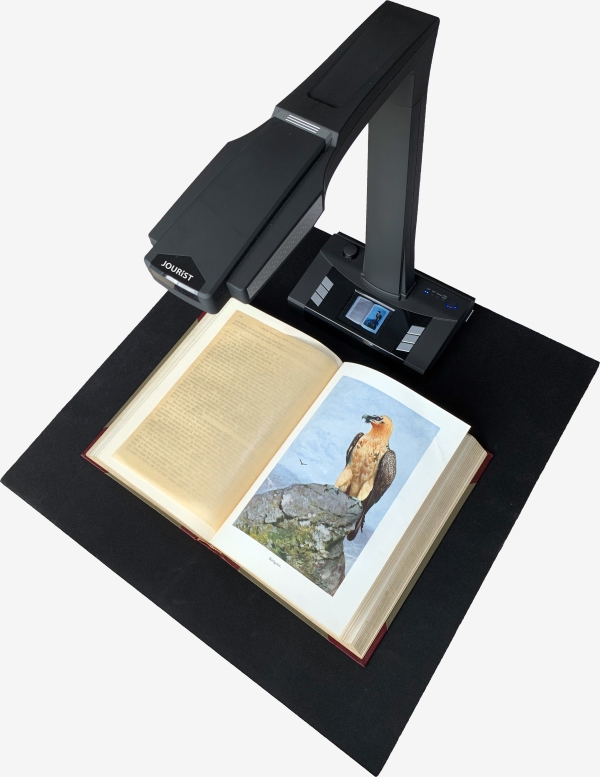
I bought a book scanner

JOURIST BT16

from a german dealer

looks like:
http://www.scanner.expert/de/images/products/buchscanner/description/5_JOURIST_Buchscanner_BS16_Standalone.jpg


It takes photos from the pages with a camera like a CZUR book
scanner. My bookscanner camera also can be opened by

guvcview

It has maximum resolution of

4608x3456

pixels for A3 scan (resolution can be selected by gucview and is shown
later when starting xsane).

When I plug it onto a usb port, several devices are recognized (dmesg
output)

[...]

All book scanner manufacturers seem to deliver only twain drivers. So
I tried to handle the scanner as an generic v4l device

My linux mint 19.3 (based on Ubuntu 18.04) distribution has a sane
backend package (1.0.27) without compiled v4l backend.
After compiling current 1.0.30 sources with v4l-dev libraries I
obtained the v4l backend

scanimage --list-devices
device `v4l:/dev/video3' is a Noname JY-VP216: JY-VP216 virtual device

but xsane and scanimage are not able to perform scan ("illegal argument")
Check the supported settings and allowed values with

   scanimage -d v4l:/dev/video3 --help --all-options
SANE_DEBUG_SANEI_USB=4 scanimage -v -d v4l:/dev/video3 --format tiff >
output.tif
scanimage: ignored request to set inactive option br-x
scanimage: ignored request to set inactive option br-y
scanimage: sane_start: Invalid argument
Try

   SANE_DEBUG_V4L=128 scanimage -v -d v4l*/dev/video3

and see if that sheds any light upon your issue.
Another program

simple scan

from Ubuntu distribution is able to scan into pdf with 1600x1200 pixel
but not with maximum resolution.

It seems for me that the v4l backend has to support higher
resolutions, like 4608x3456 e.g.
Hope this helps,
--
Olaf Meeuwissen, LPIC-2            FSF Associate Member since 2004-01-27
  GnuPG key: F84A2DD9/B3C0 2F47 EA19 64F4 9F13  F43E B8A4 A88A F84A 2DD9
  Support Free Softwarehttps://my.fsf.org/donate
  Join the Free Software Foundationhttps://my.fsf.org/join