Hi,

[email protected] writes:
> Hi,
>
> thank you for your hints. I reconnected the book scanner and was now
> recognized as video2.

The number is likely to change between power-cycling of the device.

> scanimage --list-devices
> device `v4l:/dev/video2' is a Noname JY-VP216: JY-VP216 virtual device
> device `v4l:/dev/video0' is a Noname USB2.0 HD UVC WebCam: USB2.0 HD
> virtual device
>
> Then I tried
>
> scanimage -d v4l:/dev/video2 --help --all-options
>
> with result
>
> Usage: scanimage [OPTION]...
> Start image acquisition on a scanner device and write image data to
> standard output.
> [...]
> Options specific to device `v4l:/dev/video2':
> Scan Mode:
> --mode Gray|Color [Gray]
> Selects the scan mode (e.g., lineart, monochrome, or color).
> --channel Camera 1 [inactive]
> Selects the channel of the v4l device (e.g. television or video-in.
> Geometry:
> -l 0..-513pel (in steps of 1) [inactive]
> Top-left x position of scan area.
> -t 0..-209pel (in steps of 1) [inactive]
> Top-left y position of scan area.
> -x 1280..767pel (in steps of 1) [inactive]
> Width of scan-area.
> -y 720..511pel (in steps of 1) [inactive]
> Height of scan-area.
> Enhancement:
> --brightness 0..255 [102]
> Controls the brightness of the acquired image.
> --hue 0..255 [0]
> Controls the "hue" (blue-level) of the acquired image.
> --color 0..255 [119]
> Sets the picture's color.
> --contrast 0..255 [136]
> Controls the contrast of the acquired image.
> --white-level 0..255 [0]
> Selects what radiance level should be considered "white".
>
> All options specific to device `v4l:/dev/video2':
> [same output ...]
>
> Geometry settings seem not to be supported by V4L module.
>
> I also tried successlessly
>
> SANE_DEBUG_V4L=128 scanimage -v -d v4l*/dev/video2
> Output format is not set, using pnm as a default.
> scanimage: open of device v4l*/dev/video2 failed: Invalid argument

Is that asterisk a typo in your command?  It should be a colon.

Whoops, I now see that typo was in my suggestion.  Sorry.
# That's what I get for mixing Japanese and US ASCII keyboards.

> Regards,
>
> ---
>
> Michael Dittmer
>
> FSFE fellower
>
> Am 2020-09-06 um 08:18 schrieb Olaf Meeuwissen:
>> Hi,
>>
>> Suggestions inlined below.
>>
>> [email protected]  writes:
>>
>>> ---------- Ursprüngliche Nachricht ----------
>>> Von: Michael Dittmer
>>> An:"[email protected]"
>>> <[email protected]>
>>> Datum: 23.08.2020 12:00
>>> Betreff: book scanner recognized as v4l device
>>>
>>> I bought a book scanner
>>>
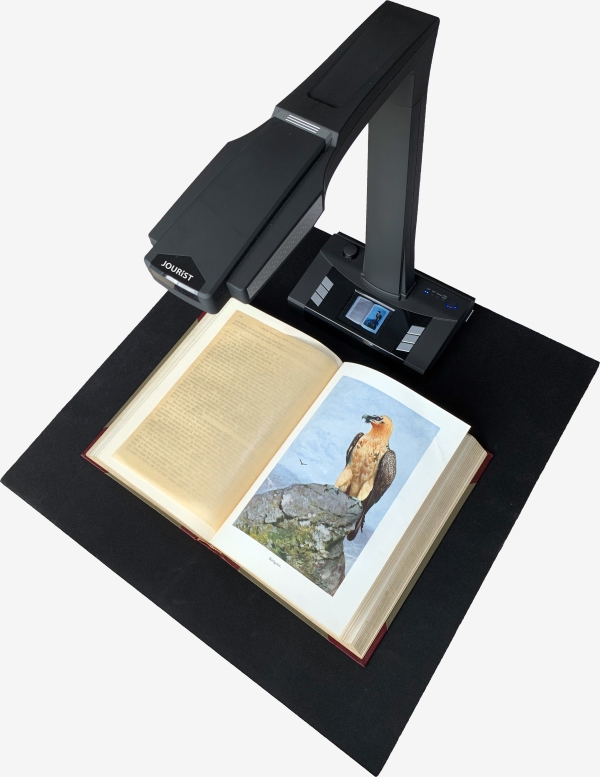
>>> JOURIST BT16
>>>
>>> from a german dealer
>>>
>>> looks like:
>>> http://www.scanner.expert/de/images/products/buchscanner/description/5_JOURIST_Buchscanner_BS16_Standalone.jpg
>>>
>>>
>>> It takes photos from the pages with a camera like a CZUR book
>>> scanner. My bookscanner camera also can be opened by
>>>
>>> guvcview
>>>
>>> It has maximum resolution of
>>>
>>> 4608x3456
>>>
>>> pixels for A3 scan (resolution can be selected by gucview and is shown
>>> later when starting xsane).
>>>
>>> When I plug it onto a usb port, several devices are recognized (dmesg
>>> output)
>>>
>>> [...]
>>>
>>> All book scanner manufacturers seem to deliver only twain drivers. So
>>> I tried to handle the scanner as an generic v4l device
>>>
>>> My linux mint 19.3 (based on Ubuntu 18.04) distribution has a sane
>>> backend package (1.0.27) without compiled v4l backend.
>>> After compiling current 1.0.30 sources with v4l-dev libraries I
>>> obtained the v4l backend
>>>
>>> scanimage --list-devices
>>> device `v4l:/dev/video3' is a Noname JY-VP216: JY-VP216 virtual device
>>>
>>> but xsane and scanimage are not able to perform scan ("illegal argument")
>> Check the supported settings and allowed values with
>>
>>    scanimage -d v4l:/dev/video3 --help --all-options
>>
>>> SANE_DEBUG_SANEI_USB=4 scanimage -v -d v4l:/dev/video3 --format tiff >
>>> output.tif
>>> scanimage: ignored request to set inactive option br-x
>>> scanimage: ignored request to set inactive option br-y
>>> scanimage: sane_start: Invalid argument
>> Try
>>
>>    SANE_DEBUG_V4L=128 scanimage -v -d v4l*/dev/video3
>>
>> and see if that sheds any light upon your issue.
>>
>>> Another program
>>>
>>> simple scan
>>>
>>> from Ubuntu distribution is able to scan into pdf with 1600x1200 pixel
>>> but not with maximum resolution.
>>>
>>> It seems for me that the v4l backend has to support higher
>>> resolutions, like 4608x3456 e.g.

Hope this helps,
--
Olaf Meeuwissen, LPIC-2            FSF Associate Member since 2004-01-27
 GnuPG key: F84A2DD9/B3C0 2F47 EA19 64F4 9F13  F43E B8A4 A88A F84A 2DD9
 Support Free Software                        https://my.fsf.org/donate
 Join the Free Software Foundation              https://my.fsf.org/join