I'm having some trouble completing a task with Scribus.

Here's the story:
I've been asked to redesign a form for psychological evaluations.
The form basically shows parents how well their kids are doing on
various assessment scales, and at the bottom of each scale is a
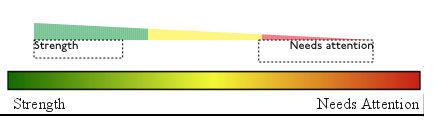
gradient.

Not your average good-looking gradient, but a big, honking ugly
gradient, from pure red through yellow and on into green.  My
first impulse was to delete the gradient and replace it with
black and white bars, but I was told that the gradient was ``Sort
of their thing,'' as it showed parents if their kids were in the
red zone, the green zone or somewhere inbetween.

Color gradients like that are difficult to print, and I was
hoping to offer them an alternative option.  You can find the
original and one of my alternatives here:

<http://i158.photobucket.com/albums/t102/superluser/fradients.png>

It may not be easy to see, but there are 168 rectangles there.  I
would like to make each one a separate color, since that should
print better than an actual gradient.

I don't have a problem with doing a lot of repetitive stuff, but
as far as I can tell, the method for doing this is

Edit>Colors>New, enter CMYK quad, hit OK
(repeat 168 times)

and then

Open up properties dialogue, select rectangle, select color
(repeat 168 times)

I really have no problem with doing the second part, but is there
any way to streamline the former?  Somebody suggested importing
an EPS file with all the colors, and it looks like that would
work, but it would still be a lot of work to create such a
palette.

Suggestions?

--
| Andrew A. Gill     To ensure continued quality of service,   |
|                    this e-mail is being monitored by the NSA |
| <superluser at frontiernet.net> <http://www.needsfoodbadly.com> |
                                                               --