Andrew A. Gill schrieb:
> I'm having some trouble completing a task with Scribus.
>
> Here's the story:
>
> I've been asked to redesign a form for psychological evaluations.
> The form basically shows parents how well their kids are doing on
> various assessment scales, and at the bottom of each scale is a
> gradient.
>
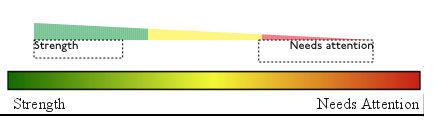
> Not your average good-looking gradient, but a big, honking ugly
> gradient, from pure red through yellow and on into green.  My
> first impulse was to delete the gradient and replace it with
> black and white bars, but I was told that the gradient was ``Sort
> of their thing,'' as it showed parents if their kids were in the
> red zone, the green zone or somewhere inbetween.
>
> Color gradients like that are difficult to print, and I was
> hoping to offer them an alternative option.  You can find the
> original and one of my alternatives here:
>
> <http://i158.photobucket.com/albums/t102/superluser/fradients.png>
>
> It may not be easy to see, but there are 168 rectangles there.  I
> would like to make each one a separate color, since that should
> print better than an actual gradient.
>
> I don't have a problem with doing a lot of repetitive stuff, but
> as far as I can tell, the method for doing this is
>
> Edit>Colors>New, enter CMYK quad, hit OK
> (repeat 168 times)
>
> and then
>
> Open up properties dialogue, select rectangle, select color
> (repeat 168 times)
>
> I really have no problem with doing the second part, but is there
> any way to streamline the former?  Somebody suggested importing
> an EPS file with all the colors, and it looks like that would
> work, but it would still be a lot of work to create such a
> palette.
>
> Suggestions?
>
>
Hi Andrew,
I'm not sure if I understood you correctly, but why aren't you use the
Scribus gradient function? It's a task of seconds to produce a gradient
like your example with 3 colors in Scribus. Here's a try:

http://www.thomas-zastrow.de/temp/ScribusGradient.sla

Best,

Tom


--
----------------------------
http://www.thomas-zastrow.de
----------------------------