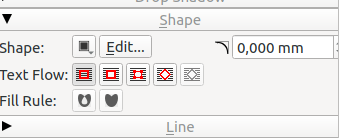
Yes, you can just set this in the *property of the frame containing your logo*.
And your logo must be *above the text frame*
(or in a layer above it where the text flow property is activated)
In very short :
(This is in French and version 1.5 - click on the 4th icon on «Text flow»
then you can modify the shape or add an extra margin)


Le 24.09.21 à 13:35, Rolf-Werner Eilert a écrit :
I vaguely remember that there was an option to let text run along a path, for example
around a circle. Or do I remember another program here?
If this is true, how would I proceed? There is a logo, and I would like to have text run
all around it: motto, address, web URL, telephone no. etc. The goal would be to form a
circular sticker.
On my system, there is 1.4.6, but I could use the latest appImage as well.

Thank you for any input!

Regards
Rolf

___
Scribus Mailing List: [email protected]
Edit your options or unsubscribe:
http://lists.scribus.net/mailman/listinfo/scribus
See also:
http://wiki.scribus.net
http://forums.scribus.net
--
Silvain Dupertuis
Route de Lausanne 335
1293 Bellevue (Switzerland)
tél. +41-(0)22-774.20.67
portable +41-(0)79-604.87.52
web: silvain-dupertuis.org <http://perso.silvain-dupertuis.org>
-------------- next part --------------
An HTML attachment was scrubbed...
URL:
<http://lists.scribus.net/pipermail/scribus/attachments/20210924/37d94303/attachment.htm>
-------------- next part --------------
A non-text attachment was scrubbed...
Name: njcbgihmdnanhhip.png
Type: image/png
Size: 11307 bytes
Desc: not available
URL:
<http://lists.scribus.net/pipermail/scribus/attachments/20210924/37d94303/attachment.png>
___
Scribus Mailing List: [email protected]
Edit your options or unsubscribe:
http://lists.scribus.net/mailman/listinfo/scribus
See also:
http://wiki.scribus.net
http://forums.scribus.net