On 08/09/2012 01:42 AM, Tzu-Mainn Chen wrote:
----- Original Message -----
From: "Matt Wagner" <[email protected]>
To: [email protected]
Sent: Wednesday, August 8, 2012 4:01:02 PM
Subject: Explanatory guide text in Conductor?
Hi folks,

I've had an idea in the back of my mind for a while, and thought I'd
mention it here to see if it was actually a good idea or not.

A lot of web apps, especially the ones that are user-friendly, tend
to
include text at the top of the main content section of each page
walking
you through what you're expected to do on the page. After you upload
a
photo to a social site, you might get a message along the lines of,
"Great photo, $user! Now, you can tag your friends in the photo, or
add
a caption below!"

In that case, it's probably semi-intuitive what you're expected to
do,
but the text at the top of the page makes it abundantly clear if you
weren't sure.

Aeolus does something pretty complicated, and a user must step
through a
bunch of forms as they build an image, create a deployable, and go to
launch it. We've talked about working on making the flow intuitive
and
the forms easy-to-understand, but I wonder if it might also be nice
to
have some text guiding the user along.

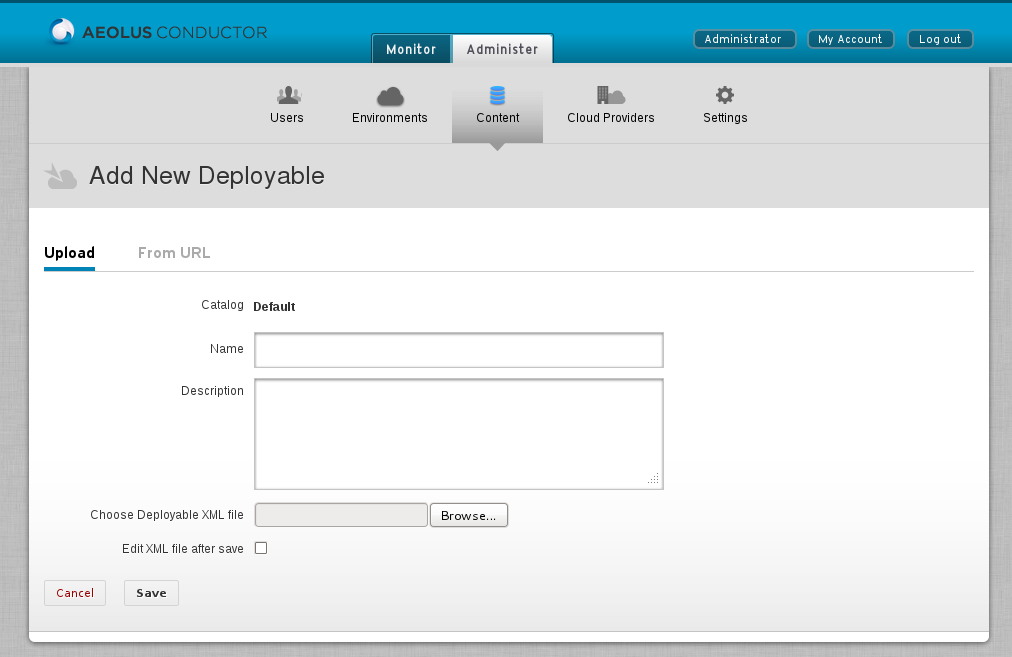
As a random example, here is what the "New Deployable" page looks
like
today:
http://dvmw6cjgjm3k7.cloudfront.net/wp-content/uploads/2012/08/Screenshot-at-2012-08-08-142841.png

It's not necessarily a complicated form, but if you stop someone on
the
street and ask them what it's all about, they're going to have no
clue.

I took a really rough stab at writing some text at the top of the
page:
http://dvmw6cjgjm3k7.cloudfront.net/wp-content/uploads/2012/08/Screenshot-at-2012-08-08-150224.png

The text probably needs some work, and we should probably have a link
or
something like that to explain _what_ a "Deployable XML file" is and
how
to create one. But I like the idea of having some text telling me
what
I'm doing on the page, and what will happen next.

Ignoring my mediocre example text and the fact that it's just an
unstyled paragraph tag, I wonder what people think about this general
concept. Would it be helpful? Or in an app like ours, do we expect
the
user to know what they're doing? (Unlike, say, sharing a photo with
some
friends, managing cloud deployments isn't necessarily you should
learn
on the fly.)

-- Matt
I like this idea, but in my opinion it should be generalized into a
glossary/index of help items and topics; and an API that lets us create help
links/popups that lead into the glossary.  Popups will help reduce clutter for
expert users, and an overall help glossary will give a starting place for new
users that might be confused.

Mainn
I don't like the idea of linking to a different page for clarification
and distracting the user from the goal he wants to achieve with redirects.
Jarda proposed in the Consistent forms wiki page to use simple_form for
all our forms which would also make dead simple to help the user with
inline labels and hints for every single input fields. With this and the
summary above the form as it was proposed originally would create a
really nice UX.
For advanced users we can provide a switch to turn off all help messages
globally eg. on his profile page.
Imre